1. State of the art, project management and documentation
Research & Ideation
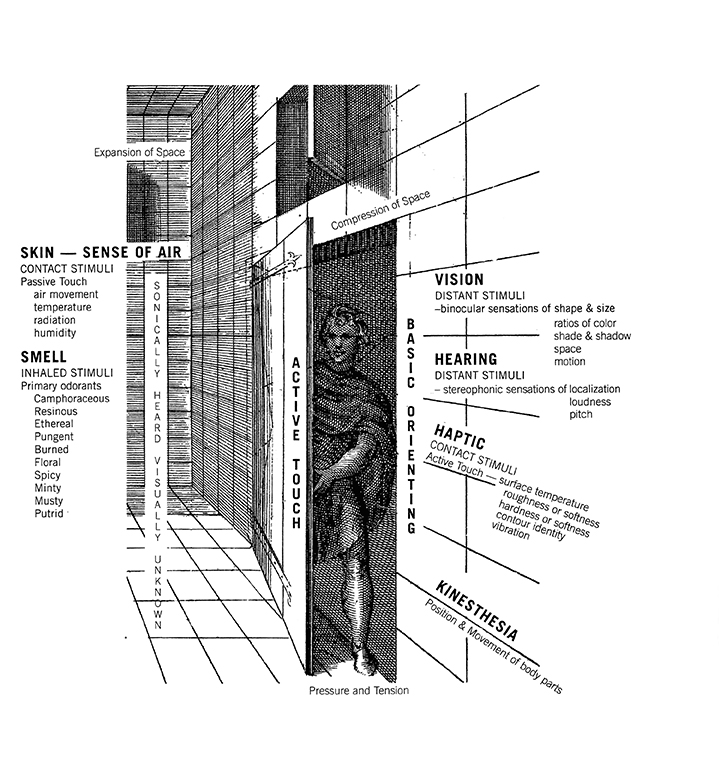
Joy Monice Malnar and Frank Vodvarka, Ranges of the Senses, from Sensory Design, University of Minnesota Press; © 2004 by Joy Monice Malnar and Frank Vodvarka cooperhewitt.org
Haptic Interface
- Touch, texture, compliance, friction.
- Color of vision, brightness, shape, pattern.
- Sounds and movements produced when handling a product.
- Smell.
- Taste.
- Temperature and perceived thermal properties.
Stimulus Transmission
A stimulus is, in fact, a variation in the membrane’s polarity. Normally, the interior of the dermis has a negative polarity. This is because there are far more negative Cl⁻ ions (chloride) than positive K⁺ ions (potassium). The external environment, instead, is positively charged due to the abundance of Na⁺ ions (sodium).
When a stimulus occurs, Cl⁻ ions exit and Na⁺ ions enter, reversing the polarity (depolarization). K⁺ ions leave much more slowly, and when they do, they restore the balance, returning the skin’s polarity to negative (repolarization).
The perceived stimulus is converted into a receptor potential, which is transmitted to afferent sensory neurons (carrying the signal to the central nervous system). Before sending the message, neurons convert it into an action potential (transduction).
Sensor Classification
🔧 Description: A categorized list of sensor types, for use in electronics, robotics, and human-computer interaction projects.
🧩 Sensor Types: - Light / Optical Sensors: photocells, photodiodes, phototransistors, photoelectric tubes, CCD, CMOS, Nichols radiometers, photomultipliers - Infrared Sensors: detect objects with different temperatures from the environment - Sound Sensors: microphones, hydrophones, speakers - Acceleration Sensors: accelerometers, seismic sensors - Temperature Sensors: thermometers, thermocouples, temperature-sensitive resistors, thermistors, bimetallic thermometers, thermostats - Heat Sensors: bolometers, calorimeters - Radiation Sensors: Geiger counters, dosimeters - Subatomic Particle Sensors: scintillators, cloud chambers, bubble chambers, ionization chambers - Electrical Resistance Sensors: ohmmeters - Electrical Current Sensors: galvanometers, ammeters - Electrical Voltage Sensors: electroscopes, voltmeters - Electrical Power Sensors: wattmeters - Magnetic Sensors: magnetometers - Pressure Sensors: barometers, barographs, pressure meters, altimeters, variometers - Gas & Fluid Flow Sensors: anemometers, flow meters, rain gauges, air velocity indicators - Motion Sensors: radar, velocimeters, tachometers, odometers, PIR sensors - Orientation Sensors: gyroscopes, artificial horizons, laser gyros, position sensors, rotation sensors - Force Sensors: load cells, strain gauges - Proximity Sensors: switches, optical proximity sensors (photocell + LED or laser) - Distance Sensors: optical sensors (photocell + LED or laser) - Biometric Sensors: detect features of the human body (retina patterns, fingertip electrical potentials) - Chemical Sensors: biosensors based on living organisms or their components (microorganisms, tissues, hormones, antibodies, enzymes, etc.)
🔗 Notes: This list can be used as a reference for designing sensor-based projects or selecting components for experiments in robotics, interactive installations, or IoT applications.
Context

Nature has always been a strong inspiration in my artistic practice. Until now, I have mainly worked with it in a digital form, translating natural processes into data or as audiovisual content (My name as VJ is Glitch&Flower and I started mixing flowers and natural contents).
I aim to create hybrid organisms where art, technology, and nature coexist in dynamic balance. I want explore wearables and intelligent textiles as sensitive, interactive surfaces, generating immersive and participatory experiences in which the audience becomes an integral part of the system.This interactivity becomes a tool for awareness, empathy, and sustainability.
Blossom, by Carlotta Premazzi eden.art
Early Concepts and Ideas
-
Serie of Yantra with conductive materials as interactive trigger for interactive installation, I'm planning build it in several way: as sculpture object created with conductive materials(maybe created with laser cut or with biomaterials) and as tapestry embroidered with conductive thread (maybe dyed with biotchromes);
-
a biomaterial support for openBCI as a third eye;
-
working with Bioluminescence;
-
Sonification and visualization of communications (continuing the line of Lucid Dream, Av EEG performance):
-
- plants-plants
-
- plants-self
-
- human-plants/flower/mushrom
-
take great microscope pictures/video;
-
Color maps of specific places, based on natural dyes and area-specific biomaterials.
-
Research on BLUE pigments;
-
working with Thermochromic, Photochromic, Electroluminescent pigment.
References & Inspiration

State of Art Inspiration Moodboard by Carlotta Premazzi
- GLOWING ALGAE DRESS, 2025 by Iris van Herpen
- Examples of BIOLUMINESCENCE urbz.io
- DUO SKIN 2016, fabrication process to create customized functional skin devices by MIT Media Lab duoskin.media.mit.edu
- GLOWING NATURE, Microorganisms glow upon your touch, 2015 by Studio Roosegaarde
- Blossom, by Carlotta Premazzi eden.art
- AGENT UNICORN, A Fashionable BCI Headset, 2019 by Anouk Wipprecht
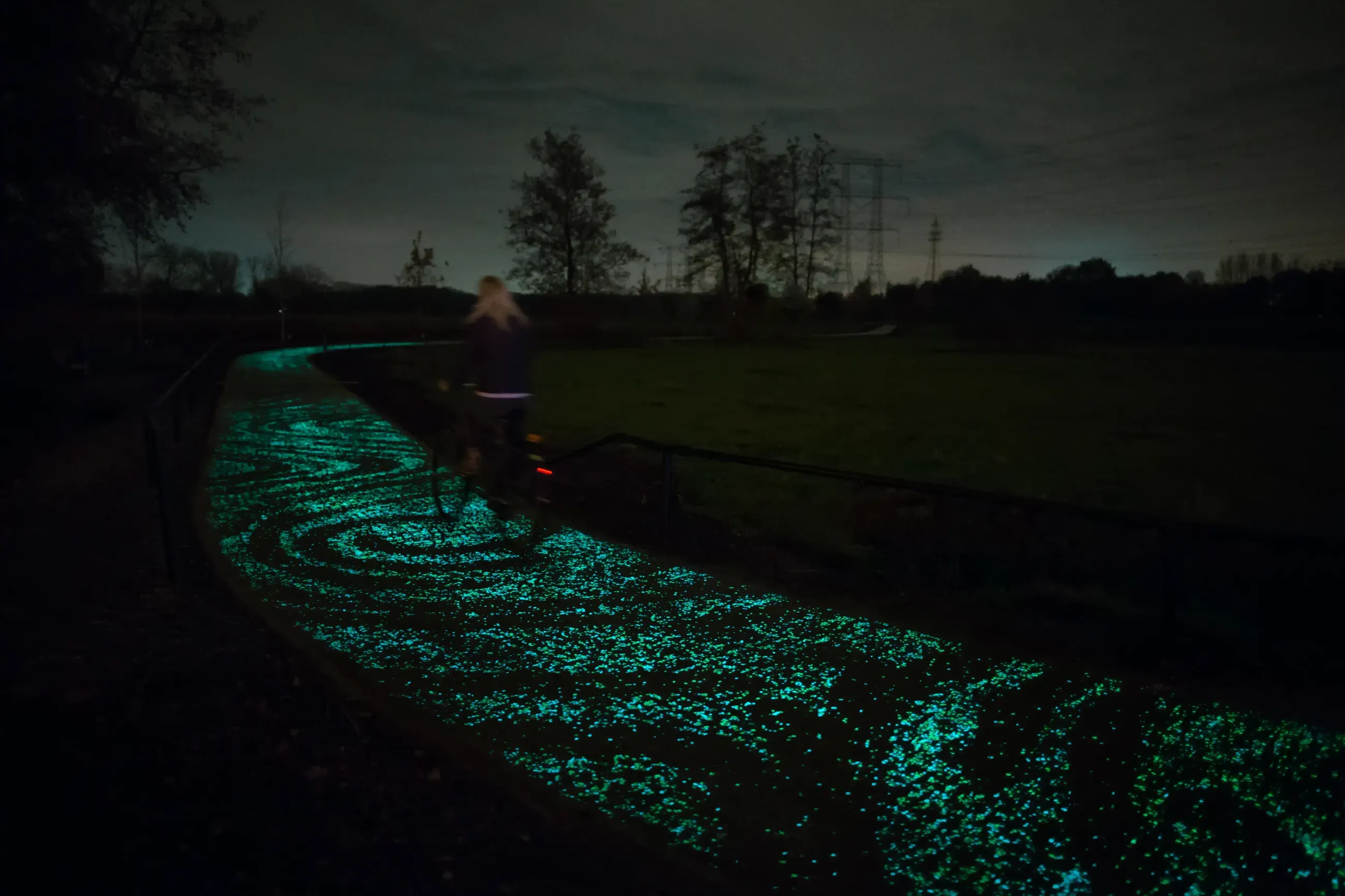
- VAN GOGH PATH, glowing bicycle path that comes to life at night, made of thousands of twinkling stones, 2012 by Studio Roosegaarde
Documentation workflow
Fabricademy Website Structure
Personal GitLab Repository
Each GitLab repo is available at a link like:
gitlab.fabcloud.org/academany/fabricademy/year/students/name-surname
Each GitLab repo containing:
- .md files (Markdown) → texts and content
- images → stored in folders
- mkdocs.yml → site configuration file
Site Generation
- The site is generated with MkDocs, a static site generator written in Python.
- Theme: Material for MkDocs
- Everything you write in the docs/ folder → becomes HTML web pages
Editing the Site
- Open your repository on GitLab.
- Click Web IDE (top-right button).
- Edit your files directly in the browser.
- Commit and push → your changes will appear on the live site automatically.
Pipeline (GitLab Pages)
Defined in .gitlab-ci.yml.
When you push:
- Installs Python + dependencies (mkdocs-material, etc.)
- Builds the site (
mkdocs build) - Publishes HTML files into
/public
Final Domain
The site is available at a link like:
class.textile-academy.org/year/username/
Customizing my website
Step 1
I just changed the header color and name in the mkdocs.yml file
- site_name:
- site_description:
- Fabricademy site:
- site_author:
- copyright:
- extra, social:
- theme, palette:
Step 2
Entered my personal information in the ~/docs/index.md file
Step 3
Creating this page ~/docs/assignments/week01.md with a structural and a more personal part.
Step 4
Changing something everyday!
- Lecture on September 16st, 2025 Fabricademy Coordination
- Tutorial on September 17st, 2025 Global Instructor: Julian Gallimore, Claudia Simonelli
- Local Tutor: Carolina Delgado
🔗 References & Tutorials
- Gitlab & Tools - Julian Gallimore
- Visual Documentation + Media Editing Live Demo - Claudia Simonelli
- Evaluations & NuEval slides - Nuria Robles
Student checklist
- [ ] Build a documentation website describing you and your motivation for the textile-academy, including your previous work
- [ ] Upload the documentation to your project page on class.textile-academy.org
- [ ] Add references and research based on the topic of your interest
- [ ] Learn how to upload images, videos, references and how to use Markdown and Gitlab
- [ ] Learn about the fab lab processes, booking system, usage, machine demos, tools and safety rules
- [ ] Customize your website and document how you did it (extra credit)