11. Open Source Hardware - From Fibers to Fabric
Research & Ideation
This week we split in different groups to be able to hack the CNC Milling machine. Some of us took cake of the designs of the stamps, preparing the natural inks, preparing the fabric, designing the stamp tool, work on the code for the ESP32 and working on the G-Code.
References & Inspiration

A reference of mine was also the traditional block printing with rust from my region, Romagna. They usually depict scenes from the rural and farm life

The project also started as an adaptation of the traditional block-printing technique in Amsterdam
Block-printing in Amsterdam
Block-printing is a tradiction that goes back to the 17th century when Chintz, a colorfully patterned cotton fabric, became really popular and its import increased. Since the long time that the import would take, traders also started to establish block-printing workshops. On the [Waag Futurelab's page}(https://hapticolor.textilelab.waag.org/cotton-block-printing-in-amsterdam/#fn:2) you can find further information about this technique.
Staphorster dotwork
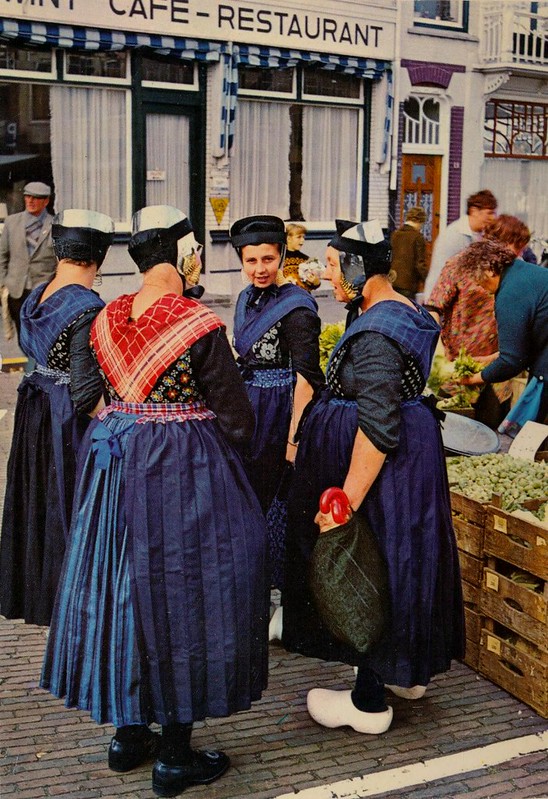
Another traditional inspiration is the staphorster dotwork, which became an intangible cultural heritage. This technique is linked to the traditional costume of Staphorst at the beginning of the last century. It was inspired by block-printing which led the women of Staphorster to create their own stamps by putting pins and nails in cork. on the Waag Futurlabs's page you can find further information about this technique.
Collective Documentaiton
Fot this week we split the tasks between us in order to achieve our goal: hack the ShopBot machine
This is how we divided the takss
-
Fabric and Inks (mordating and preparing dyes): Johanna & Amber
-
Stamps (laser cut and design): Flora
-
Grasshopper code (creating a text file for printing with the ShopBot): Flora & Asli
-
Hardware (design and printing of the stating and rotating stampint tool): Maddie & Asli
-
Electronics (coding and ESPNow communication): Alessia & Irja
Here1 and below you can find the collective documentation we made for this week.
Below you'll find more details about the coding and the ESPNow protocal that I used. You'll also find a collection of the fabrication files.
ESPNOW Protocol
After testing almost all the servo motors we have here, I could only found servo motors that do a 180-degree movement
If we want to change the direction of the stamp while printing, we need to connect 2 ESP32 boards. There are many ways that you can achieve that.
Checking the last here documentation, ESP-NOW seemed the best method
ESP-NOW is a wireless communication protocol developed by Espressif, the company behind the ESP32 microcontroller MCU. Arduino Tutorials:
Characteristics
- Wireless: devices can send data to each other without the time-consuming process of pairing or joining a network.
- Low Latency: The data transmission is nearly instant.
- Low Power Consumption: since it is not connected to the internet, the ESP can go to sleep, wake up to send a message and go to sleep again
- Range: 220 m ca
- Optional Encryption: ESP-NOW supports AES-128 encryption, so your data isn’t just flying around unprotected
- Supports Many Peers: You can communicate with up to 20 peers (unencrypted) or 10 peers (encrypted) from a single ESP device.
- Can Work Alongside WiFi: So, one device can collect data via ESP-NOW from a bunch of other ESPs, then upload it to the internet over Wi-Fi
Architecture
- Any ESP can be a sender or a receiver
- Peer-to-peer Communication: you can have one ESP32 sending data to another, one device sending data to multiple receivers or several ESPs all sending data to a central node
- MAC address: Every ESP board has a unique MAC address, and ESP-NOW uses these to route messages.
- Code to upload to the sender in order to receive the MAC address (https://randomnerdtutorials.com/get-change-esp32-esp8266-mac-address-arduino/)
Rui Santos & Sara Santos - Random Nerd Tutorials

Complete project details at https://RandomNerdTutorials.com/get-change-esp32-esp8266-mac-address-arduino/

Permission is hereby granted, free of charge, to any person obtaining a copy of this software and associated documentation files.

The above copyright notice and this permission notice shall be included in all copies or substantial portions of the Software.

*/#include <WiFi.h>#include <esp_wifi.h>void readMacAddress(){uint8_t baseMac[6];esp_err_t ret = esp_wifi_get_mac(WIFI_IF_STA, baseMac);if (ret == ESP_OK) {

Serial.printf("%02x:%02x:%02x:%02x:%02x:%02x\n",

baseMac[0], baseMac[1], baseMac[2],

baseMac[3], baseMac[4], baseMac[5]);} else {

Serial.println("Failed to read MAC address");}}void setup(){

Serial.begin(115200);


WiFi.mode(WIFI_STA);

WiFi.STA.begin();


Serial.print("[DEFAULT] ESP32 Board MAC Address: ");readMacAddress();}void loop(){}
80:B5:4E:C3:6A:64
Diagrams
The ESP32-C3 will be giving input to the ESP32-S3. It will be connected to a button, that when pressed, will rotate the arm stamp of 90°.

The ESP32-S3 will be attached to the stamp and it will move the motor based on the input receivecd from the ESP32-C3.

Codes
Code for the ESP32-C3 (client, the one with the button)3

In this part of the code where the button pin is defined, I used the actual GPIO number instead of digitalPin 7. The button wasn’t responding when I set BUTTON_PIN to 7, but it started working correctly once I used the corresponding GPIO number for the ESP32-C3.
#define BUTTON_PIN 20 // Change to the pin your button is connected to
#include <esp_now.h>
#include <WiFi.h>

#define BUTTON_PIN 20   // Change to the pin your button is connected to

uint8_t receiverMac[] = {0x10, 0x20, 0xba, 0x76, 0xe1, 0xec}; // Replace with your S3 MAC

typedef struct {
  int angle;
} Message;

Message outgoingData;
bool lastBtn = HIGH;
int currentAngle = 0;

void onSent(const wifi_tx_info_t *info, esp_now_send_status_t status) {
  Serial.print("Send status: ");
  Serial.println(status == ESP_NOW_SEND_SUCCESS ? "OK" : "FAIL");
}

void setup() {
  Serial.begin(115200);
  pinMode(BUTTON_PIN, INPUT_PULLUP);  // use internal pull-up resistor

  WiFi.mode(WIFI_STA);

  if (esp_now_init() != ESP_OK) {
    Serial.println("ESP-NOW init failed");
    return;
  }

  esp_now_register_send_cb(onSent);

  esp_now_peer_info_t peer = {};
  memcpy(peer.peer_addr, receiverMac, 6);
  peer.channel = 0;
  peer.encrypt = false;

  if (esp_now_add_peer(&peer) != ESP_OK) {
    Serial.println("Failed to add peer");
    return;
  }

  Serial.println("C3 Sender ready");
}

void loop() {
  bool btn = digitalRead(BUTTON_PIN);

  // Detect button press (falling edge)
  if (btn == LOW && lastBtn == HIGH) {
    delay(50);  // simple debounce

    // Toggle angle
    currentAngle = (currentAngle == 0) ? 90 : 0;
    outgoingData.angle = currentAngle;

    Serial.print("Button pressed → sending angle: ");
    Serial.println(currentAngle);

    esp_now_send(receiverMac, (uint8_t*)&outgoingData, sizeof(outgoingData));

    delay(1000); // to avoid double measurements
  }

  lastBtn = btn;

}
17:47:33.630 -> Send status: OK
17:47:34.932 -> Button pressed → sending angle: 90
17:47:34.932 -> Send status: OK
17:47:46.188 -> Button pressed → sending angle: 0
17:47:46.188 -> Send status: OK
Code for the ESP32S3 (server that connects the servo)4
#include <esp_now.h>
#include <WiFi.h>
#include <ESP32Servo.h>
Servo servo;
int currentAngle = 0;

typedef struct {
  int angle;
} Message;
Message incomingData;

void onReceive(const esp_now_recv_info_t *info, const uint8_t *data, int len) {
  memcpy(&incomingData, data, sizeof(incomingData));
  Serial.print("Received angle: ");
  Serial.println(incomingData.angle);

  servo.write(incomingData.angle);
  currentAngle = incomingData.angle;
}

void setup() {
  Serial.begin(115200);
  servo.attach(5);  // D5 pin
  servo.write(0);

  WiFi.mode(WIFI_STA);

  if (esp_now_init() != ESP_OK) {
    Serial.println("ESP-NOW init failed");
    return;
  }

  esp_now_register_recv_cb(onReceive);

  Serial.println("S3 Receiver ready");
}

void loop() {}
Testing ESPNOW Connection
Stamping tools: static and Rotating
As mentioned before, Maddie designed the stamping tools
Static stamp5
Motor holder6
Stamp holder7
Inkpad8
Stamp
Flora designed the stamps, here[9^] you can find out last trial