3. Circular Open Source Fashion
Research & Ideation

Open Source Circular Fashion explores alternative models of fashion design and production that challenge the traditional linear system of make–use–dispose. Instead of focusing on fixed garments, this approach emphasizes systems, processes and shared knowledge, allowing fashion objects to evolve, adapt and circulate over time. By combining open-source principles with circular design strategies, fashion becomes a distributed, adaptable and collaborative practice, where value is embedded not only in the final object but in the design logic and workflow behind it.
Serpica Naro Digicult
Critical Context: Serpica Naro and the Fashion System

Serpica Naro is a collective meta-brand created in Italy in the mid-2000s as a critical experiment within the fashion system. The project gained visibility after infiltrating Milan Fashion Week, presenting a fictional fashion label that exposed the mechanisms of authorship, branding and institutional validation in the fashion industry.
The name Serpica Naro is an anagram of San Precario, a symbolic figure representing precarious labor. This reference explicitly connects the project to broader critiques of unstable working conditions, particularly within creative and manufacturing industries.
Rather than functioning as a conventional fashion brand, Serpica Naro operates as a strategic fiction, using the language of branding to reveal how economic and symbolic value in fashion is often disconnected from the material conditions of production and labor.

A central aspect of the project is its focus on the invisibility and exploitation of labor within global fashion supply chains. Through visual narratives, collective authorship and critical interventions, Serpica Naro highlights how garment production frequently relies on precarious, underpaid and hidden work, while branding concentrates visibility and profit elsewhere.
By questioning the role of the designer, the authority of the brand and the opacity of production systems, Serpica Naro anticipates many of the concerns addressed by contemporary open-source and circular fashion practices, such as transparency, shared authorship, decentralization and ethical responsibility.
Within this research, Serpica Naro functions as a critical cultural reference, framing the need for alternative fashion models based on openness, distributed production and systemic redesign.
- Produce Reuse Recycle. Serpica Naro MarchioLiberato
- Serpica Naro Meta Brand MarchioLiberato
get inspired!
-
0-waste modular dress - Stephanie Johnsons - TextileLab Amsterdam
-
Modular balaclava - Mina Mayo Smith - FabLab Kamakura
-
Modular jewellery - Shefali Desai - Somaya
-
0-waste garment - Ruby Lennox - FabLab Bcn
-
0-waste garment - Alve Lagercrantz - FabLab Bcn
-
Assembly instructions & embedded message - Jessica Stanley - TextileLab Amsterdam
-
Modular fashion research - Zoe Olivieri - Fabricademy 2023
-
Modular garment systems - Charlotte Jacob - Fabricademy 2024
-
Digital fabrication & laser cutting archive - Fabricademy 2017
-
Open Source Circular Fashion platform - OSC Circular Fashion
 Fashion System diagram by Carlotta Premazzi
Open Source in Fashion
Open source in fashion refers to the practice of sharing design files, fabrication methods and assembly instructions, enabling others to reproduce, modify and redistribute garments. This approach promotes: transparency in design and production
- collective learning and experimentation
- decentralization of manufacturing
- longer product lifecycles through adaptation and repair
In open source fashion, garments function as platforms rather than finished products, allowing users to actively participate in their evolution.
Circular Fashion Principles
Circular fashion aims to reduce environmental impact by rethinking how garments are designed, produced, used and reused.
Key principles include:
- designing for durability and repair
- designing for disassembly
- efficient use of materials
- reuse and reconfiguration of components
Rather than aiming for absolute zero-waste outcomes, circular design focuses on measurable, transparent and intentional material flows, where waste is minimized and reintegrated into future processes.
Modular Design Systems
Modular fashion systems are based on repeatable units that can be assembled into larger textile surfaces or garments.
These systems enable: * adaptability to different body sizes and uses * easy repair through replacement of individual modules * customization and reconfiguration * compatibility with digital fabrication tools
In modular design, the garment emerges from the logic of the module and its connections, replacing traditional pattern-making approaches.
Tessellation and Pattern Logic
Tessellation is the process of covering a surface with repeating shapes without gaps or overlaps. In fashion and textile design, tessellation allows complex surfaces to be generated from a single design element.
Through operations such as: * translation * rotation * reflection
a module can produce regular or irregular patterns, including organic and biomorphic configurations inspired by natural systems. Tessellation enables scalability while maintaining coherence across the surface.
Digital Fabrication and Laser Cutting
Laser cutting plays a central role in open source circular fashion due to its precision, repeatability and accessibility in Fab Labs and makerspaces.
Digital fabrication allows designers to: * translate 2D vector designs directly into physical components * fabricate interlocking geometries without additional hardware * standardize workflows across different locations * optimize material usage through nesting strategies
This shifts the designer’s role from producing objects to designing systems and processes.
Interlocking Connections as an Alternative to Sewing
In modular garments, interlocking connections replace traditional sewing and adhesives.
Slot-based connections enable: * tool-free assembly and disassembly * easy repair and replacement * adaptability to different materials and thicknesses * reproducibility by non-experts
These systems rely on material properties, tolerances and flexibility, making prototyping and testing essential steps in the design process.
Distributed Manufacturing & Local Production
Distributed manufacturing refers to a decentralized production model where fabrication takes place across multiple local nodes, such as Fab Labs, makerspaces and small workshops.
Within open source circular fashion, this model: * reduces transportation and centralized production * allows adaptation to locally available materials * supports community-driven making * increases resilience of production systems
By sharing digital design files, garments can be produced anywhere, reinforcing the relationship between global knowledge and local fabrication.
Material Efficiency & Zero-Waste as a Design Strategy
Material efficiency focuses on maximizing the use of available material while minimizing waste during fabrication. In modular and laser-cut systems, total zero-waste is not always achievable.
However, waste can be: * calculated and documented * visualized through nesting strategies * reused in future design contexts
Zero-waste is therefore treated as a design strategy rather than a constraint, informing decisions related to module geometry, scale and material selection, while promoting transparency in the design process.
Research to Practice
This theoretical framework informs the practical development of a modular, interlocking textile system, explored through analog prototyping, digital design and laser cutting. The following sections translate these principles into a concrete design experiment.
References & Inspiration
 Circular open Source Fashion Moodboard by Carlotta Premazzi
- 3D-Printed Modular Kimono – Variable Seams – variableseams.com
- CY-BO (Cytological Packing Material) – Kenji Abe – kenjiabe.com
- "Metabolism SS15” Collection – Bolor Amgalan – boloramgalan.com
- bLoomx Decorative Modules – Harta Design – bloomx.it
- 3D-Printed Modular – Variable Seams – variableseams.com
- Muqarnas (Honeycomb Vault of the Shah Mosque) – Architettura Islamica – en.wikipedia.org/wiki/Shah_Mosque
 3D-printed modular garments by Variable Seams & Balena
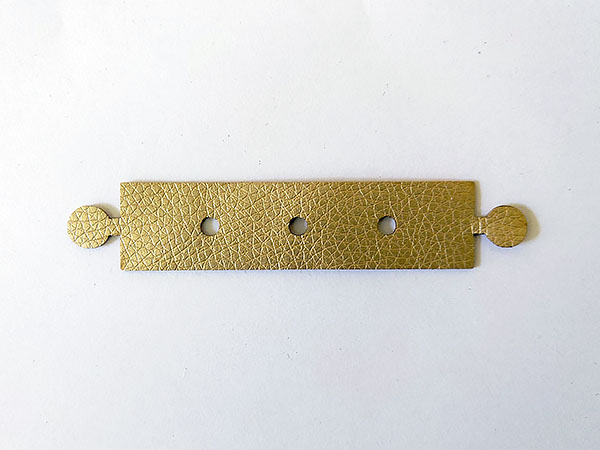
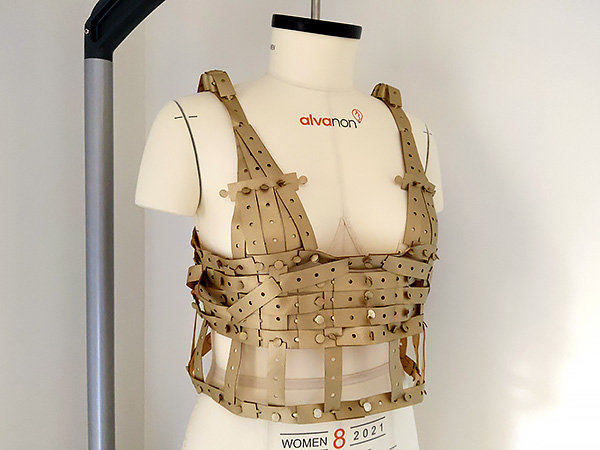
- Module and garment by Camille Barot (Fabricademy 2023)
Tools
Process and workflow
Seamless Pattern, Organic Modular Interlocking System
The design intent of this assignment is to translate an ornamental floral tessellation into a functional modular textile system. The project focuses on preserving the visual continuity of the pattern while introducing interlocking connections that enable assembly, disassembly and reuse without sewing.
Tools & Materials
Software
- Vector design software (Inkscape / Illustrator)
Prototyping
- Paper and scissors for prototyping
Fabrication
- Laser-cuttable material (felt, cork, thin textile, etc.)
- Access to a laser cutter
- Reference floral tessellation pattern

 Pattern, Module and variants, assembly methods, A4 nesting of Pattern1 and Pattern2 made in illustrator By Carlotta Premazzi
Step 1 — Define the Base Module
- Create a square working area (e.g. 60 × 60 mm).
- Design a four-petal organic shape inside the square.
- Ensure the shape:
- is symmetrical horizontally and vertically
- has smooth, continuous curves
- is a closed vector path
This shape is the only module used in the system.
Step 2 — Test Tessellation Logic
- Duplicate the module.
- Arrange copies by:
- translating along the X axis
- translating along the Y axis
- Apply horizontal and vertical reflection to alternating copies.
- Adjust the outline until:
- modules align without gaps
- petals meet consistently
- the pattern is continuous
Step 3 — Define the Interlocking Strategy
Identify where modules touch when tessellated. At each contact point, add one slot per petal. Slot requirements: rectangular shape with rounded end width = material thickness + 0.2 mm depth adjusted for material flexibility Align slots along the main horizontal and vertical axes. Use the same slot geometry on all petals.
Step 4 — Paper Prototyping
- Print the module at 1:1 scale.
- Cut several copies using scissors.
- Assemble modules by inserting slots into each other.
- Test: ease of assembly, resistance, flexibility.
- Iterate slot size and position if necessary.
 Paper prototyping: testing module repetition, slot positioning and assembly by Carlotta Premazzi
Laser Cutting Parameters
| Material | Thickness (approx.) | Laser Power | Speed | Passes | Result |
|---|---|---|---|---|---|
| Paper | ~0.2 mm | 70% | 100% | 1 | Clean cut, minimal edge darkening |
Step 5 — Prepare the Vector File
 Prepare laser cut file by Carlotta Premazzi
- Clean all paths (no overlaps, no open curves).
- Set stroke to 0.01 mm.
- Use RGB color mode.
- Export as SVG / DXF / PDF.
- Duplicate and arrange modules to create a nesting layout.
Waste Analysis
In digital fabrication (laser cutting, CNC, textile cutting), the standard method used to quantify material waste from a 1:1 file (PDF/DXF/SVG) is called Nesting Efficiency Analysis.
Key metrics
- Nesting efficiency: percentage of sheet area effectively used by the parts
- Waste / fall-off: percentage of leftover material
- Utilization factor: ratio between net part area and total sheet area
Standard calculation
Waste % = (1 − An / Ag) × 100
Where:
- An = net area (sum of all cut parts)
- Ag = gross area (total sheet size)
Industry terminology
- Nesting / marker making: layout optimization process to reduce waste
- Skeleton / scrap: remaining material after cutting
- Kerf loss: material removed by the laser beam (not included in this calculation)
A4 nesting result (this project)
- Material used: ~64%
- Leftover (scrap, excluding internal slots): ~36%
Step 6 — Laser Cutting
 laser cut Dholetec DT 1000 at Fablab Lisbon AI illustration by Carlotta Premazzi (eden.art illustration from a real photography)
Laser Cutter — Main Components
| System | Components |
|---|---|
| Machine | Aluminum frame Base frame Gantry structure (X–Y) Laser bed (honeycomb or blade bed) Material support table Adjustable bed height Enclosure panels Access doors |
| Optical System | CO₂ laser tube Laser tube mounts High-voltage cable First reflective mirror Second reflective mirror Third reflective mirror Mirror mounts with alignment screws Focus lens Lens holder Nozzle |
| Motion | X-axis rail Y-axis rail X-axis stepper motor Y-axis stepper motor Timing belts (X and Y axis) Belt pulleys Belt tensioners Linear bearings / sliders Endstop switches (X, Y) |
| Laser Head Assembly | Laser head carriage Mirror housing (third mirror) Focus lens assembly Air-assist nozzle Air tubing connection |
| Cooling & Air | Water chiller Water pump (internal to chiller) Water inlet tube Water outlet tube Temperature sensor Air compressor Air-assist tubing |
| Electronics & Control | Main control board Laser power supply (HV PSU) Stepper motor drivers Control panel LCD display Control buttons / keypad USB / Ethernet interface Emergency stop button Wiring harness |
| Exhaust & Safety | Exhaust fan Exhaust duct / hose Smoke outlet Safety interlock switches Grounding system |
Laser Cutter Operation
| Operation | Purpose | Laser Depth | Typical Use | File Type |
|---|---|---|---|---|
| CUT | Fully separate parts | Through material | Module outline, slots, holes | Vector paths |
| ENGRAVE | Mark surface lines | Shallow | Assembly guides, text, decorative lines | Vector paths |
| RASTER ENGRAVE | Engrave filled areas | Surface | Images, textures, shading | Raster image |
| SCORE | Create guide lines | Very shallow | Folding lines, alignment marks | Vector paths |
| KISS CUT | Partial cut | Controlled depth | Multi-layer or adhesive-backed materials | Vector paths |
General Workflow
-
Nesting & design preparation
Vector and raster files are prepared and optimized through nesting to minimize material waste and define cut / engrave areas. -
File setup & parameter definition
The design is imported into the laser software, where cutting order, speed, power, frequency and number of passes are set according to the material. -
Machine startup & system check
The laser cutter is powered on, water chiller, air compressor and exhaust system are activated, and cooling flow is verified. -
Material placement & origin setting
The material is placed on the laser bed and aligned; the origin point is set manually or via frame preview. -
Focus calibration (focus pin)
The laser head height is calibrated using the focus tool / focus pin to ensure the correct focal distance between lens and material. -
Test pulse & alignment check
A short test pulse or frame movement is used to verify alignment and correct positioning before starting the job. -
Job execution
The laser job is started and continuously monitored during cutting or engraving. -
Cooling, removal & post-processing
Once the job is completed, the system is left to cool, the material is removed, and cut parts are cleaned and inspected.
 Laser cutting process and first full material test on 1mm felt, including close-ups of the cut quality and test on mannequin by Carlotta Premazzi
Laser Cutting Parameters
| Material | Thickness | Laser Power | Speed | Passes | Result |
|---|---|---|---|---|---|
| Felt | 1 mm | 100% | 25% | 1 | Clean cut, slightly darkened edge |
- Select the material and measure thickness.
- Perform test cuts to confirm slot tolerance.
- Cut the full set of modules.
- Document:
- material
- thickness
- laser power
- speed
Step 7 — Assembly
 Step-by-step assembly sequence showing how individual modules are connected through slot-based interlocking joints. The sequence demonstrates alignment, insertion, friction-based locking and expansion into a 2×2 configuration, followed by a wearable simple configuration test on the wrist, by Carlotta Premazzi.
- Start assembling modules in a small configuration (2×2).
- Use translation and reflection only to expand the surface.
- Insert the circular tab into the corresponding hole to create a mechanical interlock.
- Continue building until the desired surface size is reached.
No glue or sewing is used. The slot tolerance provides sufficient friction to withstand moderate pulling forces without detachment.
Step 8 — Evaluation & Iteration
- Evaluate the assembled structure:
- Does it hold together? yes
- Is it flexible? yes
- Can it be disassembled? easly
Circular Design Notes
- All modules are identical.
- Damaged units can be replaced individually.
- The system can be fully disassembled and reconfigured.
Outcome
The result is a modular organic textile surface generated from a single repeatable floral unit, demonstrating how open-source principles and digital fabrication can support circular fashion design.
Future iterations will focus on improving nesting efficiency and exploring alternative bio-based materials for enhanced circular performance.
 Final modular textile surface assembled on a mannequin. The system adapts to curvature through rotational tessellation while maintaining structural stability via friction-based interlocking without sewing or adhesives.
Assembly videos
Fabrication files
- Download module patter1
- Download nesting pattern1 A4
- Download module pattern2
- Download nesting-pattern2 A4
🔗 References & Tutorials
Open Source & Circular Fashion
-
Serpica Naro — Meta-brand and critical fashion intervention
https://serpica.tumblr.com/MarchioLiberato -
Open Source Circular Fashion
https://oscircularfashion.com/ -
Fashion Industry through the Lens of Systems Thinking
https://www.behance.net/gallery/112068415/Fashion-Industry-through-the-lens-of-Systems-Thinking
Modular & Zero-Waste Fashion — Student References
-
Stephanie Johnson — Zero-waste modular dress (Fabricademy 2024)
https://class.textile-academy.org/2024/stephanie-johnson/assignments/week03/#f-i-n-a-l -
Mina Mayo Smith — Modular balaclava (Fabricademy 2024)
https://class.textile-academy.org/2024/mina-smith/assignments/week03/#octopus-balaclava -
Shefali Desai — Modular jewellery (Fabricademy 2025)
https://class.textile-academy.org/2025/shefali-desai/assignments/week03/ -
Ruby Lennox — Zero-waste garment (Fabricademy 2024)
https://class.textile-academy.org/2024/ruby-lennox/assignments/week03/#final-garment -
Alve Lagercrantz — Modular textile system (Fabricademy 2023)
https://class.textile-academy.org/2023/alve-lagercrantz/assignments/week03/ -
Jessica Stanley — Assembly instructions & embedded message (Fabricademy 2019)
http://class.textile-academy.org/2019/jessica.stanley/assignments/week03/ -
Zoe Olivieri — Modular fashion research (Fabricademy 2023)
https://class.textile-academy.org/2023/zoe-olivieri/assignments/week03/ -
Charlotte Jacob — Modular garment systems (Fabricademy 2024)
https://class.textile-academy.org/2024/charlotte-jacob/assignments/week03/
Laser Cutting — Materials, Safety & Fabrication
-
xTool Academy — Laser Cutting Materials List
https://www.xtool.com/blogs/xtool-academy/laser-cutting-materials-list -
NEVER CUT THESE MATERIALS — Laser Safety Guide (CPL)
https://cpl.org/wp-content/uploads/NEVER-CUT-THESE-MATERIALS.pdf -
Fab Academy — Digital Fabrication & Laser Cutting
https://math00.fabcloud.io/fabricademy2017/week3.html
Academic & Design Research
- Modular Fashion Systems and Sustainable Design
https://www.tandfonline.com/doi/pdf/10.1080/14759551.2013.837051
Lecture on September 30th, 2025, Global Instructors: Zoe Romano and Claudia Simonelli
Pattern1 ModuLeaf fabrication PDF file at oscircularfashion.com
Student checklist
- [ ] Include some inspiration: research on artists or projects that work with modules and zero waste systems
- [ ] Document, Design and prototype with paper and scissors modular configurations and interlocking connections
- [ ] Document, Design and prototype digitally your modular configurations and interlocking connections in 2D
- [ ] Document the process of testing and laser cutting your designs, including the machine settings, material type and thickness
- [ ] Laser cut the modules. Create a modular or seamless garment, showing that the connection is well-designed and holds the pull/stretch. Document the assembly process and tests
- [ ] Upload the fabrication PDF file at oscircularfashion.com, in 1:1 scale accompanied by 1-5 pictures (preferably in white background)
- [ ] Submit some of the modules to the analog or digital material library of the lab. (Recommended size 20cm x 20cm) (extra credit)