Deliverables
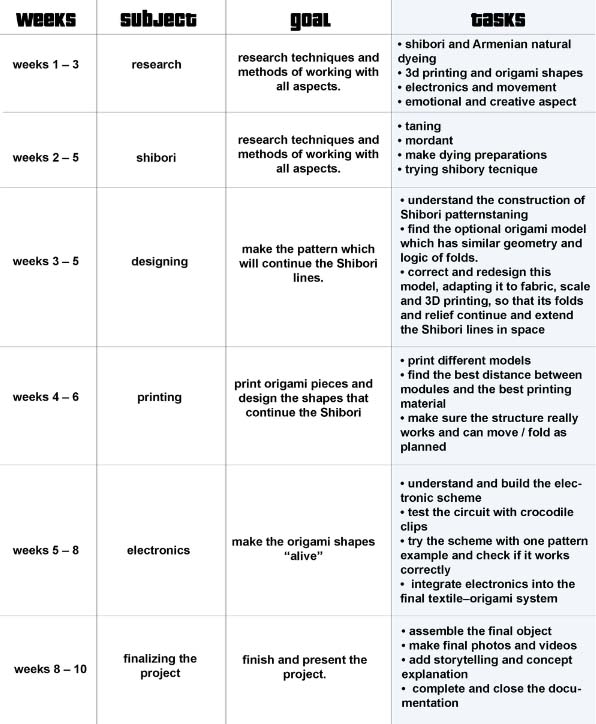
Planning calendar
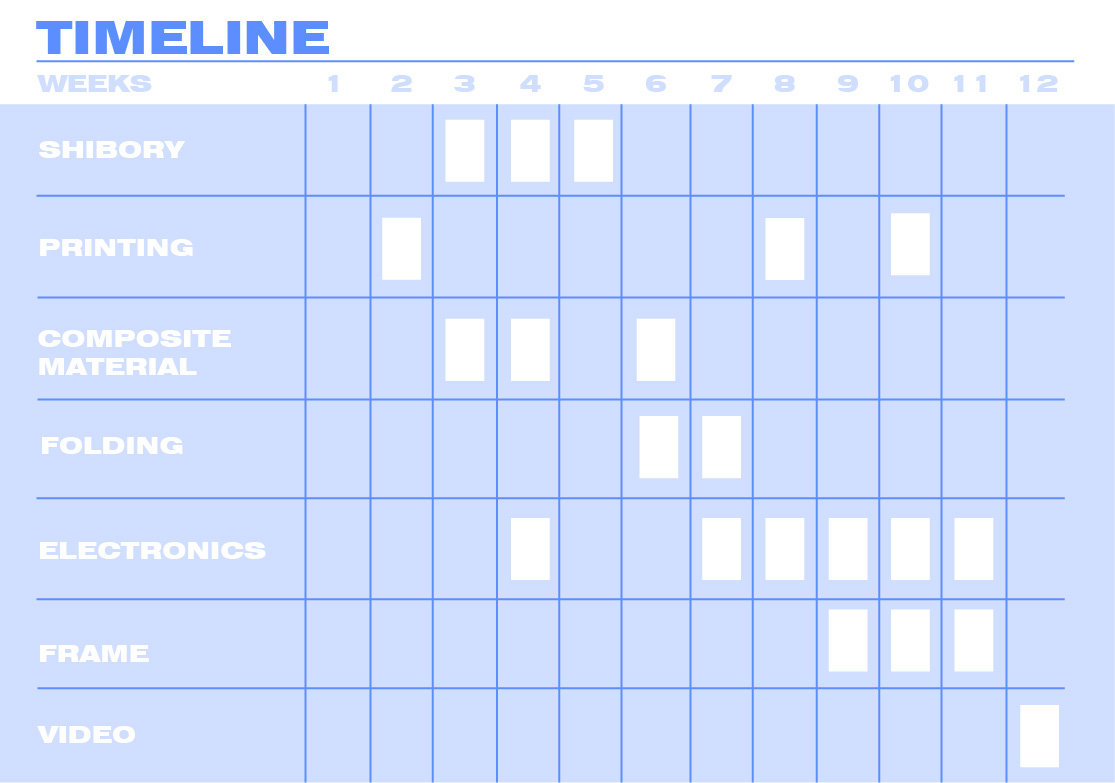
 In reality, the process was never linear. I was working on many things at once — testing steps together, going back, changing directions, and trying again. The project was constantly evolving as I worked on it.
What you see here is a simplified timeline of these three months — a way to organize a process that, in reality, was much more fluid and experimental.
Moodboard
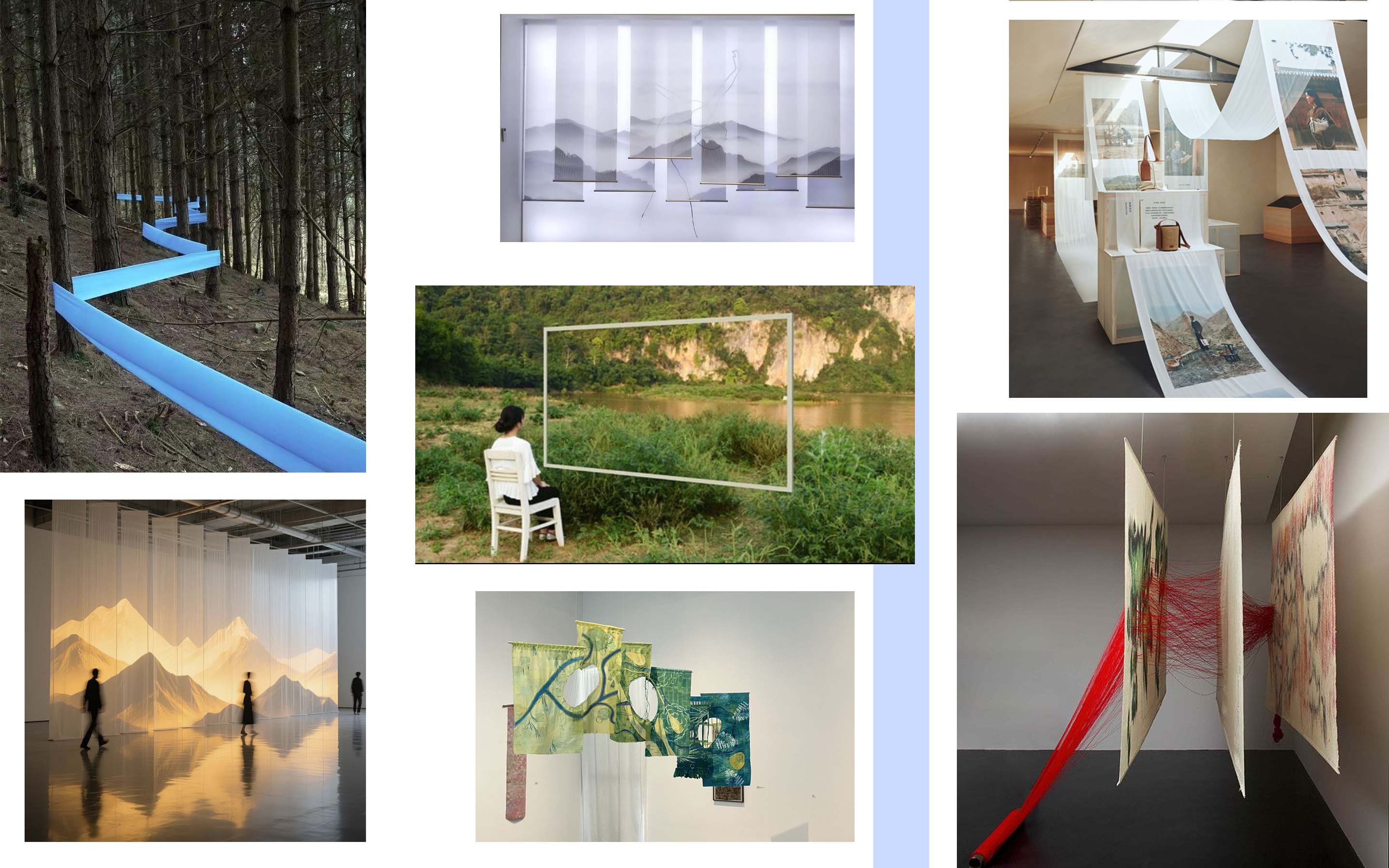
In these photos, I focus on the communication between art, nature, and human. The artwork moves beyond the 2D surface, creating a sense of an alternative reality where people can feel and experience it.
Sources
All the people who inspired me and all the sources I relied on can be found in my step-by-step documentation. Please explore them and follow the process together with me.
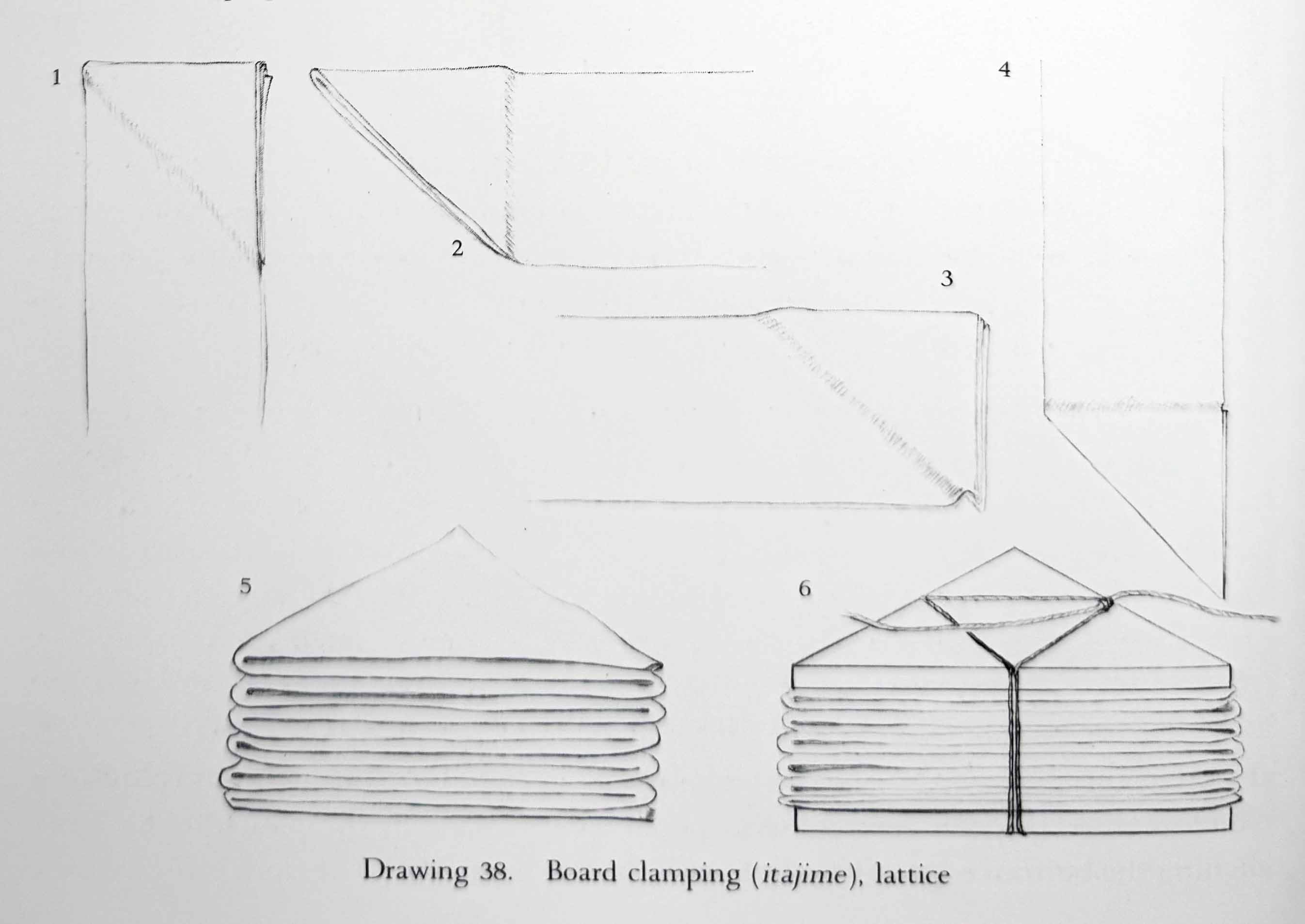
Anyway, I would like to mention again the shibori book, which is truly amazing and inspiring. During both the shibori week and the concept week, I gained a lot of valuable information from it. The book is called Shibori: The Inventive Art of Japanese Shaped Resist Dyeing.
BOM. Bill of materials
| Qty | Description | Price ($) | Link | Notes |
|---|---|---|---|---|
| 1 | Fabric (linen) | 40.00 | N/A | — |
| 1 | Onion skin (0.5 kg) | 14.00 | N/A | Natural dye |
| 1 | Alum, washing soda, etc. | 2.00 | N/A | Chemicals |
| 1 | Gelatin, alginate, etc. | 7.00 | N/A | Biomaterial |
| 1 | Bowls and other tools | 50.00 | N/A | Tools |
| 1 | Arduino Uno | 20.00 | N/A | Electronics |
| 1 | Arduino Shield | 40.00 | N/A | Electronics |
| 2 | Sharp Distance Sensor | 20.00 | N/A | Sensors |
| 1 | Stepper Motor | 35.00 | N/A | Motion |
| 1 | Electronic threads | 5.00 | N/A | Conductive |
| 1 | Wood | 15.00 | N/A | Structure |
| 1 | Wood varnish | 2.00 | N/A | Finish |
| Total | 250.00 |
A lot of this materials Fab lab Armenia get me for free. big thanks them for this much sport.
Mid Term Presentation
Storytelling Presentation
Files for Project Production
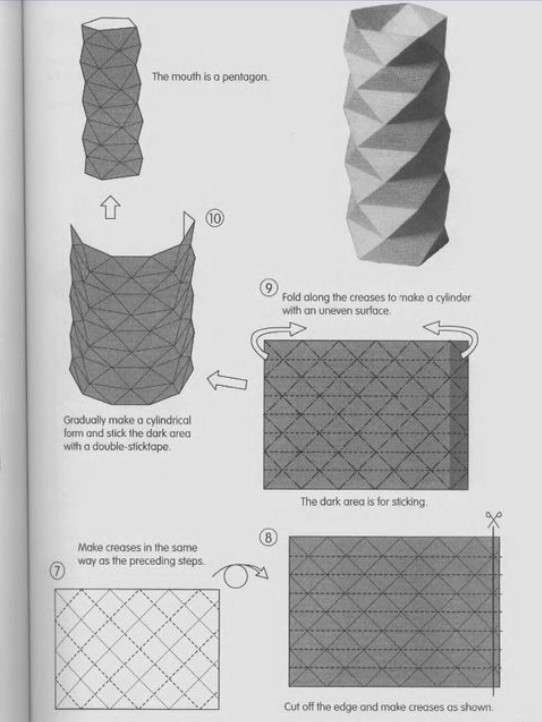
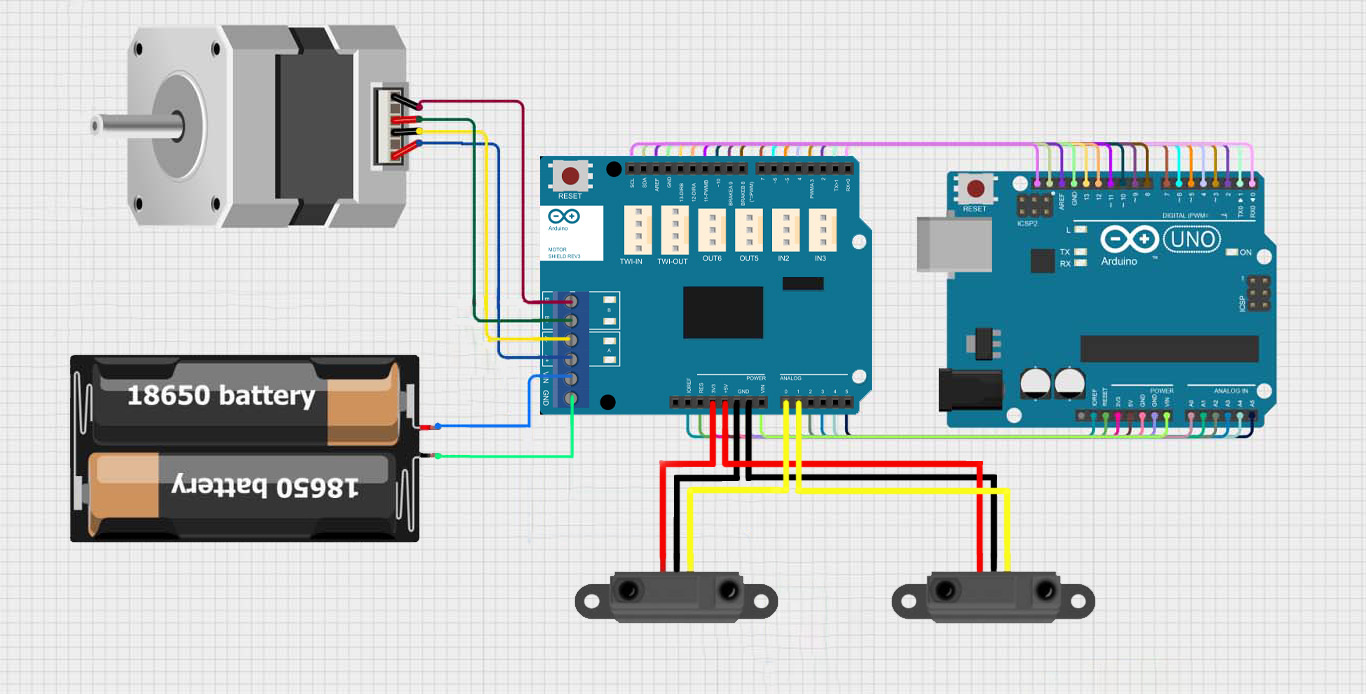
Each step has a separate page with a detailed description. You can find all the information there, but for convenience, I am including all the necessary files here.
Dying steps
- Washing with soda ash
- Tanning (in my case, using tea)
- Mordanting with aluminum sulfate
- Dyeing
-
Water — 2080 ml
- Gelatin — 200 g
- Glycerin — 80 g
-
Alginate — 5 g
Code:
#include "Stepper.h"

// Steps per revolution
const int stepsPerRevolution = 200;

// Motor shield pins
#define pwmA 3
#define pwmB 11
#define brakeA 9
#define brakeB 8
#define dirA 12
#define dirB 13


// Sensors
#define rightSensor A2
#define leftSensor  A4

Stepper myStepper(stepsPerRevolution, dirA, dirB);

unsigned long int counter = 0;

void setup() {

  Serial.begin(9600);

  pinMode(pwmA, OUTPUT);
  pinMode(pwmB, OUTPUT);
  pinMode(brakeA, OUTPUT);
  pinMode(brakeB, OUTPUT);

  pinMode(rightSensor, INPUT);
  pinMode(leftSensor, INPUT);

  digitalWrite(pwmA, HIGH);
  digitalWrite(pwmB, HIGH);
  digitalWrite(brakeA, LOW);
  digitalWrite(brakeB, LOW);

  myStepper.setSpeed(60);
}

unsigned long int sum_left = 0;
unsigned long int sum_right = 0;

int filtered_right = 0;
int filtered_left = 0;
bool data_ready = 0;

void loop() {

  /*Serial.print("left: ");
  Serial.print(filtered_left);
  Serial.print("  right: ");
  Serial.println(filtered_right);
  filtered_right = analogRead(rightSensor);
  filtered_left  = analogRead(leftSensor);
  data_ready = 1; */
  if(data_ready == 0)
  {
    while(counter < 20)
    {
      int rightState = analogRead(rightSensor);
      int leftState  = analogRead(leftSensor);
      sum_left += leftState;
      sum_right += rightState;
      counter++;
    }
  }
  if(counter == 20)
  {
    counter = 0;


    filtered_left = sum_left / 20;
    filtered_right = sum_right / 20;
    Serial.print("left: ");
    Serial.print(filtered_left);
    Serial.print("  right: ");
    Serial.println(filtered_right);
    data_ready = 1;
    sum_left = 0;
    sum_right = 0;
  }


 // Serial.println(rightState);

  // LEFT detector → +360 then back
  if (filtered_left > 200) {
    digitalWrite(pwmA, HIGH);
    digitalWrite(pwmB, HIGH);
    data_ready = 0;
    Serial.println("Left!!!!!!!!!!!!!!");
    myStepper.step(200);   // +360°
    //delay(30);

    myStepper.step(-200);  // return to 0
    //delay(30);
  }
  else if(data_ready == 1)
  {
    digitalWrite(pwmA, LOW);
    digitalWrite(pwmB, LOW);
    data_ready = 0;
  }


  // RIGHT detector → -360 then back
  if (filtered_right > 100) {
    digitalWrite(pwmA, HIGH);
    digitalWrite(pwmB, HIGH);
    data_ready = 0;
    Serial.println("Right!!!!!!!!!!!!!!");
    myStepper.step(-200);  // -360°
    //delay(30);

    myStepper.step(200);   // return to 0
    //delay(30);
  }
  else if(data_ready == 1)
  {
    data_ready = 0;
    digitalWrite(pwmA, LOW);
    digitalWrite(pwmB, LOW);
  }
 // Serial.println(data_ready);

}
You can find all manuals and educational materials on the relevant pages.