E-textiles
1. Objective
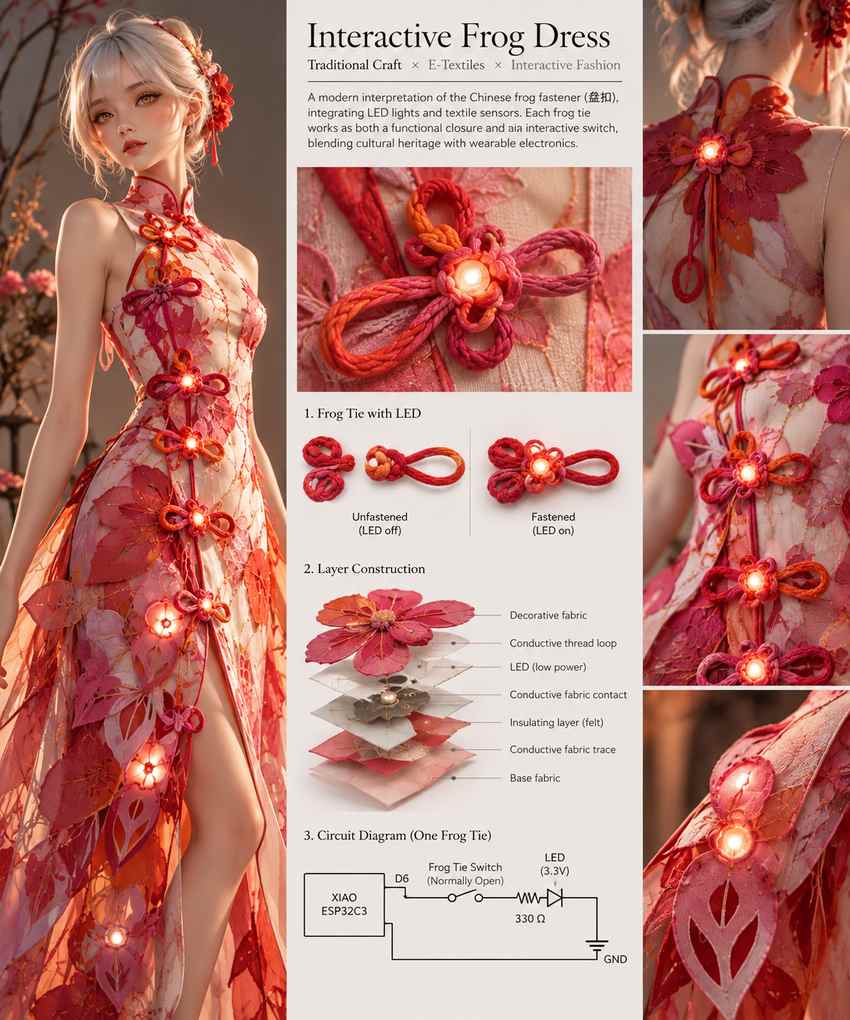
The objective of this week's assignment is to explore the integration of electronics into textiles by designing and fabricating both digital and analog soft sensors, experimenting with conductive materials, and understanding how textile structures can function as interactive electronic interfaces.
My personal goal is to investigate how traditional Chinese frog fasteners (盘扣) can be transformed into functional electronic switches, combining cultural craftsmanship with wearable technology. Using the Seeed Studio XIAO microcontroller, I will experiment with conductive thread, conductive fabric, and soft sensor construction to detect touch, pressure, and proximity.
Ultimately, with the elements that I have developed in this module, I want to explore an interactive garment that responds to human presence, using textile-based sensors to control wearable LEDs that change color as someone approaches the wearer (not for this homework, but might be for final project).
2. References, research & inspiration
2.1 Chinese frog fasteners (盘扣)

Chinese frog fasteners, known as 盘扣 (pán kòu), are traditional decorative closures commonly associated with garments such as the qipao (旗袍), changshan (长衫), and traditional Chinese jackets. Unlike conventional buttons, frog fasteners consist of a knotted button and a corresponding loop, often handcrafted from fabric strips or braided cords. They serve both functional and ornamental purposes, securing the garment while adding an expressive decorative element.
The history of Chinese knotted fastenings extends back centuries, although the styles most recognizable today developed through different periods of Chinese dress, particularly during the Qing dynasty and the evolution of the modern qipao in the early 20th century. Over time, 盘扣 evolved from relatively simple closures into elaborate textile ornaments featuring floral motifs, geometric patterns, and symbolic shapes.

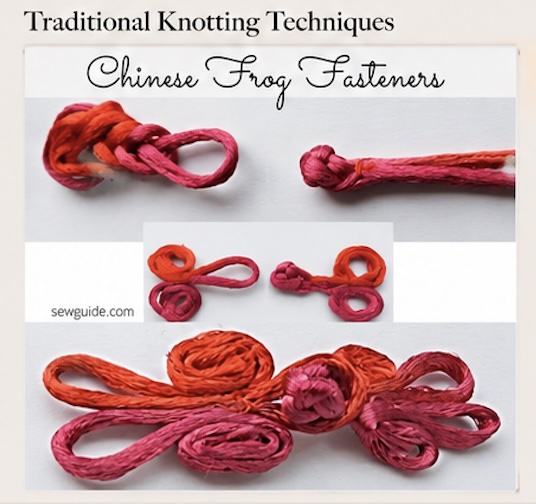
Today, 盘扣 continues to evolve beyond traditional Chinese clothing. Contemporary designers reinterpret frog fasteners through experimental materials, exaggerated proportions, and unconventional placements.
For my E-Textiles project, I want to explore how this traditional fastening mechanism can become an interactive electronic component.
2.2 Anouk Wipprecht — Fashion as an Interactive Interface



Anouk Wipprecht is my favourite Dutch fashion-tech designer whose work explores the intersection of fashion, robotics, engineering, and human-computer interaction. Rather than treating clothing as a passive object, she creates garments that sense, react, and interact with their surroundings, transforming fashion into an extension of the human body.
One of her most recognizable projects is the Spider Dress, a robotic garment inspired by the defensive behavior of spiders. Equipped with proximity sensing and mechanical appendages, the dress responds to people approaching the wearer, exploring the relationship between personal space, bodily autonomy, and technology.
What particularly inspires me about Anouk's work is how she transforms invisible interactions between people into visible, physical responses. Her garments do more than incorporate electronics as decoration; they use technology to communicate emotions, boundaries, and social behavior.
For this week's assignment, I want to explore how to build such material language with analog sensors. As someone approaches the wearer, the garment could respond by changing its colors, making personal space visible through light. By incorporating textile-based proximity sensing and programmable RGB LEDs, I envision a dress that responds to the presence of people around the wearer - as someone approaches, the lights on the garment could gradually change color - become a responsive interface that communicates personal space.
3. Soft Circuits
3.1 Simple Circuit
For my first experiment and build, I started with a simple circuit to understand how electrical components can be integrated into soft materials. I used the felt flowers that my mom previously made for me, conductive thread to create electrical connections, copper tape as a contact material, and a regular LED as the output.
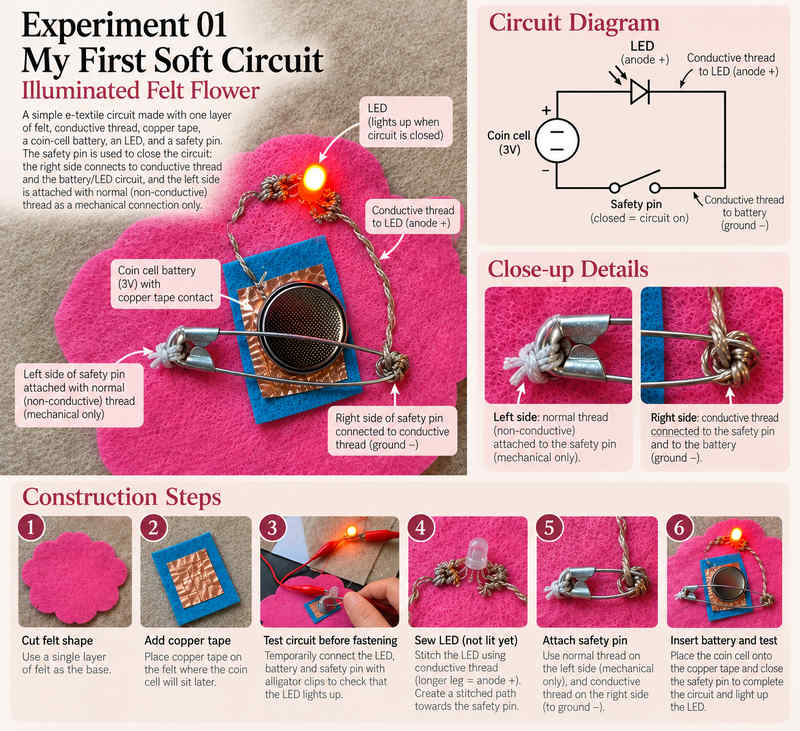
The experiment helped me explore three fundamental concepts: electrical continuity, polarity, and hard-to-soft connections. Sewing this together was my first step toward understanding how a functional circuit could be constructed directly on fabric.
3.2 Power Breakout
After completing my first illuminated felt flower, I wanted to explore a more modular approach to powering textile circuits. Instead of integrating the battery directly into each LED circuit, I experimented with creating a standalone textile power breakout module that could supply electricity to different wearable electronic components. This would serve as a detachable power module for my other swatches.
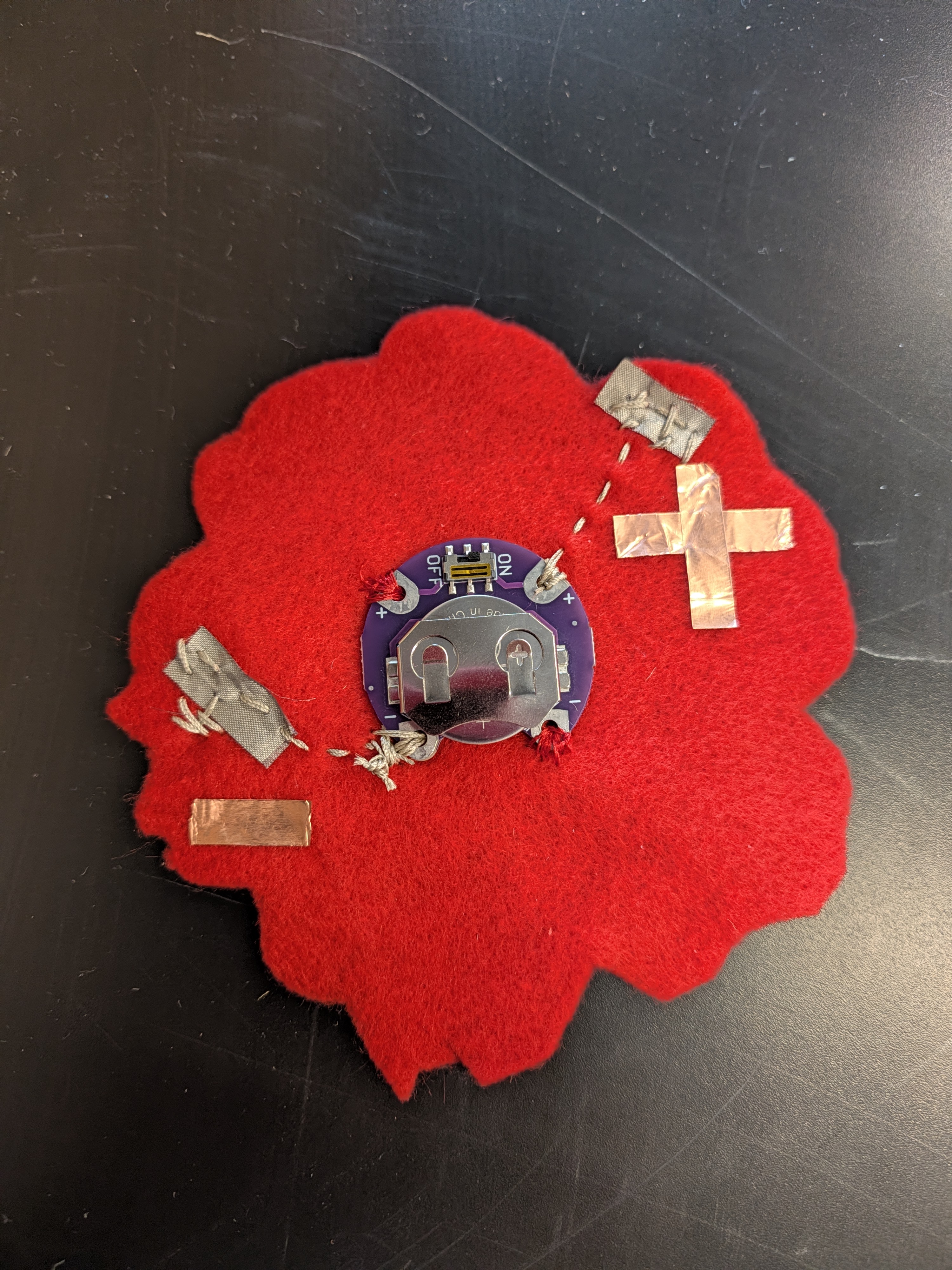
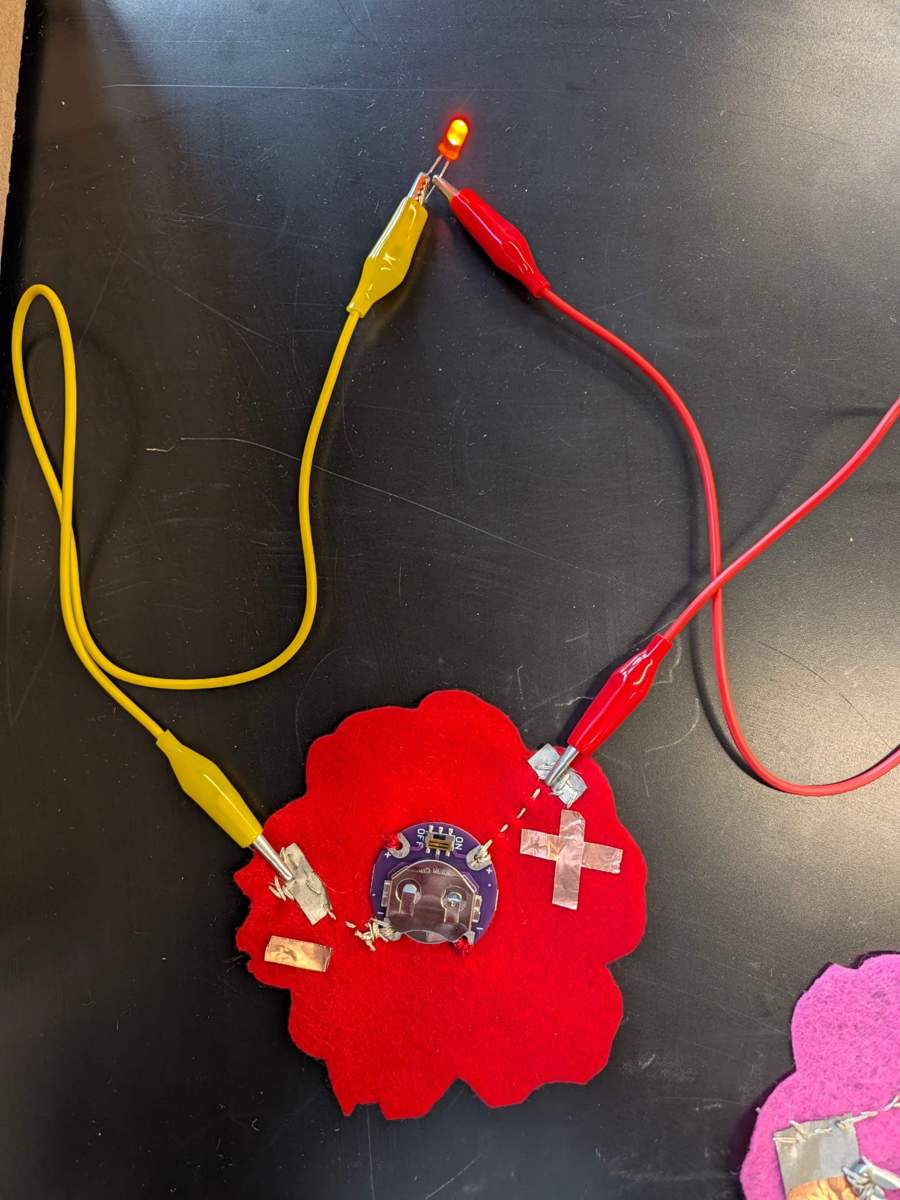
For the construction, I used a flower-shaped red felt base, a sewable coin-cell battery holder with an integrated ON/OFF switch, conductive thread, conductive fabric contacts, and copper tape. I marked the positive (+) and negative (−) connections using copper tape to make the polarity easy to identify.
The battery holder was stitched onto the felt using conductive thread, connecting its electrical terminals to separate conductive fabric contact pads. These pads function as accessible power connection points, allowing external components to be attached without modifying the battery holder itself.
Info
To test the module, I connected an external LED using alligator clips. One clip was attached to the positive contact and the other to the negative contact, completing the circuit through the LED. The LED illuminated successfully, demonstrating that the textile breakout could deliver power to an external component. The integrated ON/OFF switch also provides a convenient way to disconnect the battery without removing it.
3.3 Digital Embroderiry Exploration
During Fab Hub Kendall's Community Night, I explored how computerized sewing and decorative stitching could enhance the visual design of my felt flowers while preparing them for integration with wearable electronics.
I experimented with the Brother XR3340 computerized sewing machine, exploring its built-in decorative stitch library to create patterns directly on laser-cut felt flowers.
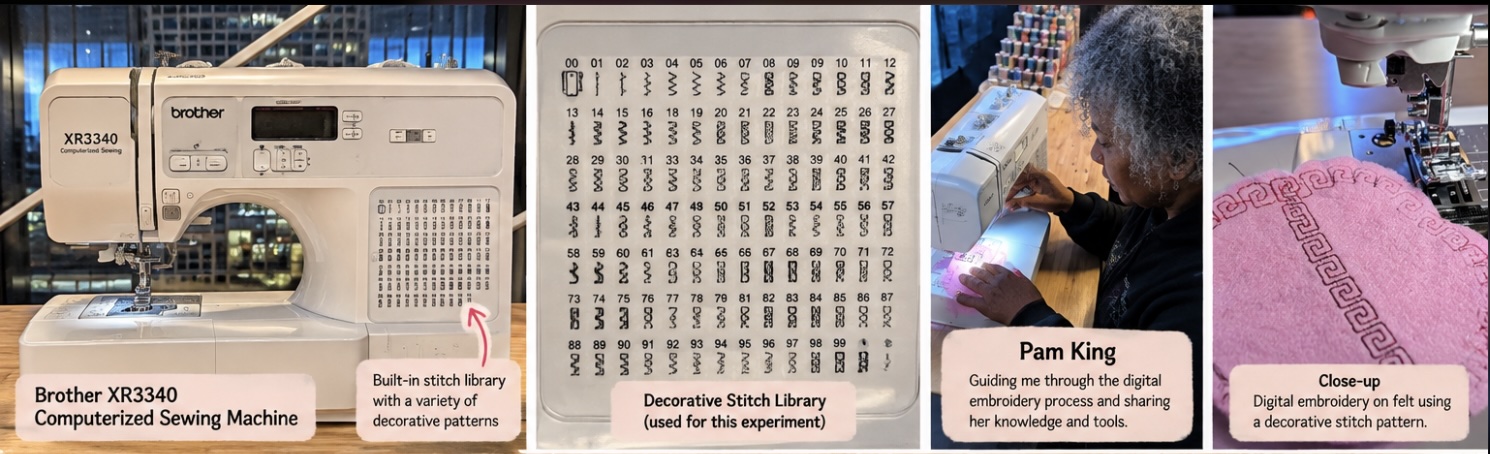
I was particularly interested in how digital stitching could combine traditional textile motifs with contemporary fabrication techniques. I tested several decorative patterns, including geometric Greek-key borders, delicate leaf-like stitches, and circular ornamental designs. These patterns helped transform simple felt shapes into more elaborate textile components.
The embroidery also provided an opportunity to explore how decorative stitching could complement electronic components. For example, stitched borders could visually frame a battery holder, while symmetrical motifs could help organize the placement of conductive traces, LEDs, and traditional Chinese frog fasteners (盘扣).
I experimented with the Brother XR3340 computerized sewing machine, exploring its built-in decorative stitch library to create patterns directly on laser-cut felt flowers.
I tested geometric Greek-key borders, delicate leaf-like stitches, and circular ornamental patterns. These stitches transformed simple felt shapes into more elaborate textile components.
I also explored how decorative embroidery could complement electronic components, framing battery holders and creating visual pathways for future conductive traces.
A special thanks to Pam King, who shared her sewing knowledge and gifted me a beautiful piece of African Kente fabric, introducing another source of textile inspiration. This unexpected cultural exchange reminded me that textile making is not only about materials and techniques, but also about the people, stories, and traditions we encounter through making. As she jokingly said, "she has created a monster LOL".
3.4 Single LED Module
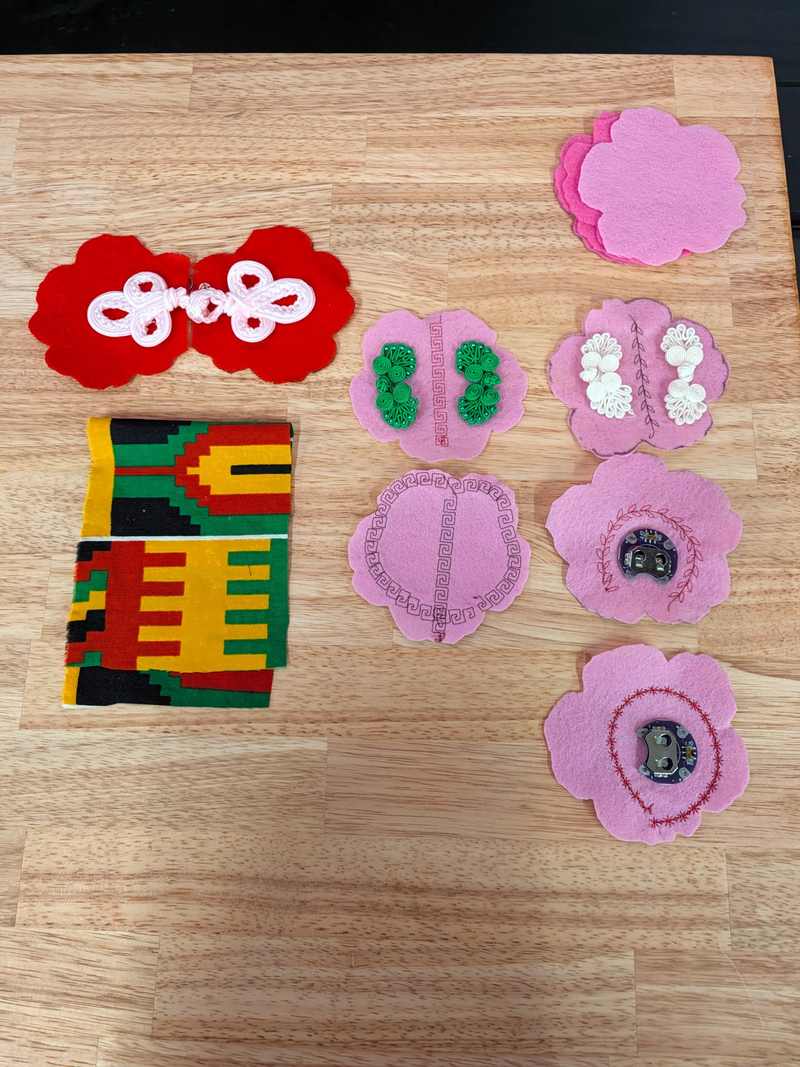
For my next swatch build, I created a standalone LED module using a pink felt flower, a decorative green Chinese frog fastener (盘扣), and copper tape.
The goal was to integrate a functional LED into a decorative textile element while exploring whether copper tape could provide a reliable electrical connection on a flexible fabric surface.
Construction and testing: I placed copper tape electrodes on the back of the felt flower, with separate positive and negative contact areas. The LED was positioned within the decorative frog fastener, and I used alligator clips to test the electrical connections.
Result: The LED only illuminated when I pressed down on the module. Without pressure, the electrical connection was intermittent or open.
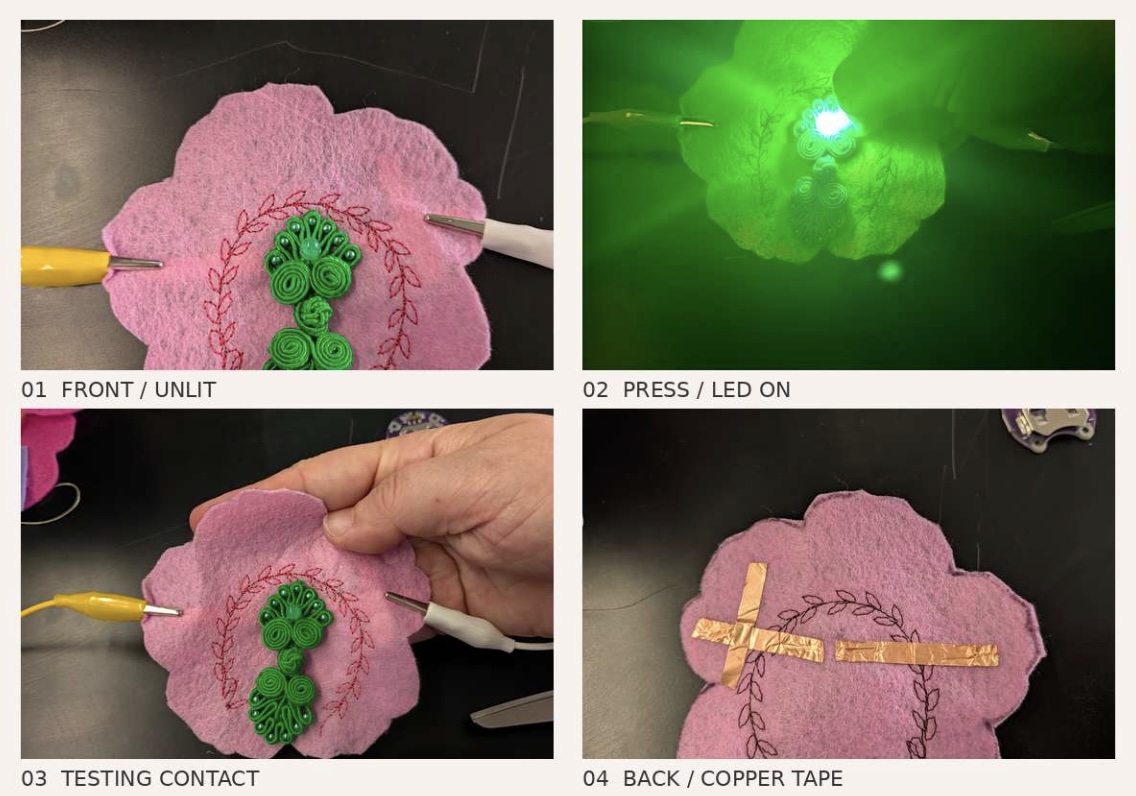
Reflection: This experiment revealed a limitation of copper tape in soft circuits. Although copper tape is easy to apply, its adhesive backing and the flexibility of felt can make electrical contact unreliable, particularly where tape overlaps or connects to component leads. Applying pressure temporarily improved the connection.
This was an important distinction: the module was intended to function as a continuously illuminated LED, but instead behaved like a pressure-activated contact. For the next iteration, I would reinforce the connections with mechanically secured conductive thread or suitable conductive fabric contacts, and test continuity with a multimeter before integrating the module into a wearable.
For the second iteration of my single LED module, I replaced the copper tape connections with conductive fabric and conductive thread, while keeping the same pink felt flower, decorative Chinese frog fastener (盘扣), and embroidered details.
The conductive fabric serves as a flexible contact pad, while the conductive thread creates an electrical pathway between the LED and the contact points on the back of the flower.
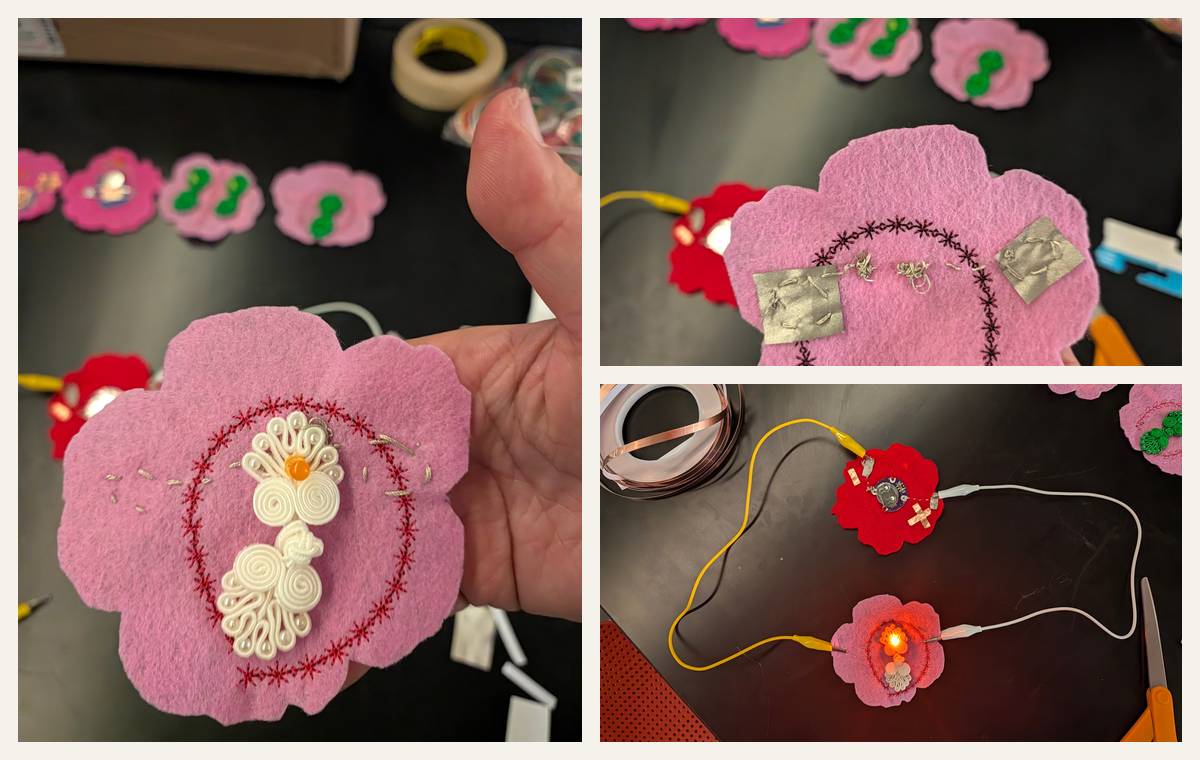
Testing and results: I connected the flower module to my previously constructed textile power breakout using alligator clips. Unlike the copper tape version, which required pressure to illuminate, the LED in this iteration remained illuminated without pressing down on the flower. This is a good circuit!
3.5 Dual LED Circuits
On my next swatch build, I expanded the previous single-LED design into a dual-LED circuit. And I made 3 kind of prototypes, the same circuit using different conductive connection methods: copper tape, conductive fabric with conductive thread, and metal safety pins. All three prototypes used the same basic electrical arrangement: two LEDs connected in parallel, with their positive terminals facing inward and negative terminals facing outward.
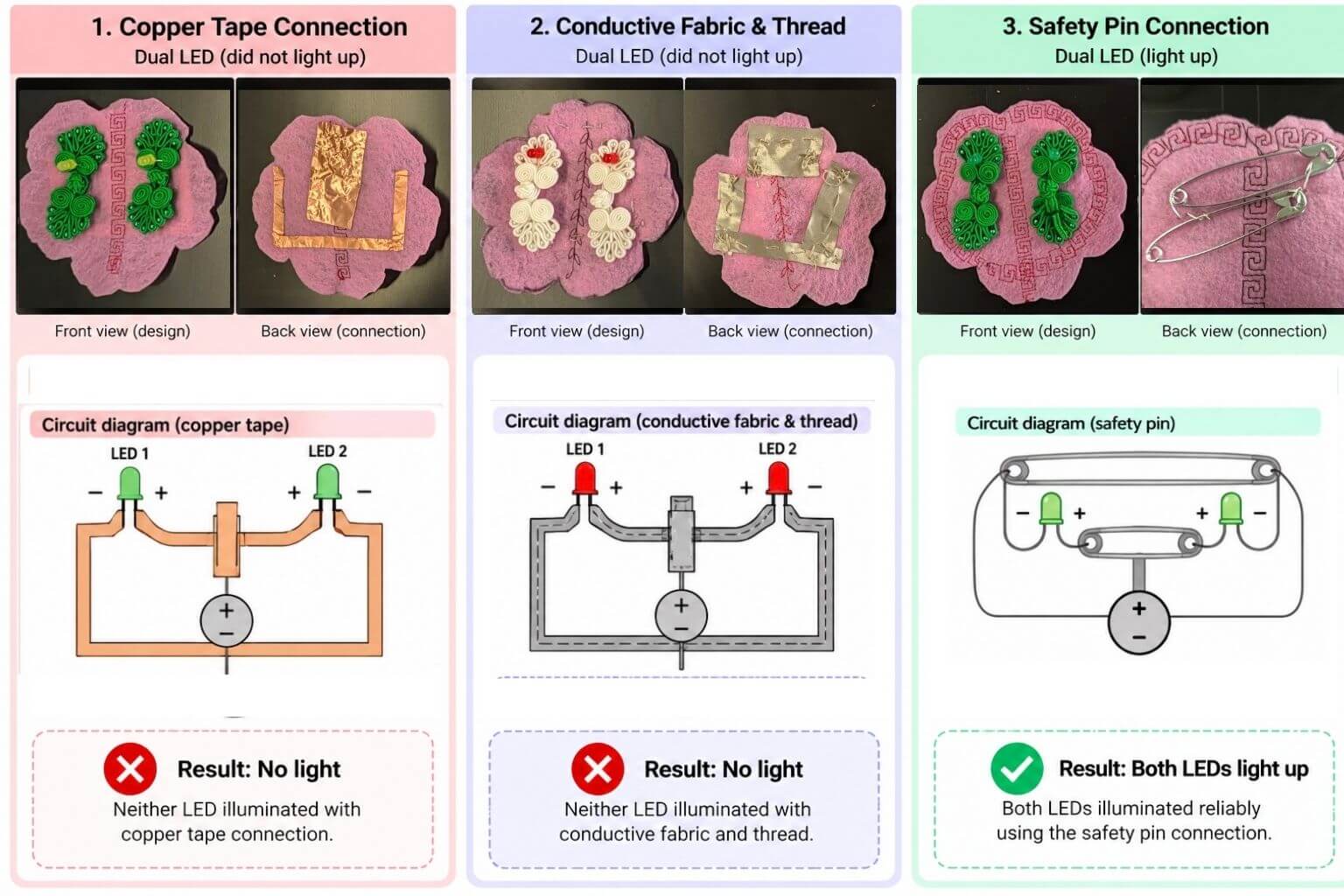
Prototype 1 — Copper Tape Connection
For the first prototype, I used copper tape to create conductive pathways on the back of the felt flower. Although the tape was easy to cut and arrange into circuit patterns, neither LED illuminated during testing. However, when pressed down on the LED itself, it will light up. (Same as single LED result)
Prototype 2 — Conductive Fabric and Thread
For the second prototype, I replaced the copper tape with conductive fabric patches connected using conductive thread. This approach was more compatible with textile construction because the connections could be sewn directly into the felt.
However, neither LED illuminated in this particular dual-LED prototype.
Prototype 3 — Safety Pin Connection
For the third prototype, I experimented with metal safety pins as conductive connectors. Unlike the previous two versions, both LEDs successfully illuminated nicely!
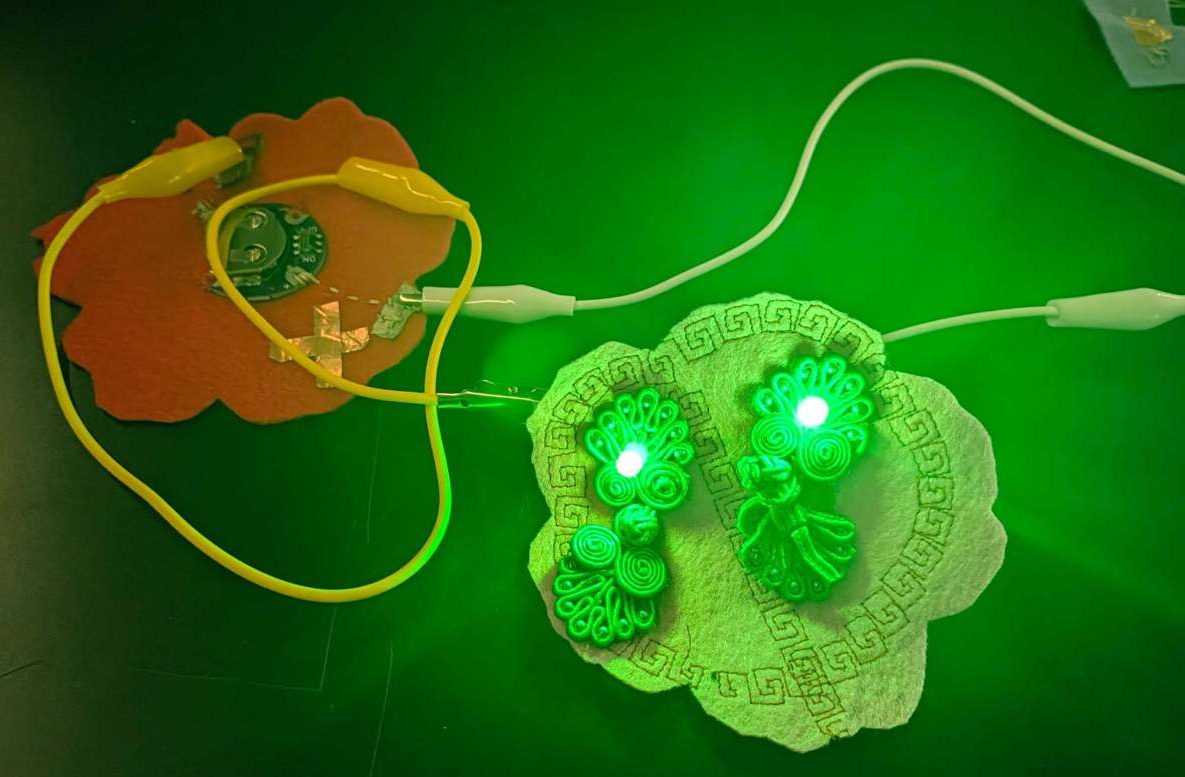
The metal safety pins provided a more direct conductive path and mechanically secured the connections. This experiment demonstrated how connection quality can be just as important as the choice of conductive material.
3.6 Dual LED Circuits - Troubleshoot
I was very confused by the Copper and the Conductive Fabric swatches so I decided to reduce my dual-LED circuit - removing the frog button and only using copper tape to create better clean electrical pathways across a pink felt flower.
The goal was to isolate and test whether the copper tape could reliably distribute power to multiple LEDs without the decorative fastener. During testing, I observed three different behaviors: - Without pressure: Only one LED illuminated. - When pressing the copper tape connections: Both LEDs could illuminate. - When contact was unstable: The LEDs flickered intermittently.
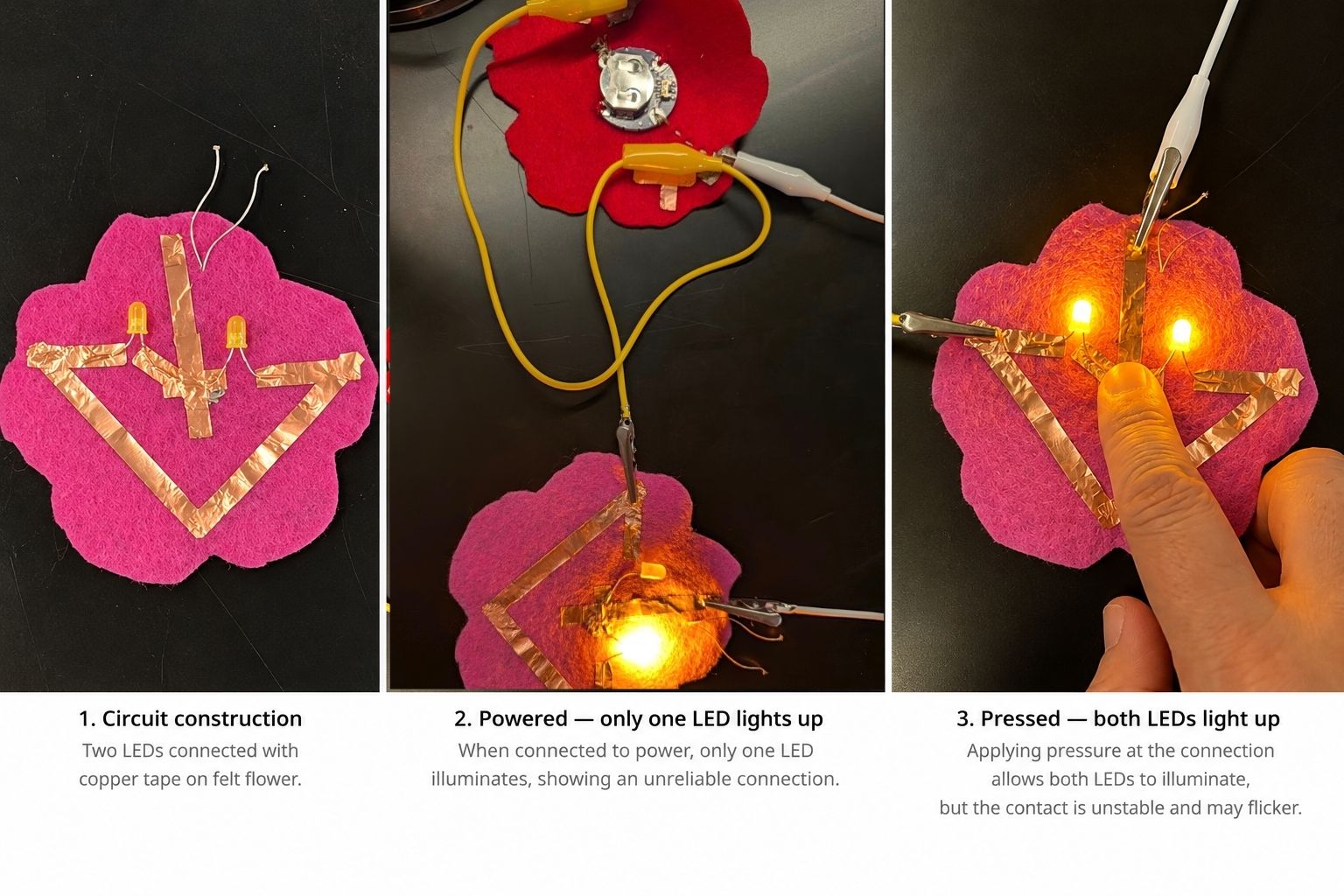
This experiment reinforced that the copper tape construction is not reliable. Adding a second LED made the connection problem more obvious. The circuit could power both LEDs, but its performance depended on physical pressure at the contact points. This highlighted the importance of mechanical stability and reliable electrical contact in e-textile fabrication, especially when building flexible circuits intended to move with the body. So, no bueno to copper tapes.
Later (next day), when Quetin from CBA helped me troubleshoot, we also discovered that the back (adhesive) side of the copper tape was non-conductive. Although the copper surface conducts electricity, the adhesive layer acts as an insulator, preventing a reliable electrical connection when two pieces overlap or when conductive thread contacts the adhesive side. This explains why my LED only illuminated when I pressed down on the connection—the pressure temporarily improved contact between exposed conductive surfaces. This was an important lesson in material selection for e-textiles: a material being conductive does not mean every surface or connection is conductive. In my next iteration, I replaced the copper tape with conductive fabric and conductive thread, creating a more reliable sewn connection that no longer required pressure to keep the LED illuminated.
Then we looked at the conductive fabric one - and discovered that one was actually short-circuited. I had sewn conductive fabric patches onto the back of the felt flower and connected them using conductive thread. However, some of the conductive pathways unintentionally came into electrical contact, creating a connection between the positive and negative sides of the circuit.
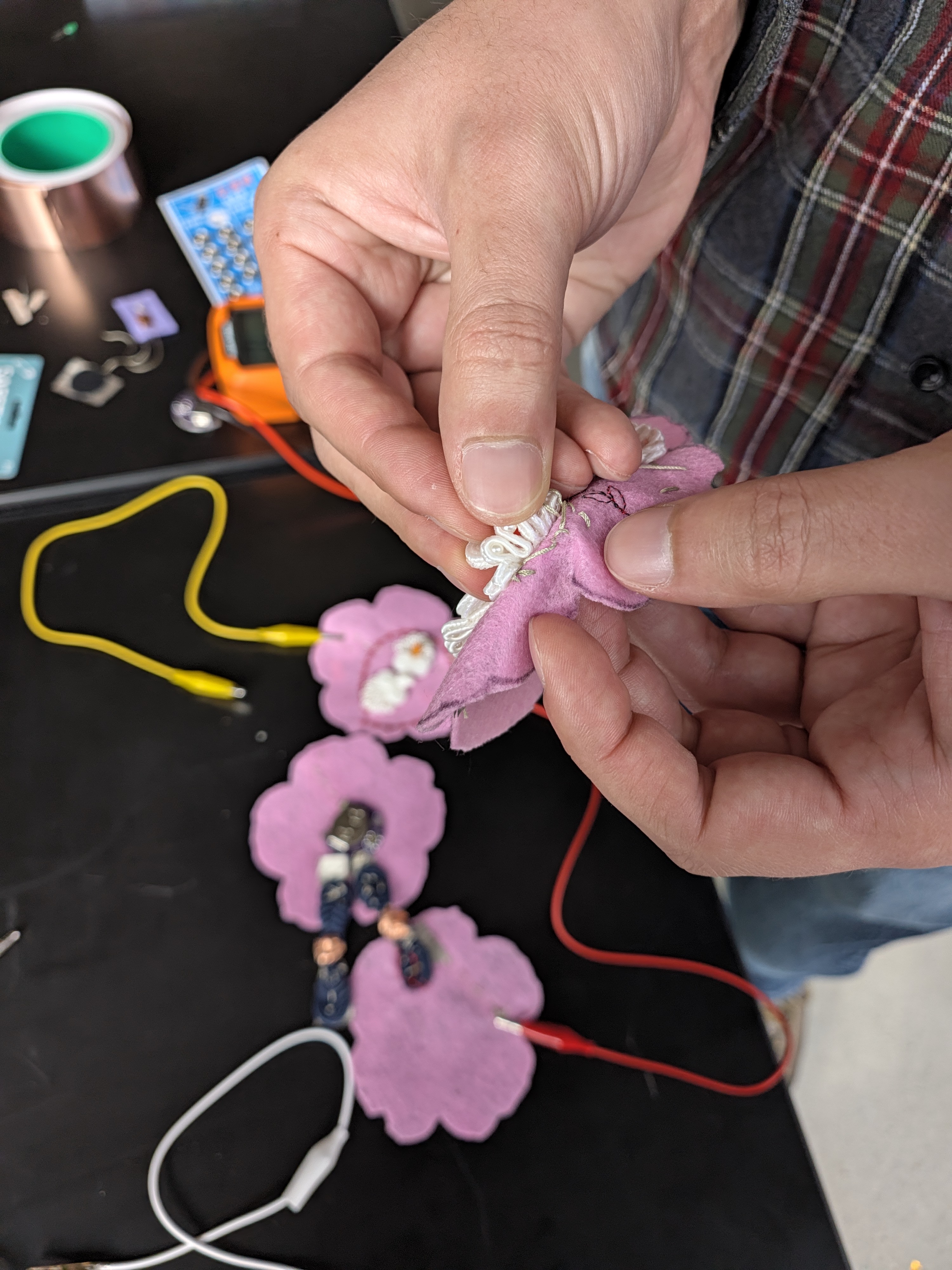
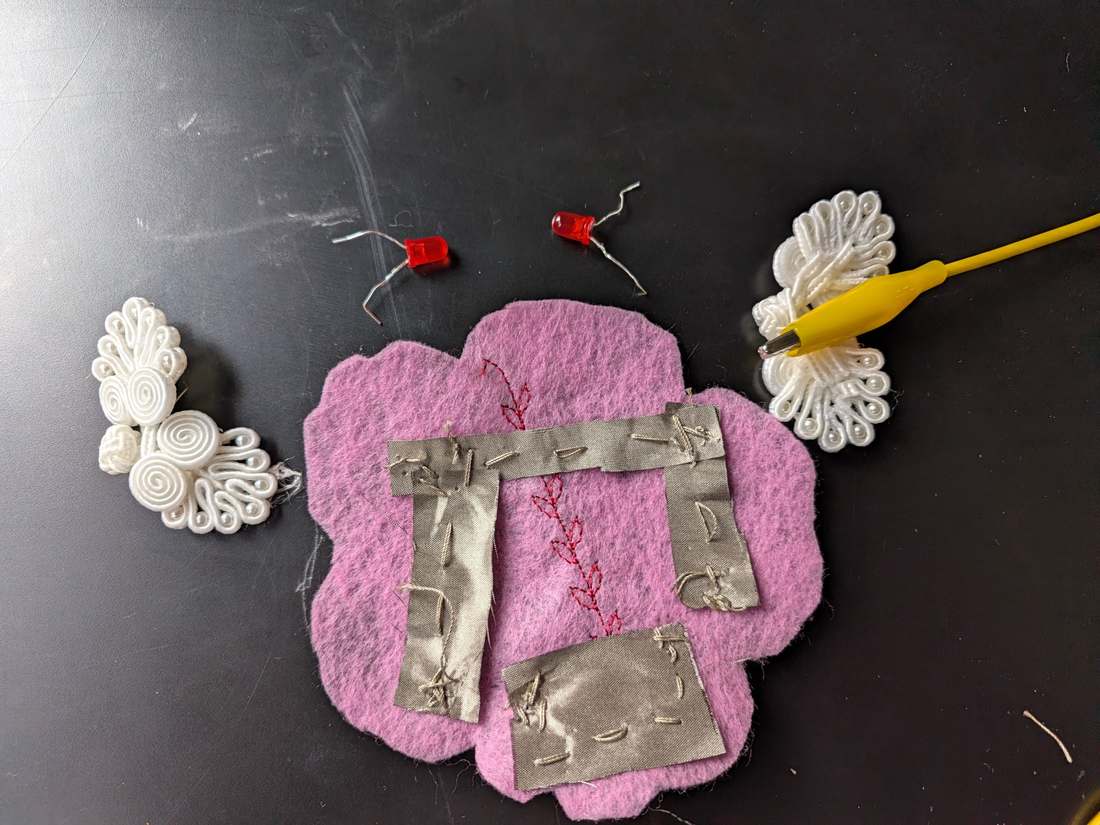
Unlike traditional insulated wires, conductive fabric and thread have exposed conductive surfaces. This makes it easier to accidentally create short circuits, especially when fabric patches overlap, stitches cross, or loose conductive threads touch neighboring pathways.
To troubleshoot this problem, I learned to use a multimeter in continuity mode. By placing the two probes on different points of the circuit, I could check whether they were electrically connected. If the multimeter beeped when I tested between the positive and negative pathways, it indicated an unintended low-resistance connection.
I also learned that a continuity test can help identify broken connections. By testing two points along the same conductive pathway, I could check whether the thread and fabric formed a continuous electrical route.
Key Learning: Conductive materials need careful routing and insulation
Before connecting a battery or LEDs, testing the circuit with a multimeter can help identify shorts and open connections, making the debugging process much more systematic.
3.7 Folding Circuit: Why Insulation Matters
I then also built a foldable e-textile circuit using conductive thread, metal snaps, and LEDs. I want the LED to be sandwiched and inside the two felts, so it "glows" and diffuses light. Initially, the circuit worked and the LEDs lit up. However, once I folded the fabric, the LEDs stopped working. After troubleshooting, I discovered that folding brought the positive and negative conductive paths into contact, creating a short circuit. The solution was simple: add an extra piece of felt between the layers as insulation.
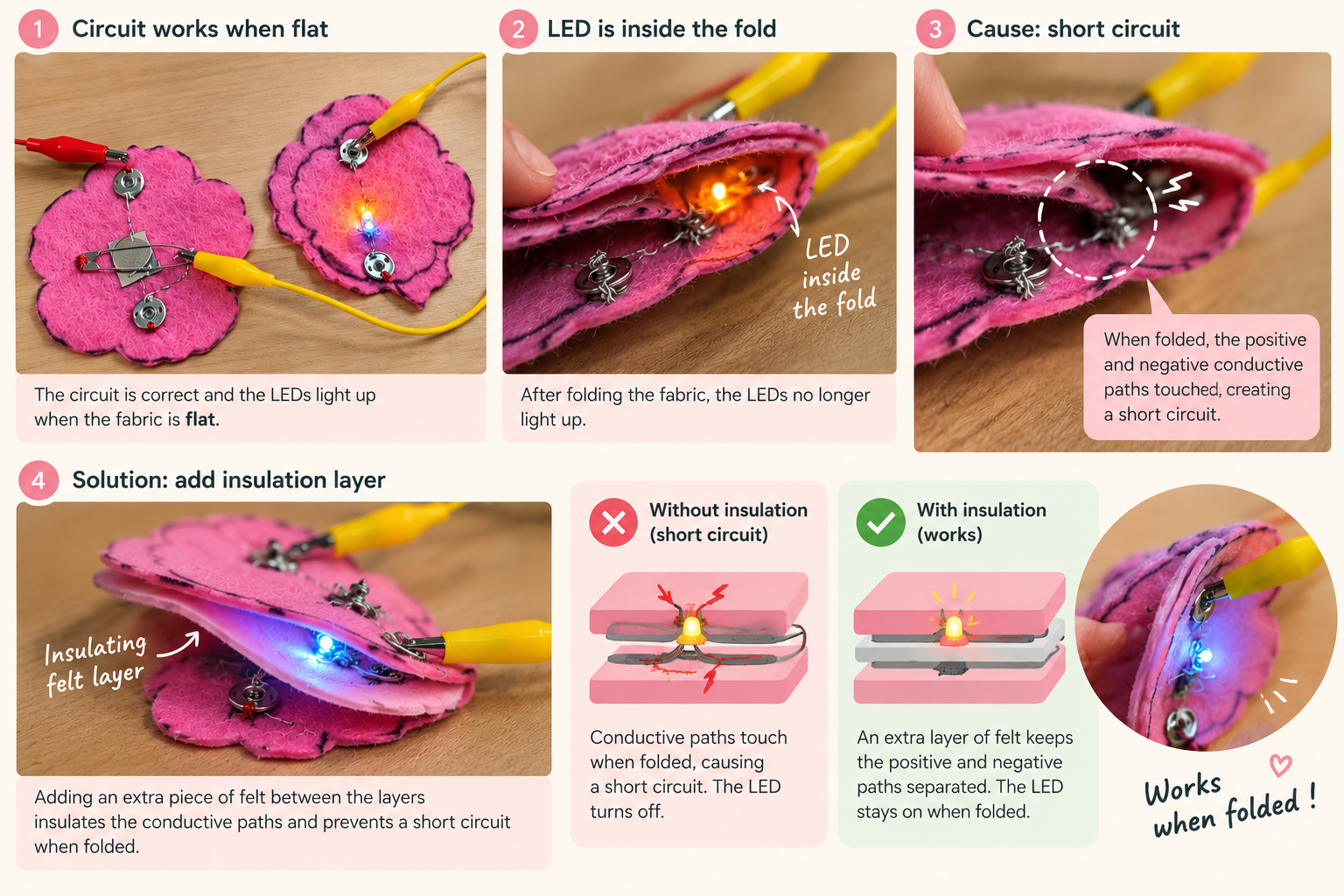
Key learning: A circuit that works flat may fail when folded.
In e-textiles, insulation is just as important as conductivity, especially when designing flexible and wearable electronics. A circuit that works flat may fail when folded. So we need to consider how movement and deformation affect electrical connections. Adding insulating felt between conductive layers helps prevent short circuits in wearable electronics.
3.8 Frog Fastener Circuit
Finally, my favourite creation of the week is the Frog Fasterner Circuit. It actually took me a whole week to develop and eventually fabricate, after all the previous experiments with materials, connections, and components helped me greatly embody how soft circuits work.
The idea is quite simple - when the two contact points close, it closes the circuit. The fastener itself turning into an electrical connection was not hard at all to grasp.
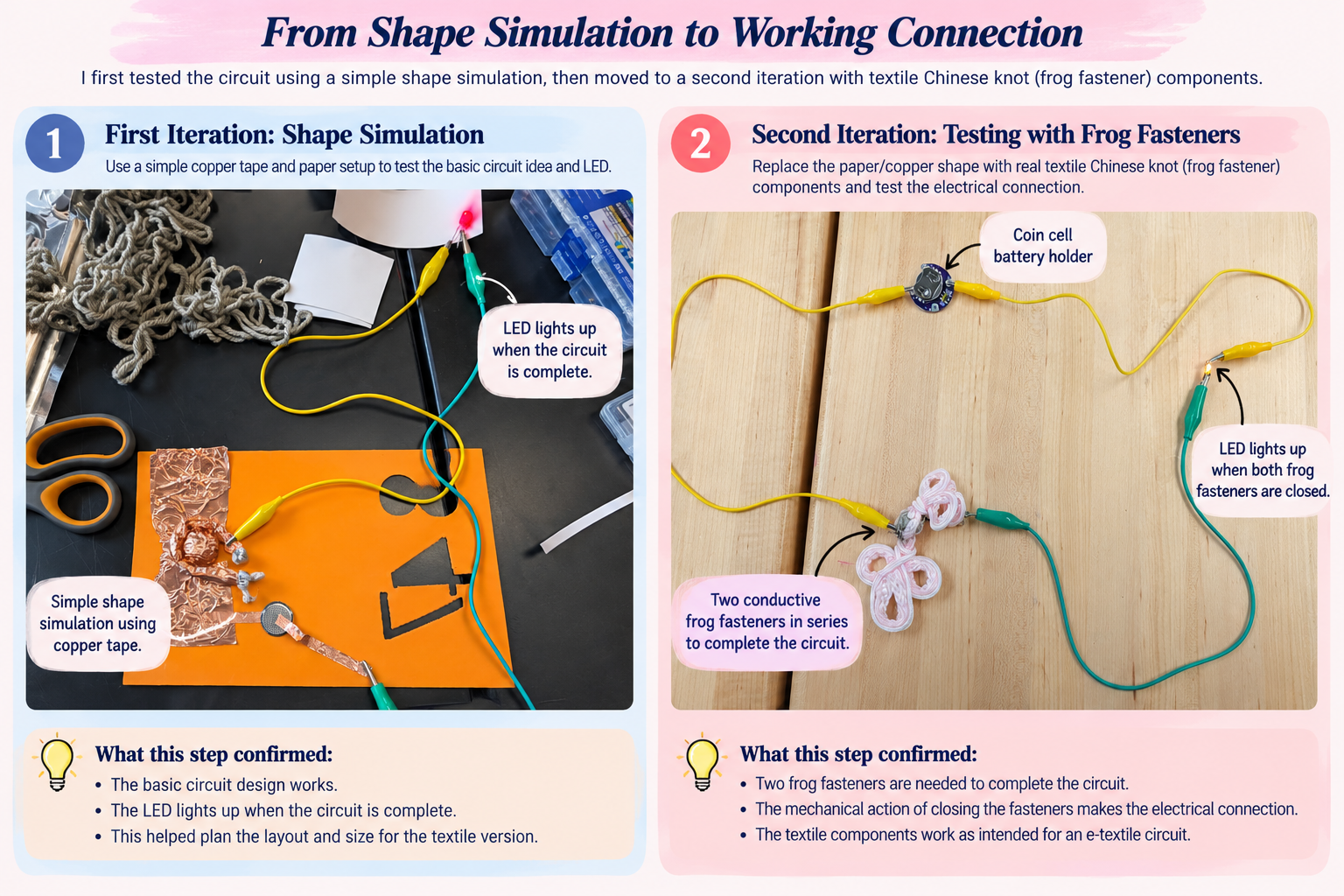
Iteration 1 — Shape Simulation
I started with a simple prototype using cardboard, copper tape, and conductive materials to simulate the shape of the electrical connections. By connecting an LED and power source, I was able to test the basic circuit and explore how the fastening mechanism could function as an electrical switch.
Iteration 2 — Testing the Frog Fastener Connection
Next, I procured actual textile frog fasteners, adding conductive contact points to the knots and loops.
Iteration 3 - Design the Circuit
One of the biggest challenges was figuring out how to close the circuit . I initially focused on the physical fastening mechanism without fully understanding how the electrical current would travel through the design.
I started sketching basic circuits with a battery, LED, and switches to visualize where the electrical connections were interrupted.
The breakthrough: I realized that my design had two separate connection points, so either I can close the connection by 1) use a pair of press buttons OR 2) use two frog fasteners to close the circuit.
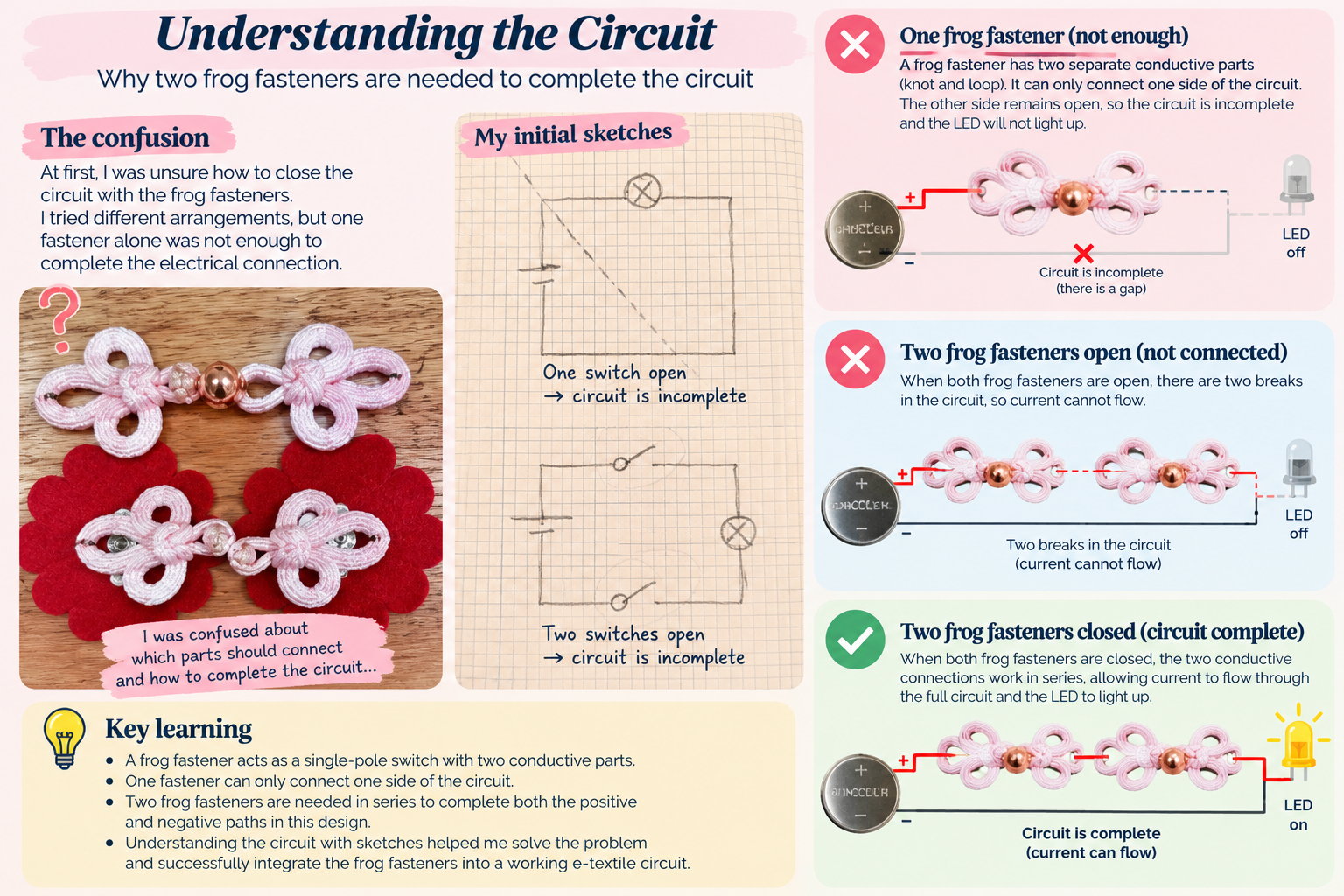
This helped me understand the relationship between mechanical connections and electrical continuity. A traditional textile fastening mechanism could become an electronic switch, but the conductive paths needed to be carefully designed.
Key learning: Sketching the circuit before sewing helped me identify the missing connections and understand how two switches in series work.
A single frog fastener can function as a switch in a differently wired circuit, but my particular design required both connections to close.
Iteration 4 - Build the Circuit
The complete build step follows this sequence: 1. Stitch conductive thread into the frog fastener. 2. Wrap the knot with copper tape. Thread through the copper tape to make electrical connection. 3. Prepare the matching conductive loop. 4. Attach the battery holder to felt. 5. Assemble the frog fastener on the flower-shaped substrate. 6. Sew in the LEDs and conductive traces. 7. Arrange two frog fasteners to form the circuit. 8. Test the assembled circuit and document the illuminated LEDs.
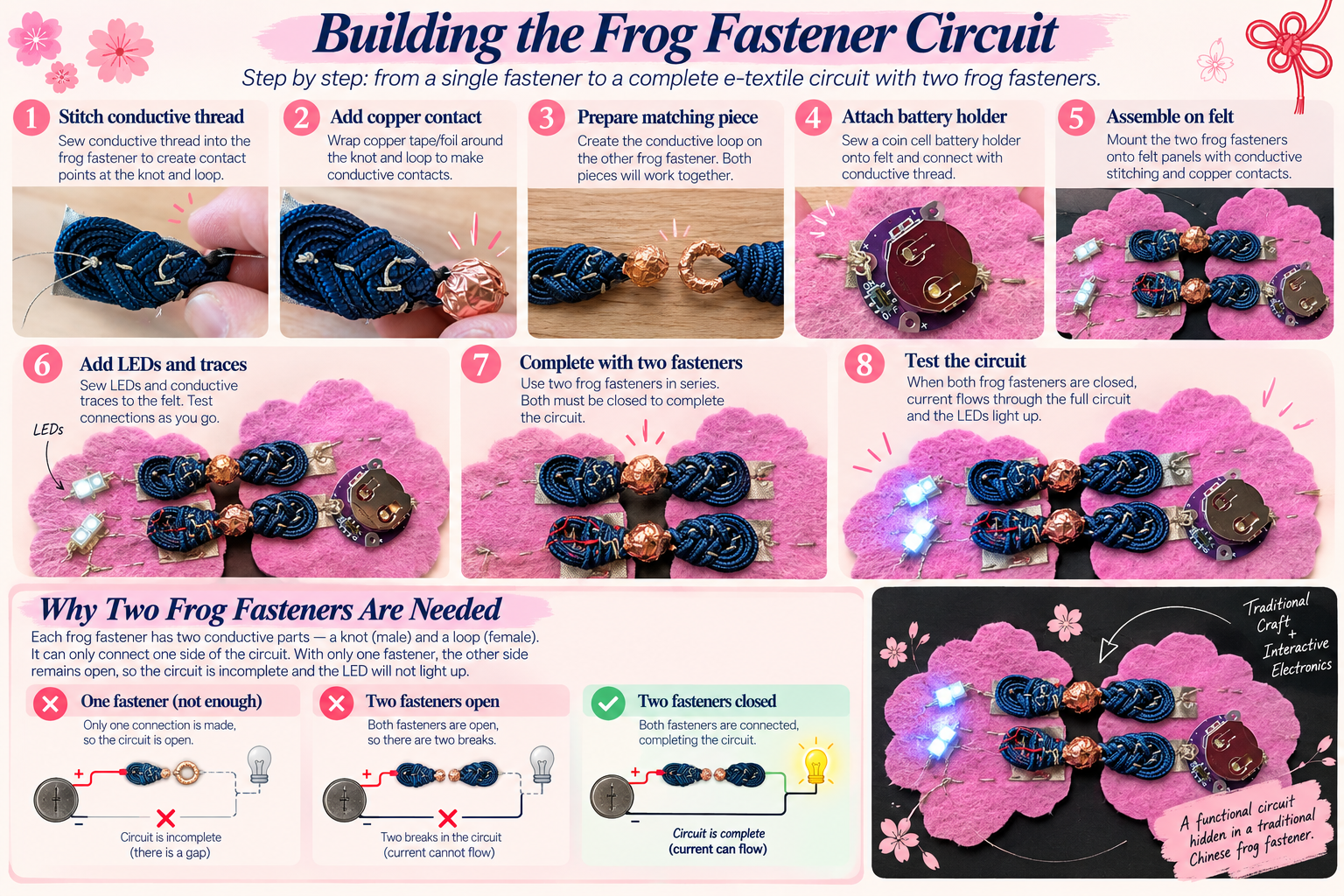
Completing this circuit was incredibly satisfying! The real joy wasn't just seeing the LEDs light up, but finally understanding how the entire circuit worked. I went from being confused about how to even create a simple circuit (on paper), to able to fabricate the circuit with conductive wire, conductive fabric, copper tape, all with its own unique characteristics, leveraging both front and back layers of the fabric, and able to diagnose electrical problems, troubleshoot connections with multi-meter, and figure out solutions on my own. It was one of those wonderful moments when theory finally clicked through hands-on experimentation. More than a working prototype, I gained the confidence to understand why something works, not just how to make it work.
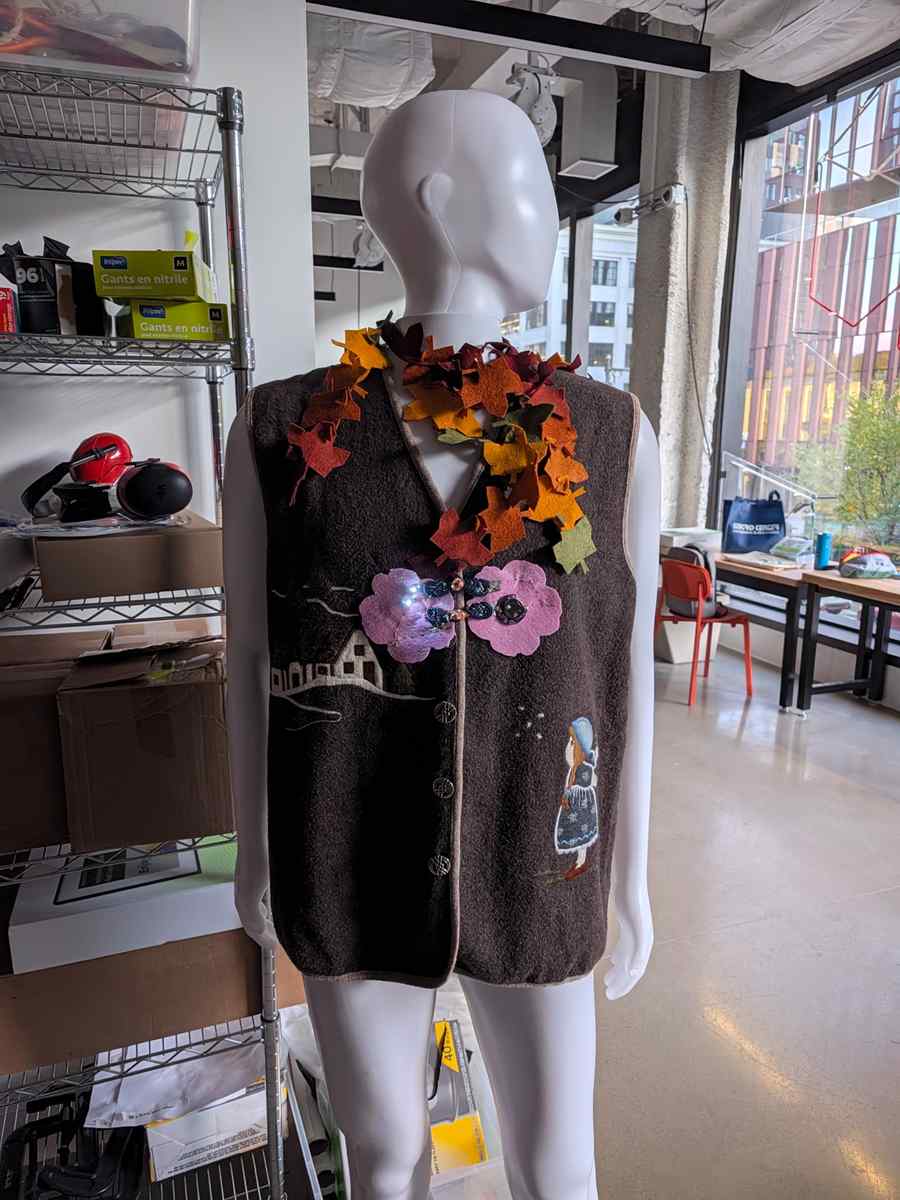
And now this has been added as a swatch to the lab! Happy Autumn! (I picked up this vintage felt vest from a second hand thrift store in Berlin, it found its lovely way to Boston)
4. Soft Analog Sensors
4.1 Build a soft pressure sensor
For this experiment, I explored how soft textile materials can become interactive electronic interfaces. Instead of using a conventional rigid pressure sensor, I constructed my own analog pressure sensor using conductive fabric, pressure-sensitive foam, and felt.
The idea is simple: transform physical pressure into a measurable electrical signal through changes in material resistance.
This experiment also introduces an interesting relationship between textile construction and electronics. The textile is no longer just a passive surface; it becomes an active sensing material.
For this prototype, I used:
Materials
- Conductive fabric
- Pressure-sensitive foam
- Felt
Electronics
- Seeed Studio XIAO
- Resistors
- Jumper wires
I used the black foam material from an electronics component box that was available in the lab. Its soft, compressible structure makes it suitable for experimenting with pressure-responsive textile interfaces.
The foam is intended to act as the variable-resistance element of the sensor. When compressed, changes in the internal conductive contacts can alter its electrical resistance. The sandwich construction is also relatively simple to reproduce and modify, making it a useful starting point for exploring soft interfaces in wearable technology.
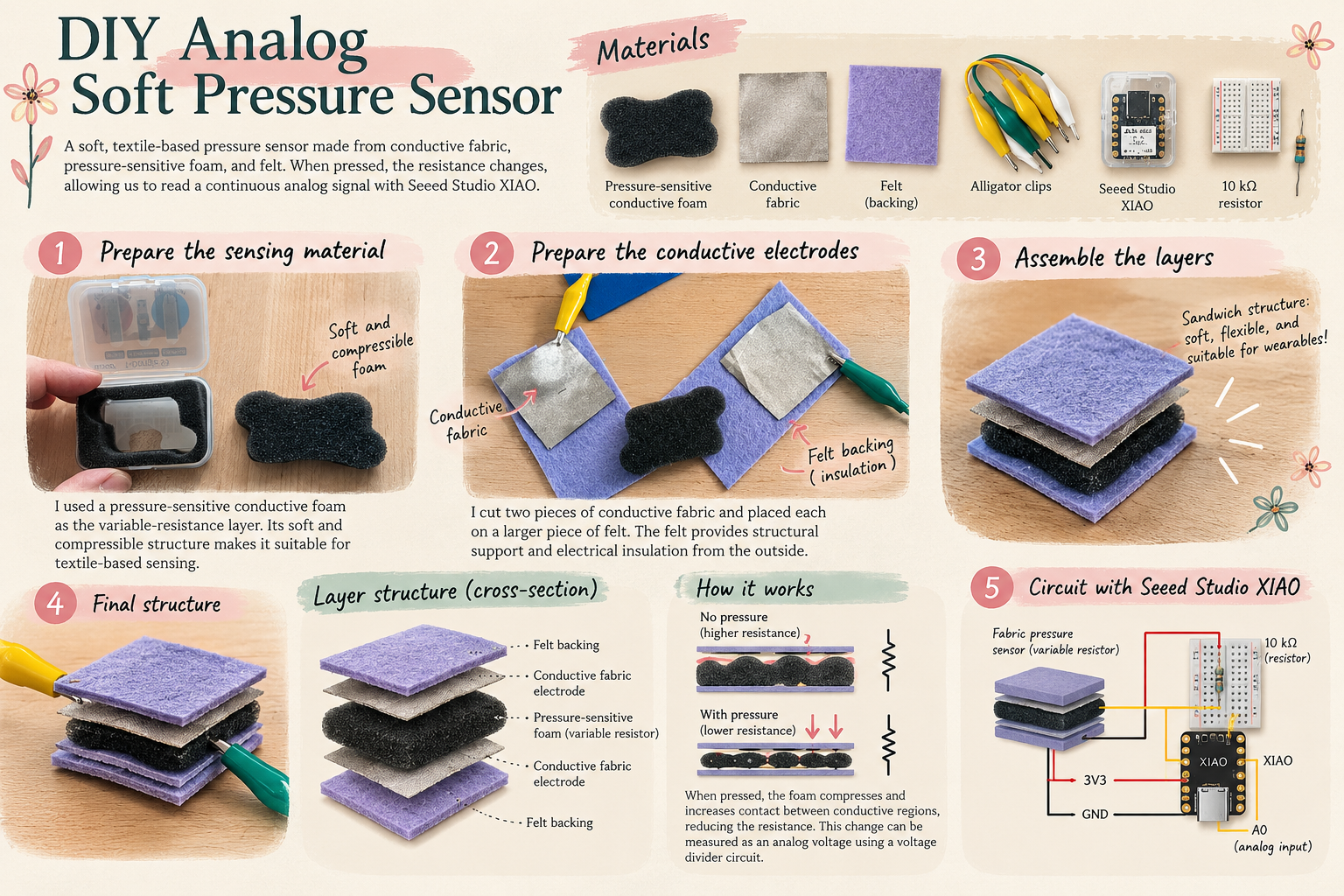
Understanding the Sensing Principle
This prototype is based on piezoresistive sensing, where mechanical deformation produces a change in electrical resistance.
When pressure is applied, the foam compresses, potentially increasing contact between conductive regions and reducing electrical resistance.
By connecting the sensor to a voltage-divider circuit, resistance changes can be converted into an analog voltage readable by a microcontroller.
Unlike a digital switch, which detects only two states, an analog sensor can provide a continuous range of values corresponding to different levels of applied pressure.
One interesting aspect is that the sensing mechanism depends on the physical properties of the materials: compressibility, contact area, thickness, and flexibility. I didn't do a series of different contact area/thickness experiments in this round, but that would be an interesting aspect to tackle for future references if I were to use this in my final project.
4.3 Setup XIAO and Arduino IDE
Before collecting analog sensor data, I needed to configure my Seeed Studio XIAO SAMD21 in Arduino IDE. Although the process initially appeared straightforward, I encountered several challenges involving board selection, USB permissions, serial communication, and data visualization.
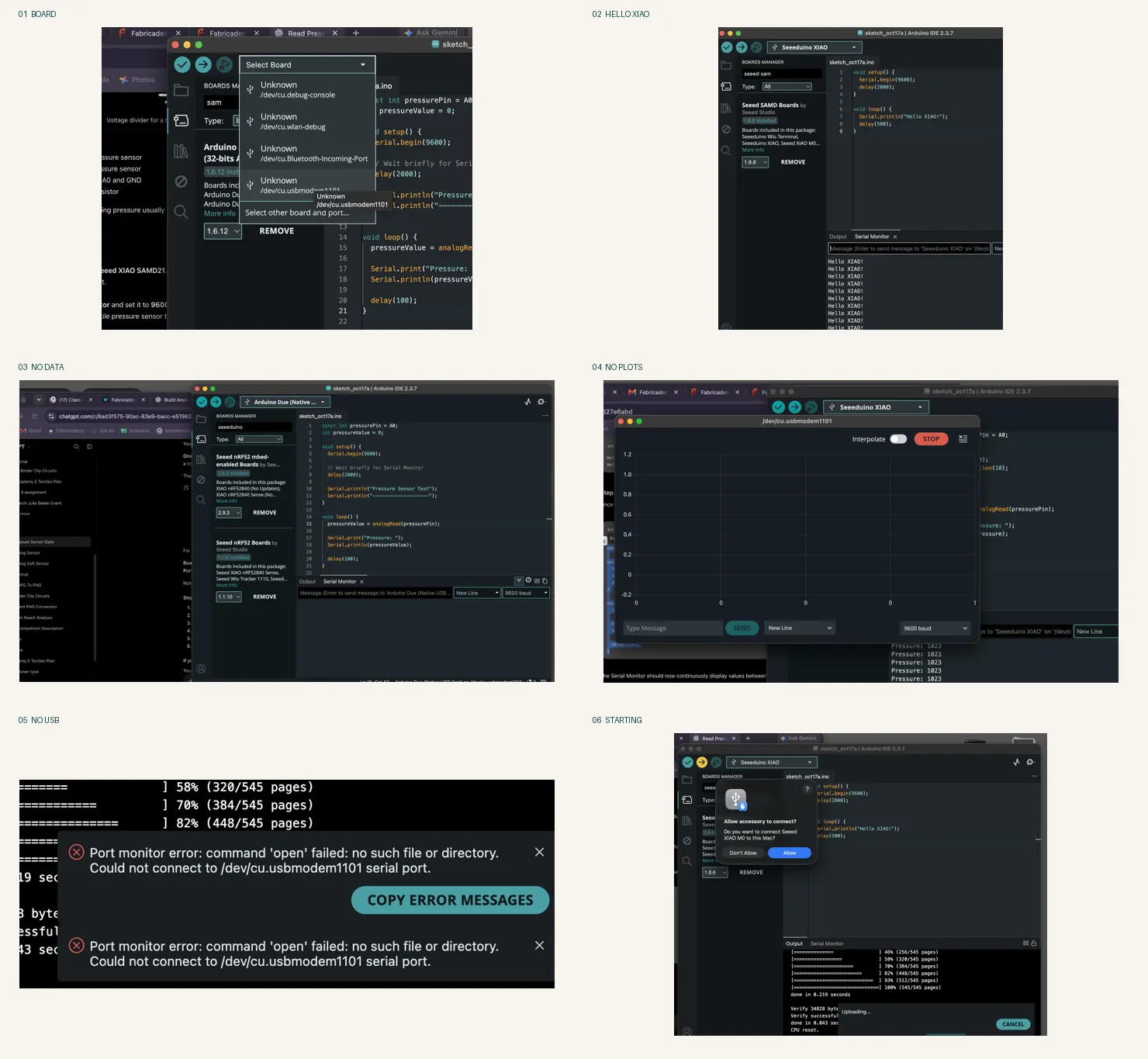
What I initially expected to be a simple plug-and-play process turned into an exercise in debugging microcontroller communication. I learned to distinguish between the board definition, USB serial port, and actual data transmission. A successful upload does not necessarily mean the Serial Monitor or Serial Plotter is receiving data.
The breakthrough came from verifying the correct Seeeduino XIAO board configuration and testing communication with a simple Hello XIAO! sketch before introducing the pressure sensor. This gave me a reliable baseline for diagnosing subsequent circuit and sensor problems.
Key takeaway
When working with embedded electronics, test one layer at a time: board recognition → code upload → serial communication → sensor readings → output control. This systematic approach makes troubleshooting significantly more manageable.
4.4 Testing & Sensor Data Collection
The next stage is to connect the assembled sensor to the Seeed Studio XIAO and observe its analog readings through the Arduino Serial Plotter.
To investigate:
How resistance changes under light, medium, and strong pressure
Whether the readings return to baseline after releasing pressure
How the thickness and size of the sensing material influence sensitivity
Whether the sensor can control LED brightness rather than simply switching an LED on and off
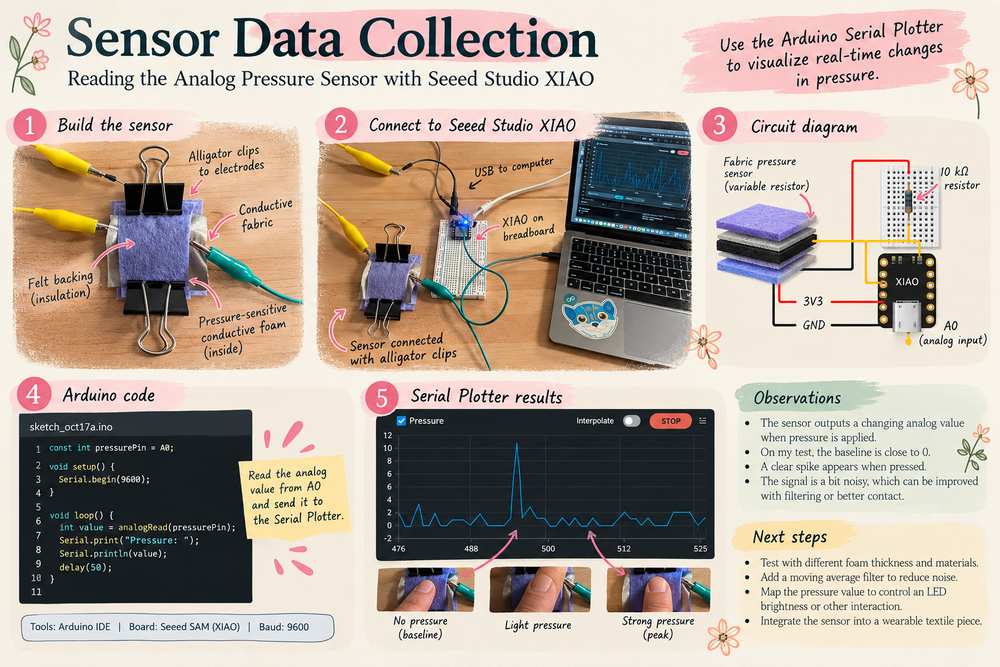
After assembling the textile sensor, I connected the two conductive fabric electrodes to my Seeed Studio XIAO for analog data collection.
I used binder clips to hold the layered structure together, maintaining contact between the conductive fabric and pressure-sensitive foam. Alligator clips provided temporary electrical connections, allowing me to test the sensor without permanently sewing or soldering the components.
Using the Arduino IDE's Serial Plotter, I visualized the analog readings in real time while applying pressure with my fingers.
Observations:
- The readings remained close to zero for much of the recorded interval.
- A noticeable spike, reaching approximately 11 on the plotted scale, appeared during testing.
- The signal exhibited small fluctuations even when no obvious pressure was applied.
- The low signal range and fluctuations suggest that further testing of the electrical connections, sensing material, and voltage-divider circuit would be useful - right now, the circuit is "noisy"
The next challenge is not simply detecting pressure, but making the sensor stable, repeatable, and sensitive enough to distinguish different levels of force.
4.5 Compare to a thin-film pressure sensor
After building my own soft pressure sensor and observing significant fluctuations in its analog readings, I wanted to establish a baseline using a commercial off-the-shelf (COTS) pressure sensor.
For this comparison, I used a USDRWAM thin-film force-sensitive resistor (FSR), connected to my Seeed Studio XIAO SAMD21. This commercial sensor also has a compact circular sensing area, making it suitable for wearable pressure-detection experiments.
The objective was to investigate whether the noisy readings were primarily caused by my handmade sensor's materials and construction, or by other factors such as wiring, contact resistance, ADC noise, and signal processing.
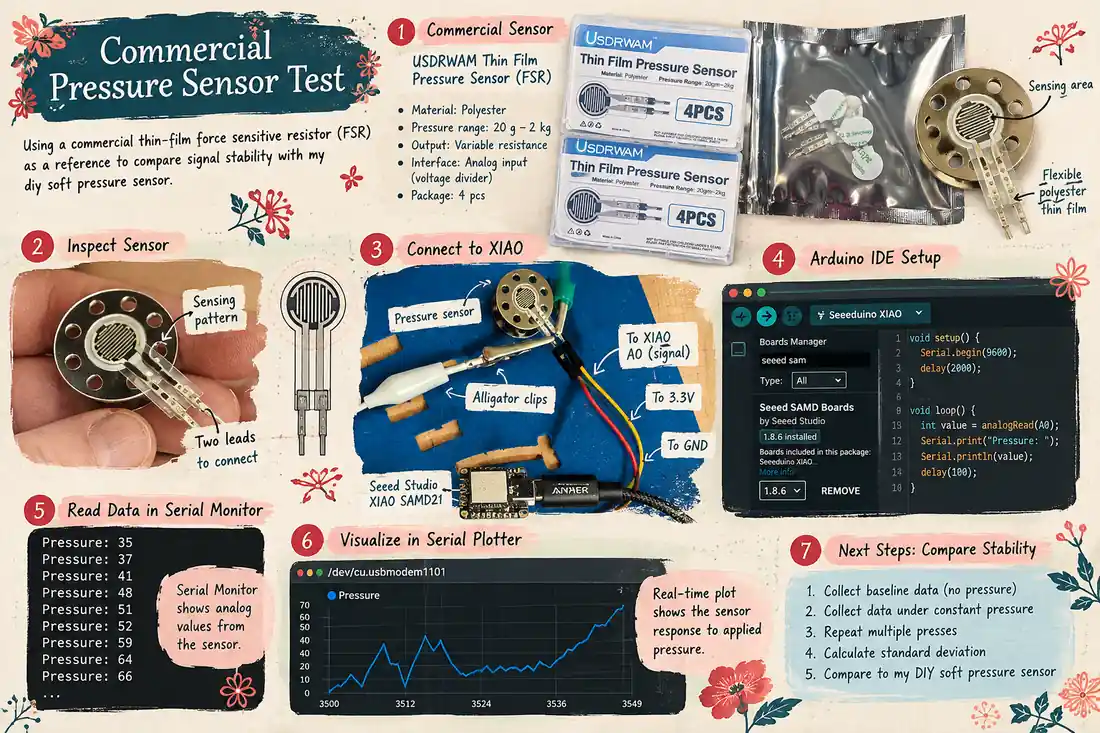
The commercial sensor uses a patterned resistive sensing element on a flexible polyester substrate. Its resistance changes when pressure is applied, allowing the microcontroller to measure the response through a voltage-divider circuit. I actually mounted the sensor by remove its back adhesive so it attaches onto an empty bobbin from the conductive thread roll.
I then connected the sensor to the XIAO using jumper wires and alligator clips, then monitored the analog output using Arduino IDE's Serial Monitor and Serial Plotter.
The video below demonstrates that the sensor responds to applied force. However, there are still fluctuations in the readings.
5. I/O experiments
5.1 Use DIY pressure sensor to control LED
For the next stage of my assignment, I wanted to move beyond simply collecting analog readings and turn my handmade pressure sensor into an interactive input device.
The goal was simple: press the soft sensor to turn on an LED, and release it to turn the LED off.
I connected my handmade textile pressure sensor to the Seeed Studio XIAO SAMD21 and used Arduino IDE to read the analog signal and control an LED integrated into my embroidered felt flower.
The circuit worked as an interactive prototype, but I encountered a significant challenge: the analog signal was too noisy to reliably distinguish intentional pressure from fluctuations in the sensor readings.
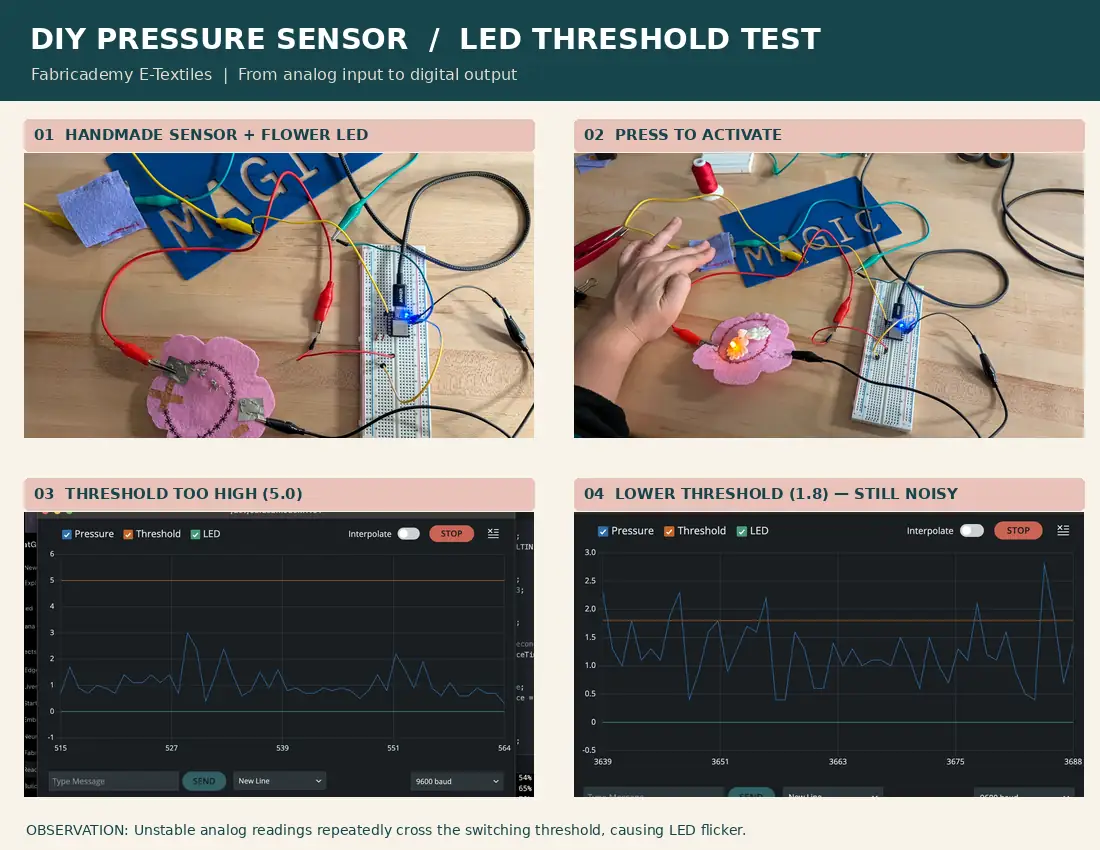
My threshold adjustment process:
Iteration 1 — Threshold = 5.0 Initially, I set the threshold to 5.0. However, the analog readings remained mostly between approximately 0.5 and 3.0, even during the test. As a result, the signal rarely reached the threshold, preventing the LED from activating reliably.
Iteration 2 — Threshold = 1.8 I lowered the threshold to approximately 1.8 to make the circuit more responsive. This improved the chance of detecting pressure, but introduced another problem: the signal fluctuated around the threshold. As the readings crossed above and below it, the LED could switch repeatedly.
So while the circuit demonstrated that a textile sensor could be used as an interactive input, translating the analog readings into a reliable ON/OFF signal was much more challenging than expected.
This experiment taught me that sensitivity and stability are not the same thing. A sensor can detect touch but still be unreliable for controlling an output.
5.2 Use a Seeed Studio rotatory sensor to control LED
For analog, the challenge was not simply making the LED turn on. It was so the LED respond consistently to the input. After experimenting with my handmade soft pressure sensor, I decided to try a different approach. Although the textile sensor could detect pressure, its fluctuating analog readings made it difficult to control the LED consistently.
I switched to a Grove Rotary Angle Sensor as a reference input. By rotating a potentiometer instead of pressing a soft material, I could control the analog signal more deliberately and focus on testing the threshold logic - The goal was to determine whether the unstable LED behavior came from the handmade sensor itself or from the Arduino threshold logic and output circuit.
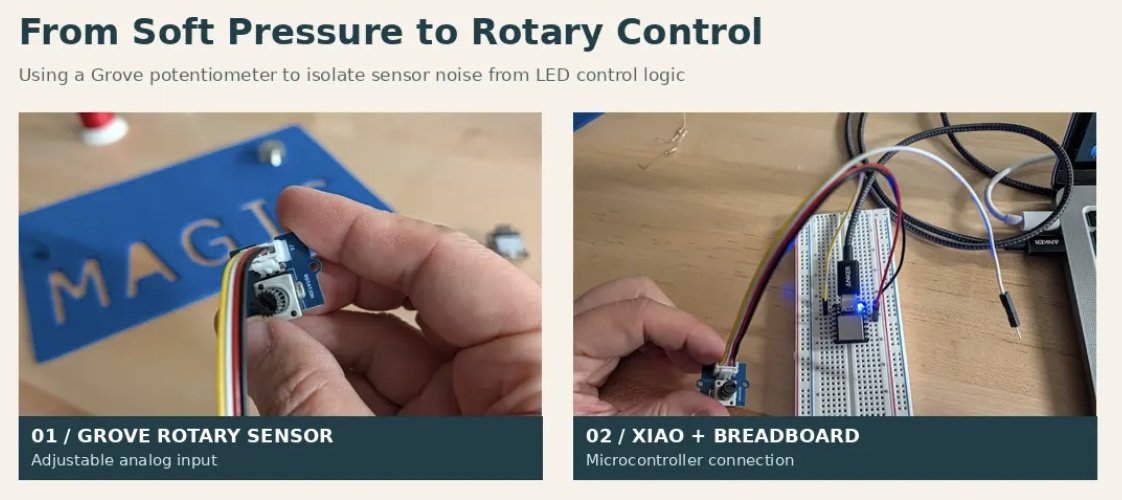
debugging lesson
When several parts of a system are interacting, isolate one variable at a time. By replacing the experimental textile sensor with a more predictable electronic component, I could investigate the software and LED output independently."
For future work, I want to bring that understanding back to my handmade sensor and improve its reliability without sacrificing the softness and flexibility that make textile electronics interesting. That will include lots of signal processing techniques, calibration, software fixes etc. to be learned and applied.
5. Reflections
Balancing Electronics and Textile Design A successful e-textile circuit must balance electrical reliability, mechanical durability, and textile aesthetics. Unlike conventional electronics, textile circuits must withstand bending, stretching, and repeated physical interaction while remaining functional. I learned that stitching techniques, conductive connections, and material selection are just as important as the electronic components themselves.
The Material Itself Can Become the Sensor By combining conductive and pressure-sensitive textile components, it is possible to create an interface that responds to physical interaction without relying on a conventional rigid sensor module. This was one of my favorite discoveries: the fabric is no longer just a surface that carries electronics; it becomes an active part of the circuit. It opens up possibilities for more intuitive, soft, and expressive wearable interfaces.
Analog Signals Are Messier Than Expected Building my own pressure sensor taught me the difference between detecting a signal and obtaining a reliable measurement. Although my DIY sensor responded to pressure, its analog readings fluctuated significantly, making threshold-based LED control difficult. I experimented with different thresholds and learned that sensitivity does not necessarily mean stability. Signal filtering, calibration, and hysteresis are important considerations when translating physical interactions into digital behaviors.
Debugging Means Isolating Variables When my LED did not respond consistently, I replaced the handmade pressure sensor with a Seeed Studio Grove Rotary Angle Sensor. This allowed me to test the analog input and LED control logic using a more predictable signal. I learned an important engineering principle: change one variable at a time. Sometimes the fastest way to understand a handmade system is to temporarily replace one experimental component with a known reference.
From Making Circuits to Designing Interactions The most rewarding part of this assignment was connecting electronics with textile craftsmanship. From experimenting with traditional frog fasteners as switches to creating a pressure-sensitive textile and an embroidered LED flower, I began to see circuits as more than technical systems. They can become part of the visual language, structure, and interaction of a textile object. My next challenge is to move beyond breadboards and alligator clips toward more integrated, durable, and wearable designs.
6. Codes
For controlling LED with rotatory input
const int rotaryPin = A0;
const int ledPin = D1;

void setup() {
  Serial.begin(9600);
  analogReadResolution(10);
  pinMode(ledPin, OUTPUT);
}

void loop() {
  int rotary = analogRead(rotaryPin);

  int brightness = map(rotary, 0, 1023, 0, 255);
  brightness = constrain(brightness, 0, 255);

  analogWrite(ledPin, brightness);

  Serial.print("Rotary:");
  Serial.print(rotary);
  Serial.print("\tBrightness:");
  Serial.println(brightness);

  delay(50);
}
Trying to stablize LED with threshold control
const int pressurePin = A0;
const int ledPin = LED_BUILTIN;

// Thresholds
const int ON_THRESHOLD = 5;
const int OFF_THRESHOLD = 3;

// Smoothing
const int NUM_SAMPLES = 10;

// Debounce time in milliseconds
const unsigned long debounceTime = 150;

bool ledState = false;
bool candidateState = false;
unsigned long candidateSince = 0;

void setup() {
  Serial.begin(9600);
  analogReadResolution(10);

  pinMode(ledPin, OUTPUT);
  digitalWrite(ledPin, HIGH); // OFF
}

void loop() {
  long total = 0;

  for (int i = 0; i < NUM_SAMPLES; i++) {
    total += analogRead(pressurePin);
    delay(2);
  }

  float pressure = total / float(NUM_SAMPLES);

  // Hysteresis
  bool requestedState = ledState;

  if (!ledState && pressure >= ON_THRESHOLD) {
    requestedState = true;
  }
  else if (ledState && pressure <= OFF_THRESHOLD) {
    requestedState = false;
  }

  // Debounce
  if (requestedState != candidateState) {
    candidateState = requestedState;
    candidateSince = millis();
  }

  if (candidateState != ledState &&
      millis() - candidateSince >= debounceTime) {
    ledState = candidateState;
  }

  // XIAO SAMD21 built-in LED is active LOW
  digitalWrite(ledPin, ledState ? LOW : HIGH);

  Serial.print("Pressure:");
  Serial.print(pressure);
  Serial.print("\tThreshold:");
  Serial.print(ON_THRESHOLD);
  Serial.print("\tLED:");
  Serial.println(ledState ? 10 : 0);

  delay(20);
}