Week 05 – E-Textiles
00 Assignment
- Research and document inspiration from artists, projects or processes working with e-textiles, soft circuits and textile sensors.
- Build at least one digital and one analog soft sensor using different materials and techniques.
- Use Arduino to read and understand the sensor values, including analogRead() measurements.
- Program an LED interaction using a self-made textile sensor.
- Integrate both sensors into one or two textile swatches using hard-soft connections.
- Document the materials, fabrication process, electronic circuits, schematics and sensor measurements.
- Upload the Arduino code as text and include a short video showing the sensors functioning.
01 Inspiration & Research
After the lecture, I was really excited about the possibilities of combining electronics and textiles. I have worked with electronics for many years, but mainly with conventional components, wires and circuit boards. The idea of replacing some of these components with fabric, conductive thread or even handmade sensors is something I find particularly interesting.
I wanted to explore two directions: how electronic circuits can be integrated into textiles and how textiles themselves can become electronic components.
During my research, I found several projects that approached these questions in very different ways.
Modular E-Textile Projects
One thing I was particularly interested in was how to create textile circuits that can be connected, disconnected and rearranged. Instead of building one fixed circuit, I liked the idea of making individual components that could be combined in different ways.
01 Stitch Synth – Jessica Stanley
Stitch Synth is a modular, analog synthesizer made from textiles. Instead of conventional wires and circuit boards, it uses conductive threads and fabrics. The individual modules can be connected using snap buttons, and different sounds are produced by touching, pressing or pulling the textile sensors.
What I really like about this project is that the electronics are not hidden inside the textile. The textile itself becomes part of the circuit, and the individual components can be rearranged to create different configurations.
02 Modular Textile Circuits – Naim Al-Haj Ali
Naim Al-Haj Ali explored a similar approach during Fabricademy. Inspired by electronic Snap Circuits kits, he developed textile modules made from felt and foam that can be connected using snap buttons.
The modules include different electronic components, such as LEDs, switches, resistors, sensors and a power supply. He also experimented with conductive fabrics, threads and Velostat to create flexible circuits.
Making Sensors from Textiles
Besides looking at complete projects, I wanted to understand how different sensors could be made directly from textile materials.
For this, I spent some time exploring the website How To Get What You Want by KOBAKANT. It contains a huge collection of tutorials and experiments about electronic textiles, conductive materials and handmade sensors.
What I find fascinating is how many different techniques can be used to create a sensor. Depending on the materials and construction, textiles can react to pressure, stretching, bending or touch.
Three examples particularly caught my attention.
03 Neoprene Pressure Sensor – KOBAKANT
This sensor uses a layered construction with conductive materials and a pressure-sensitive, resistive layer.
When pressure is applied, the electrical resistance changes. This makes it possible to measure different pressure levels rather than simply detecting whether a button has been pressed.
04 Circular Knit Stretch Sensor – KOBAKANT
This example uses conductive yarn in a knitted structure. When the textile is stretched, the arrangement of the conductive fibres changes, resulting in a change in electrical resistance.
What I like about this approach is that the textile structure itself creates the sensing function.
05 Felt Squeeze Sensor – KOBAKANT
Another interesting approach is creating a pressure-sensitive material using conductive fibres and felting techniques.
Instead of placing a separate sensor inside a textile, the fibres themselves become part of the sensing element. Compressing the material changes the electrical connections between the fibres and therefore its resistance.
Artistic Inspiration – Irene Posch
While researching electronic textiles, I also came across the work of Irene Posch. Her projects explore how traditional textile crafts can be used to create electronic components and even complete computational systems.
I especially like that her work does not simply add electronics to textiles but questions how electronics themselves could be made differently.
06 Crafted Logic – Irene Posch & Ebru Kurbak
Crafted Logic explores how fundamental digital logic gates can be created using textile techniques.
Instead of using conventional semiconductor components, the artists created electromagnetic relays using handcrafted textile structures. These can perform logical operations similar to those used in digital electronics.
07 The Embroidered Computer – Irene Posch & Ebru Kurbak
Taking this idea even further, The Embroidered Computer explores the possibility of creating a programmable computer using traditional embroidery techniques, metal threads and beads.
The electronic connections and logic are translated into embroidery patterns, making functions that are usually hidden inside electronic components physically visible.
08 Crafting Stories – Irene Posch
One of my favourite projects from this research is The Book My Grandmother Might Have Made, an interactive textile children's book.
The project was inspired by a fabric book Irene Posch's grandmother made for her in the 1980s. Posch recreated the idea and extended it with electronic textiles, sensors, lights, sounds and interactive elements.
For example, placing candles and a star on a Christmas tree activates lights. Other pages include flowers that change colour, a door that triggers a recorded greeting and animals that respond to interaction.
I absolutely love this project because the electronics are not simply added as an extra feature. They support the interaction and storytelling.
Books and Further Reading
In addition to the online projects, I also looked for books about wearable electronics and textile circuits.
09 Make: Wearable Electronics – Kate Hartman
This book introduces wearable electronics and explores how sensors, actuators, microcontrollers and conductive materials can be integrated into textiles and accessories.
I found it interesting as a practical reference for combining conventional electronics with textile construction techniques.
10 Sew Electric – Leah Buechley & Kanjun Qiu
Sew Electric focuses on combining sewing, electronics and programming through practical projects using the LilyPad Arduino.
The projects range from simple illuminated accessories to interactive textile objects, including a fabric piano.
02 First Ideas
After the lecture, I wanted to try out evrything. I find it fascinating how electronics can be integrated into textiles, but also how sensors themselves can be made from different materials.
Instead of simply experimenting with individual sensors, I wanted to create something that would have a purpose beyond this week's assignment. This led to the idea of developing a small modular demonstration system that explores different hard-soft connections, handmade textile sensors and actuators.
The finished system could be displayed in our FabLab as an inspiration and demonstration tool for students during workshops.
First Concept – A Modular System
I started by thinking about the basic components needed for a simple electronic circuit:
Power source – provides the energy.
Sensor – reacts to an external input.
Actuator – creates an output, such as light or movement.
This gave me the idea of creating a system consisting of three interchangeable modules. Different sensors and actuators could be combined without having to rebuild the entire circuit.
My first approach was to arrange the modules in a straight line, connecting them one after another using snap buttons. Each connection would require two to four snap buttons, while an additional conductive path along the bottom would close the circuit.
I even created a first prototype, but I wasn't really happy with the result.
Several questions remained unanswered. How could I make sure that an actuator was always included to prevent a short circuit? Should I use colours or markings to indicate the correct connections? And how could I reduce the number of snap buttons needed?
Second Concept – Closing the Circle
So I decided to start again, keeping only one important idea: the system should consist of three interchangeable modules.
Then I realised something quite simple: an electrical circuit needs to be closed to work. So why not use this as the basis for the physical design?
Instead of arranging the modules in a line, I decided to connect them in a circle.
The new concept consists of three differently coloured elements, each representing one category: power source, sensor and actuator.
The individual elements are designed to fit together and form a complete circular shape. This way, the design itself communicates that all three components belong together and that the circuit needs to be closed.
The goal is to create a system where exactly one element from each category is needed, while still allowing different sensors, actuators and power sources to be exchanged.
The following images show the shape of the individual modules and how the three elements fit together to form one complete unit.
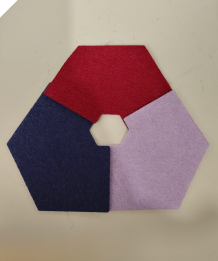
I used felt as the material, just like in Week 2, so that I could easily cut out the basic shape with the laser cutter.
03 Conection
How can we connect electronics with textiles? Electronic components are often rigid and can be damaged by bending or repeated movement, while textiles are meant to stay soft and flexible. So how can these different properties work together?
To explore this, I tested different ways of attaching electronic components to fabric and creating electrical connections. I wanted to find out what works, what does not, and how the connections behave when the fabric moves.
Sewing
The simplest way to attach components and create electrical connections is with conductive thread and a needle. We have several types of conductive thread in our lab. I chose a conductive embroidery thread because of its tensile strength and ease of sewing.
At first, I simply stitched my components in place and connected them with basic stitches. Throughout the week, my stitches became neater, and I was able to create more structured patterns.
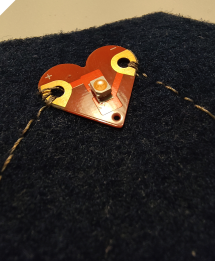
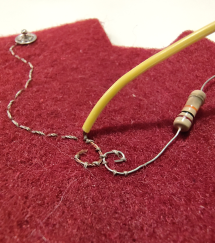
As a third approach, I secured insulated wires to the fabric using non-conductive thread to hold them in the desired shape. Only the stripped ends were attached to the snap fasteners using conductive thread to establish the electrical connection
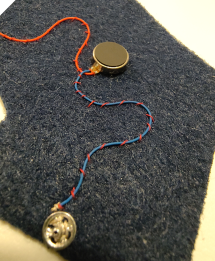
Machine Embroidery
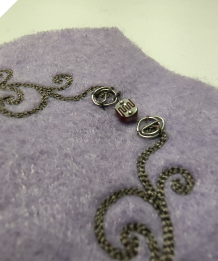
Besides sewing by hand, I also used the embroidery machine to create conductive traces on fabric. This allowed me to work with digitally designed shapes and explore how machine embroidery could be used for my electronic connections.
Brother PR680W
Machine PR680W
Company Brother
Working Area 300 × 200 mm
Input Format PES
Type 6-Needle Embroidery Machine
Embroidering patterns, lettering and conductive traces onto fabric.
I started by drawing my designs in Inkscape, using both paths and filled shapes. I then used the Ink/Stitch extension to turn these designs into embroidery files for our machine. This step connects the digital drawing with the actual stitching process: the shapes need to be translated into stitch patterns that the machine can follow.
Open-source Inkscape extension for turning vector designs into machine embroidery files.
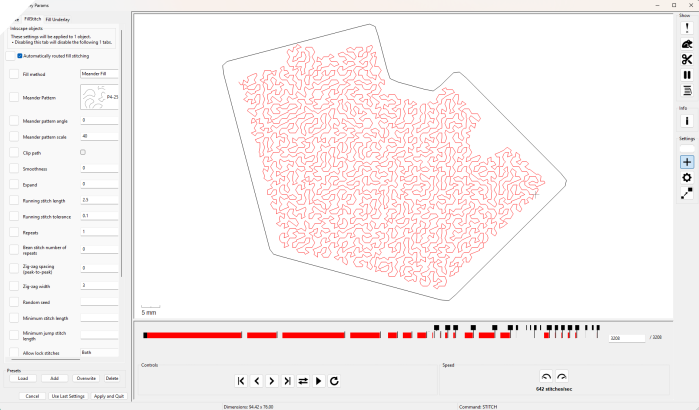
Ink/Stitch offers many settings, and I learned a lot about them throughout the week. At first, I mainly relied on the automatically generated stitches. This gave me a starting point, but as I continued experimenting, I wanted more control over the appearance of the embroidered traces.
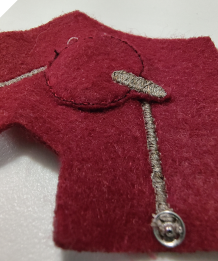
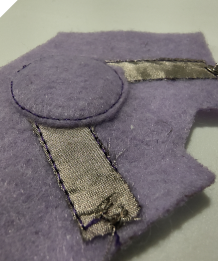
I began trying different stitch types and comparing the results on the fabric. My focus gradually shifted from simply producing a stitched connection to making the lines and shapes look neater and more intentional. These experiments helped me understand how much the choice of stitches influences the final appearance and how designing for embroidery differs from drawing a shape on screen.
To access the stitch settings, select the paths or shapes you want to configure in Inkscape, then go to Extensions → Ink/Stitch → Params. Here, you can adjust the embroidery settings for the selected objects.
Rivets
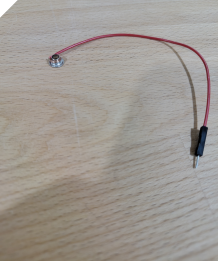
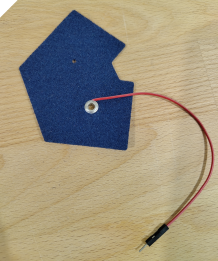
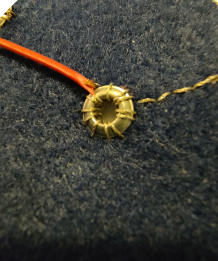
To connect existing cables to my textile modules, I wanted to find an attachment that would hold securely, as cables can easily be pulled loose. I decided to experiment with rivets to create both a mechanical attachment and an electrical connection.
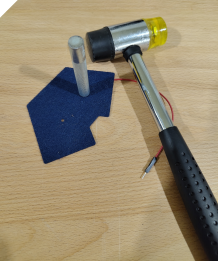
First, I selected some rivets and tested whether they were electrically conductive. I then stripped a sufficiently long section of insulation from the cable to wrap the exposed copper strands around the rivet. After making a hole in the felt, I inserted the rivet and hammered it closed to secure the connection.
After transporting the modules several times, I noticed that the cable had come loose once or twice. I therefore added stitching around the rivet to give the cable extra support and reduce the strain on the connection. This showed me that the rivet alone was not enough to keep the cable securely attached during handling.
Screen Printing
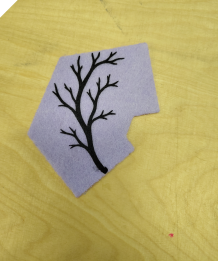
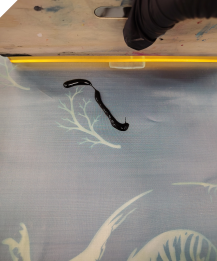
Since we also have conductive paint in our lab, I wanted to test it as another way of creating conductive traces on fabric. To achieve a clean, clearly defined pattern, I applied the paint using screen printing.
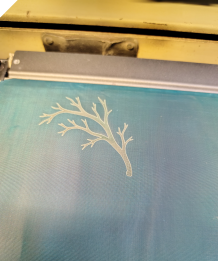
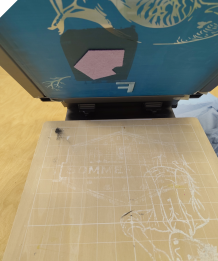
Our lab has screen-printing frames with a stencil film that is suitable for laser processing. I created my design in Inkscape and then used the laser to remove the areas of the film where I wanted the paint to pass through. These openings formed the pattern that would later appear on my textile.
Next, I secured the frame in place over my textile and applied the conductive paint. I made two passes with the squeegee, pushing the paint through the open areas of the stencil to transfer the design onto the fabric.
Soldering
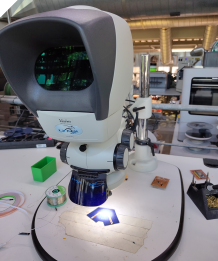
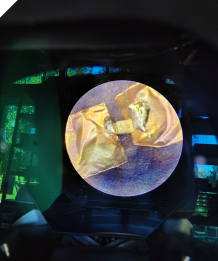
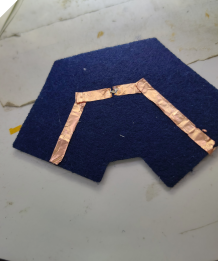
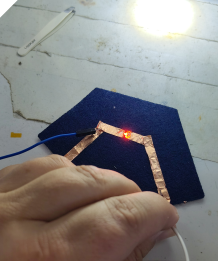
I also wanted to include soldering as a traditional method of connecting electronic components. For this sample, I attached two conductive traces made from self-adhesive copper tape to the fabric and stitched them to the snap fasteners.
I left a small gap between the two copper traces and soldered an SMD LED across it, connecting one terminal to each trace. The LEDs we had available were extremely small, so I had to work under a microscope. Without magnification, positioning and soldering the component would have been very difficult.
The connection worked quite well, even though the LED ended up slightly crooked. However, from my experience, this self-adhesive copper tape is not particularly robust when used on flexible fabric. I still wanted to include it as an example to explore how soldered connections can be integrated into textiles.
03 Digital Sensor
A digital sensor detects a change in its environment and provides a signal with two possible states: ON or OFF (1 or 0).
A simple example is a switch. When the switch is closed, electricity can flow. When it is open, the circuit is interrupted.
In e-textiles, digital sensors can be made using conductive materials such as thread, fabric or metal snap buttons. By bringing two conductive surfaces into contact or separating them, we can create a simple textile sensor.
Button Sensor
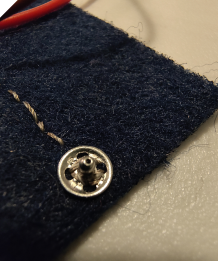
Let's start with my first digital sensor, even though I am not explicitly using it as a sensor in this project: snap buttons.
I use sew-on metal snap buttons to connect the individual modules of my system. They can be attached directly to the fabric using conductive thread, creating both a mechanical and an electrical connection.
But snap buttons can also function as a very simple digital sensor or switch. When the two parts are connected, the circuit is closed and electricity can flow. When they are separated, the circuit is interrupted.
Magnet Button Sensor
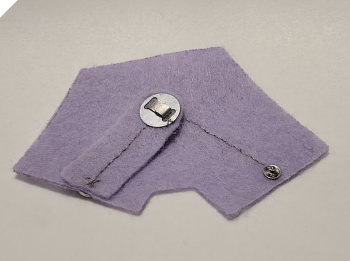
For my second digital sensor, I built a magnetic switch. It works in a similar way to the snap buttons, but instead of snapping two metal parts together, a magnet and a metal plate create the electrical connection.
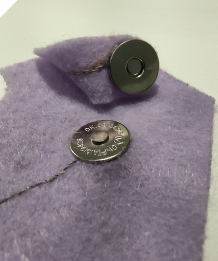
We already had suitable magnetic fasteners in our FabLab that could easily be attached to fabric.
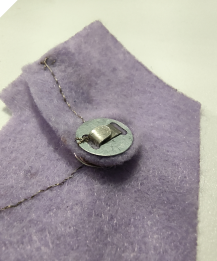
I attached both parts to the textile element and connected each of them to one of the two snap buttons using conductive thread.
When the magnet touches the metal plate, the circuit is closed and electricity can flow. When the two parts are separated, the circuit is interrupted.
This creates another simple digital textile sensor that can be opened and closed without using a traditional switch.
04 Analog Sensor
Unlike a digital sensor, which only has two states (ON or OFF), an analog sensor can produce a range of values.
For example, a pressure sensor can detect not only whether it is being pressed, but also how much pressure is applied. Depending on the pressure, its electrical resistance changes.
In e-textiles, analog sensors can be created using materials such as conductive fabric, conductive thread or pressure-sensitive materials like Velostat.
The main difference is that digital sensors detect two states, while analog sensors can measure gradual changes. This makes analog sensors useful for detecting pressure, bending, stretching or other variable inputs.
Pressure-Sensitive Sensor
Next, I wanted to create an analog pressure sensor that reacts to how firmly it is pressed.
Felted Wool
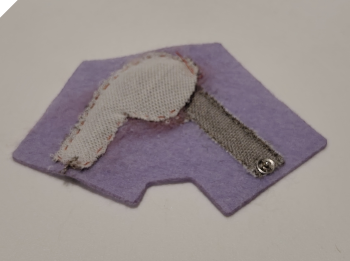
My idea was to use two conductive layers with a semi-insulating layer in between. Normally, this middle layer should keep the conductive materials separated, but when pressure is applied, the two layers should come into contact.
Since my base material was already felt, I decided to use felted wool as the middle layer.
First, I sewed a piece of conductive fabric onto the felt and connected it to one of the snap buttons using conductive thread.
Next, I added a layer of wool and needle-felted it firmly into the base material. This worked quite well because the base itself was made of felt.
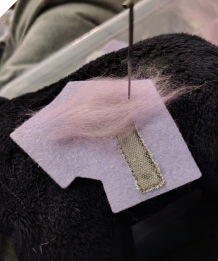
For the third layer, I used conductive thread to create another conductive surface on top of the felted wool. I made this area slightly larger than the first conductive layer to prevent the stitches from overlapping and accidentally creating a permanent electrical connection.
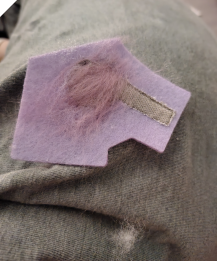
Finally, I connected the upper conductive layer to the second snap button.
How it works: When pressure is applied to the sensor, the conductive layers can make contact at different points. The harder the sensor is pressed, the more contact points can form, changing the electrical resistance.
This allows the sensor to respond to different pressure levels instead of simply detecting ON or OFF.
Velosat
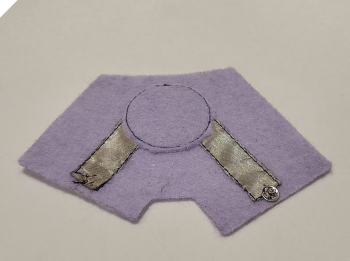
Similar to my Pressure-Sensitive Sensor – Felted Wool, I built another pressure sensor using the same principle, but this time with Velostat as the middle layer.
Velostat is a pressure-sensitive, electrically conductive material whose resistance changes when pressure is applied. By placing it between two conductive fabric layers, I could create a sensor that responds to different levels of pressure.
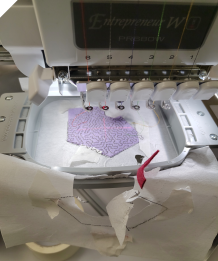
To assemble the different layers, I used my embroidery machine and created the sensor using the In-The-Hoop (ITH) technique. ITH is an embroidery technique in which an entire object is assembled directly inside the embroidery hoop, rather than just adding decorative stitching.
First, I embroidered the placement outline onto the stabilizer. Then I positioned my first piece of fabric and secured it with adhesive tape. The machine stitched the fabric into place, and I trimmed the excess material along the stitching line.
I repeated this process for the next layers, adding the conductive materials and Velostat in the correct order. This allowed me to assemble the complete sensor directly in the embroidery hoop.
The video below shows the individual steps of the assembly process.
Poti
Next, I wanted to build a textile potentiometer. During my research, I came across several different ways of making one using conductive materials.
A potentiometer is a variable resistor. A traditional potentiometer consists of a resistive track and a movable contact, called a wiper. When the wiper moves along the track, the length of the resistive path between the contact and one end of the track changes.
The longer this path is, the higher the electrical resistance. A shorter path results in lower resistance. When all three terminals are used, the potentiometer acts as a voltage divider, allowing the output voltage to be adjusted by moving the wiper.
This principle can also be transferred to textiles by using resistive materials and a movable conductive contact.
Most of the textile examples I found followed the same visual concept as a traditional potentiometer, with a circular track and a rotating contact.
While this works well, I wanted to explore how the same functionality could be integrated into a more interesting textile design.
Instead of simply recreating a traditional electronic component in fabric, I wanted to think about how the properties and possibilities of textiles could influence the appearance and interaction of the sensor.
Embroidered Meander Potentiometer
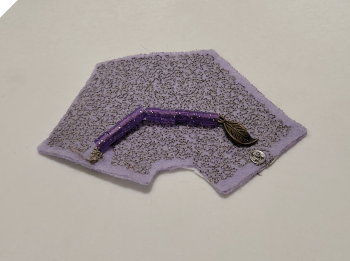
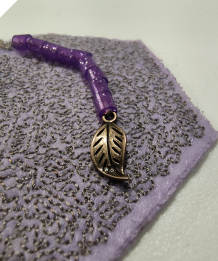
My first idea was to embroider the longest possible conductive path. The basic principle was simple: the farther the contact moves along the path, the longer the resistive route becomes, and the higher the resistance. Since the yarn I use becomes longer, the resistance increases.
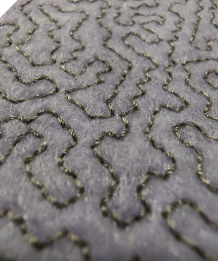
To create this, I used the meander fill function in Ink/Stitch. This type of fill covers an area with one continuous line following a predefined irregular pattern that does not cross itself. As a result, it creates one long conductive thread path with a clear start and end point.
Getting the start and end points exactly where I wanted them was a bit tricky, but in the end it worked more or less as planned.
One thing I really liked about this approach was the visual result. The stitched path created a very nice pattern across the whole surface. From a distance, it does not immediately look like one single long thread, but rather like a textured conductive area. This makes the sensor visually more interesting while still keeping its function.
For the movable contact, I used a conductive pendant attached to a piece of conductive thread, which was sewn onto the third connector point of the module.
However, I still needed to insulate this movable contact so that it would not accidentally touch the conductive surface before intended. My original plan was to use small glass beads as spacers, but I had completely forgotten to buy them. Fortunately, I still had some glittery ironing beads at home, and these worked well for the same purpose.
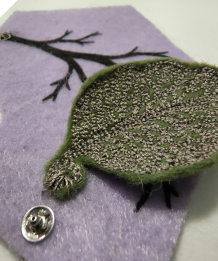
Branch and Leaf Potentiometer
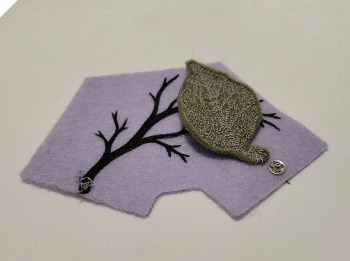
My second idea for the potentiometer was a more visually playful version.
Instead of using an abstract stitched surface, I wanted to create a design that looked like a painted conductive branch. The movable part would then be a rotating leaf with stitched conductive veins.
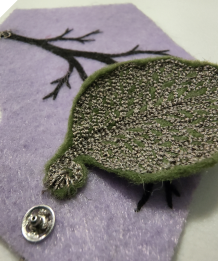
The idea is based on the same principle as a potentiometer: as the contact point moves along the conductive path, the length of the electrical path changes, and with it the resistance.
In this version, the branch acts as the resistive track, while the leaf functions as the movable contact. When the leaf is rotated, the conductive veins touch different positions along the branch. Depending on how far the leaf is turned, the current has to travel a longer or shorter path, which changes the resistance value.
Other Seonsors
I also wanted to try two more sensors made with conductive yarn that I had seen in the tutorial: a pompom pressure sensor and a crocheted bend sensor.
For both experiments, I 3D printed small tools to help me make the textile elements.
Pompom Sensor
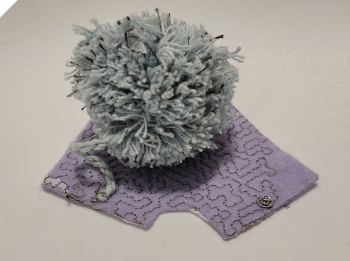
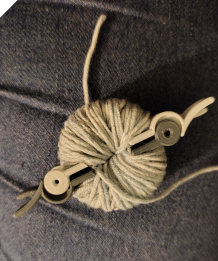
For the pompom sensor, I started by making a regular pompom using a 3D-printed pompom maker.
I mostly used regular yarn, but every now and then I wrapped some conductive yarn around the tool as well. This way, the conductive threads were distributed throughout the pompom.
I then connected the pompom to one of the snap buttons using conductive thread.
On the felt base, I embroidered a meander pattern with conductive thread and connected it to the second snap button.
The idea is that when the pompom is pressed against the embroidered surface, the conductive threads inside the pompom connect different parts of the meander pattern. This creates shorter electrical paths and reduces the resistance.
Of course, this is not intended to be a highly precise sensor. But honestly, it's a pompom sensor! How cool is that?
Crocheted Bend Sensor
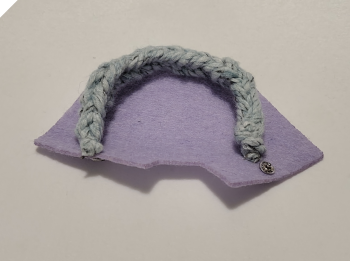
For my second experiment, I wanted to make a flexible bend sensor using yarn.
Since I can't crochet (seriously, I just don't have the patience for it), I looked online for a 3D-printable knitting fork that could help me create a similar textile structure.
I printed the tool and started experimenting, but my first attempts didn't work very well. I think the yarn I was using was simply too thin.
Since I didn't have any thicker yarn available, I decided to make my own by twisting several strands together, including a strand of conductive yarn.
This gave me a thicker yarn with a conductive element running through it.
After several attempts and watching a few tutorial videos, I finally managed to create a reasonably decent-looking, although rather coarse, knitted structure.
I then connected both ends to the snap buttons on my module.
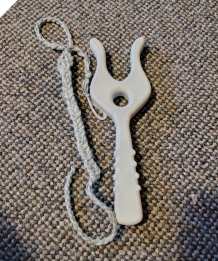
The idea behind this sensor is that bending or stretching the textile structure changes the contact between the conductive threads, which can change its electrical resistance.
Light Sensor
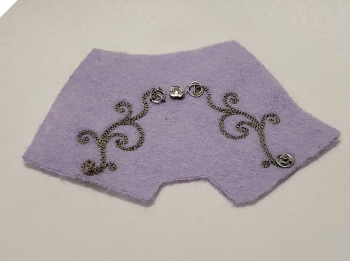
I also added a light sensor to my collection, mainly for two reasons.
The first was a small mistake. I had accidentally embroidered a pattern intended for the blue LED module onto a purple piece of felt instead. Since the embroidered patch was already finished, I wanted to find another use for it.
The second reason was my curiosity about making a light sensor directly on fabric. I briefly researched different ways of creating light-sensitive conductive materials or applying them to textiles. However, I couldn't find a simple method that I could reproduce using the materials available in our FabLab.
So instead of making the sensor itself, I decided to use a conventional electronic light sensor and sew it onto my accidentally created purple patch.
To create the decorative embroidery, I first drew a sketch on paper and then digitized it into an embroidery design.
This way, I could still integrate a light sensor into my modular textile system while giving the electronic component a more textile-based appearance.
05 Aktor
LEDs – Three Different Ways to Integrate Them
For my first actuators, I naturally thought of LEDs. They can be used with both digital and analog sensors and provide immediate visual feedback. A digital sensor can switch an LED on or off, while an analog sensor can influence its brightness.
One important thing to consider when working with LEDs is that they are designed for a limited current and may require a current-limiting resistor. Since I was using only a 3 V battery for my experiments, I decided to work without an additional resistor. However, whether this is safe depends on the LED characteristics and the battery's current limitations.
I wanted to explore different ways of integrating LEDs into textiles, so I created three variations.
Classic LED
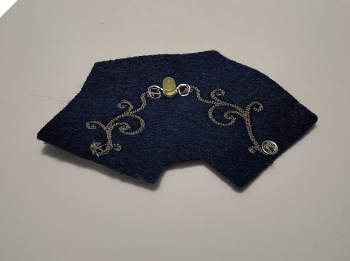
For the first version, I used a regular LED with two metal legs.
Similar to my light sensor, I embroidered the conductive paths directly onto the felt. I then twisted the LED legs into small loops and sewed them onto the conductive paths using conductive thread.
This is a simple way to integrate conventional electronic components into textiles without soldering.
Sewable LED
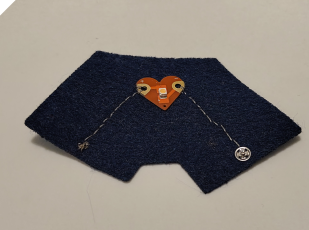
For my second version, I used an LED specifically designed to be sewn onto fabric.
I attached it by hand using conductive thread and a backstitch, which creates an almost continuous embroidered line when viewed from above.
I have to admit that the result wasn't particularly beautiful. My hand embroidery skills were still a bit limited at this point. Fortunately, I improved them quite a lot towards the end of the week.
SMD LED and Copper Tape
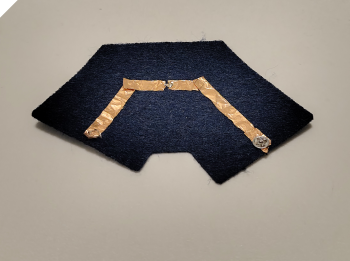
For the third version, I wanted to try a different approach without conductive thread.
I applied two strips of self-adhesive copper tape directly onto the felt to create the conductive paths. Then I soldered a small SMD LED directly onto the copper strips.
Vibration Motor
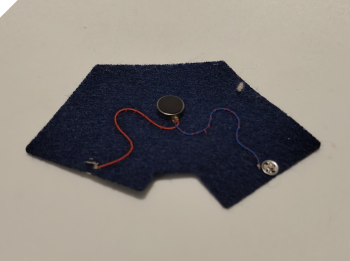
After experimenting with LEDs, I wanted to include another type of actuator that could work with both digital and analog sensors and run on my 3 V power supply.
I decided to use a small vibration motor.
Unlike an LED, which provides visual feedback, a vibration motor creates tactile feedback that can be felt through the textile.
A digital sensor can turn the motor on or off, while an analog sensor can potentially influence the intensity of the vibration, depending on the circuit and the available current.
I sewed the small motor onto the felt and connected its electrical contacts to the snap buttons of my modular system.
06 Power
I created two versions of the battery module: one using a ready-made circuit board with a switch and another with embroidered conductive traces.
Ready-Made Board with Switch
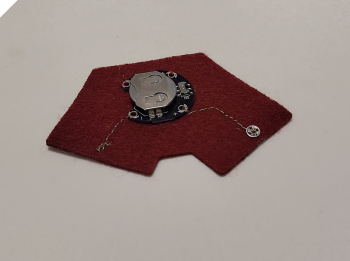
For the first version, I used a ready-made battery board with an integrated switch. The switch allows me to turn the power supply on and off without removing the battery.
Embroidered Battery Module
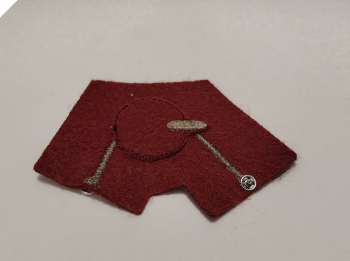
For the second version, I used the in-the-hoop (ITH) technique again. This time, instead of stitching fabric pieces in place, I embroidered the conductive traces using conductive thread.
07 Electronics
Connecting the Sensors to an Arduino
To test my sensors with an Arduino and read their values, I made two additional patches that allow me to build a voltage divider. Unfortunately, I mixed up the patch colours, but this does not affect their electrical function.
The first patch has two wires connected to the snap fasteners, providing connections to the supply voltage (+) and ground (−). The second patch contains a 10 kΩ resistor between its two snap fasteners. An additional wire on the sensor side of the resistor connects the measuring point to an analog input on the Arduino.
How the Voltage Divider Works
A resistive sensor changes its electrical resistance when, for example, it is pressed or stretched. However, an Arduino analog input measures voltage, not resistance directly. A voltage divider converts the changing resistance into a changing voltage that the Arduino can read.
In this circuit, the sensor and the fixed 10 kΩ resistor are connected in series between the supply voltage and ground. The Arduino measures the voltage at the point between them. With the sensor connected towards the positive supply and the fixed resistor towards ground, the measured voltage is:
Vout = Vin × Rfixed / (Rsensor + Rfixed)
When the sensor’s resistance decreases, the measured voltage increases. When its resistance increases, the voltage decrea into readable values, rather than simply connecting the sensor between the supply and an input without a defined voltage divider.
The 10 kΩ resistor provides a starting point for testing. The most suitable resistance depends on the sensor’s resistance range, so a different resistor may give a larger useful change in the readings. The patches must share ground with the Arduino, and the divider’s supply voltage must stay within the permitted voltage range of its analog input.
Testing the Sensors with an Arduino Uno
To test my textile sensors, I used an Arduino Uno connected to my computer via USB. This connection supplies power to the board and allows me to upload a program and receive sensor readings.
The Uno R3 has 14 digital input/output pins, which can read or output HIGH and LOW signals, and six analog inputs, labelled A0–A5, for measuring changing voltages. Six of the digital pins also support PWM, for example to control LED brightness. These are not true analog outputs: they switch rapidly between HIGH and LOW.
Opening the Example Sketch
I opened the Arduino IDE and selected the built-in example under:
File → Examples → 01.Basics → AnalogReadSerial
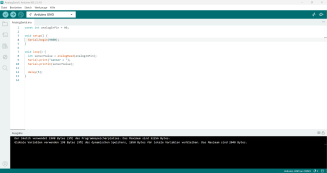
This sketch reads the voltage at analog input A0 and sends the reading to the computer. On the Uno R3, the default readings range from 0 to 1023, corresponding approximately to voltages between 0 V and 5 V. These are raw readings, not directly resistance or pressure values.
The following sketch reads A0 and sends each measurement to the Serial Monitor.
void setup() {
  // Start serial communication at 9600 baud.
  Serial.begin(9600);
}

void loop() {
  // Read the voltage at analog input A0.
  int sensorValue = analogRead(A0);

  // Send the reading as a new line.
  Serial.println(sensorValue);

  // Pause briefly between readings.
  delay(1);
}
The setup() function runs once when the Arduino starts. Serial.begin(9600) starts communication with the computer at 9600 baud.
The loop() function repeats continuously. analogRead(A0) takes a measurement and stores it in the variable sensorValue. Serial.println(sensorValue) sends this value to the computer, with each reading on a new line. Finally, delay(1) adds a short pause of one millisecond.
Connecting the Sensor
I connected my patches to form a voltage divider with the textile sensor and the 10 kΩ resistor:
- 5V: connected to the sensor side of the voltage divider.
- GND: connected to the fixed resistor side.
- A0: connected to the measuring point between the sensor and the resistor.
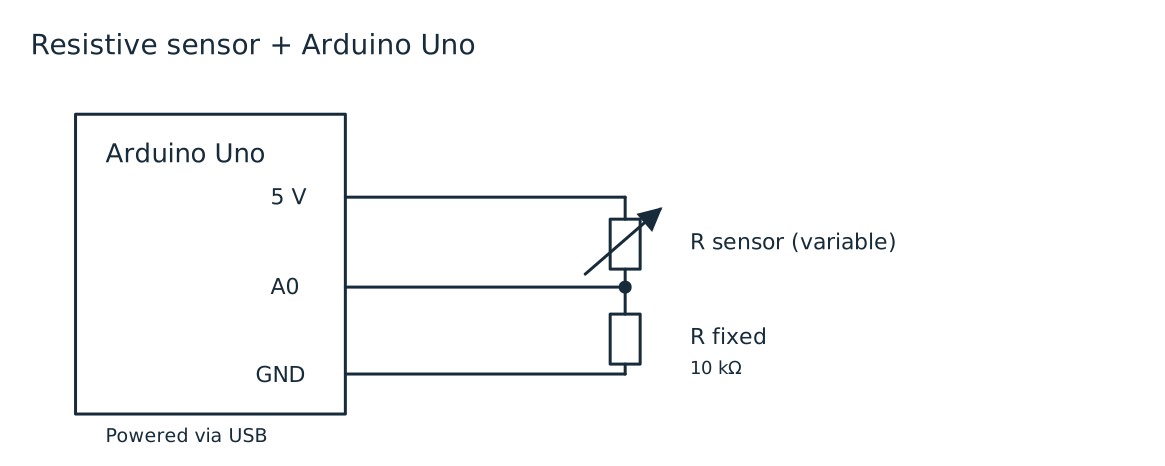
For this test, the Arduino supplies the circuit, so the battery module is disconnected.
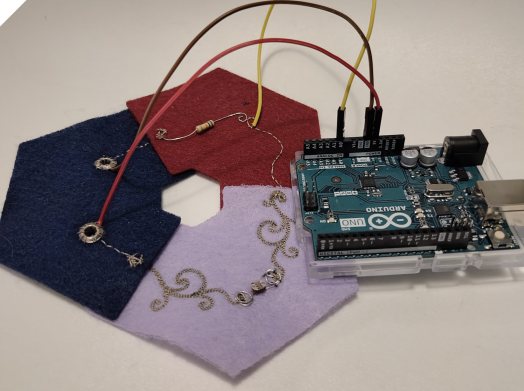
Uploading and Viewing the Readings
Before uploading, I selected Arduino Uno and the corresponding USB port in the IDE. I then clicked the Upload button—the right-pointing arrow at the top left—to transfer the sketch to the board.
After the upload finished, I opened the Serial Monitor to view the readings. In Arduino IDE 2, its button is at the top right. It can also be opened through Tools → Serial Monitor.

For a visual representation, I can open Tools → Serial Plotter, which displays the readings as a graph over time. This makes changes easier to observe while interacting with the sensor.
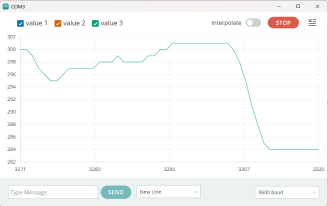
The baud rate in the Serial Monitor or Serial Plotter must match the value in Serial.begin(9600): 9600 baud. If the settings do not match, the received text may appear as unreadable characters.
Arduino Measurement Results
I tested the sensors using an Arduino Uno and a voltage divider. The analog input returns values between 0 and 1023. These are raw readings, not calibrated measurements of pressure, bending, or light intensity. The recorded ranges describe the values observed during my tests.
| Sensor | Measured values | Observation | Conclusion |
|---|---|---|---|
| Light Sensor | 45–990 | The readings changed with the light conditions and covered a large part of the available measurement range. | The sensor produced a clear response and detected changes in light intensity, as it would in a conventional electronic circuit. |
| Wool Sensor | Not pressed: 0; pressed: 980–1022 | The readings changed sharply between the released and pressed states, rather than gradually with pressure. | This version was suitable as a textile switch, but less useful for distinguishing different pressure levels. |
| Pom-Pom Sensor | 800–1018 | The readings varied but remained in the upper part of the measurement range. | The sensor showed potential as a variable input, but further testing would be needed to check its consistency under repeated pressure. |
| Leaf Sensor – Vein Structure | 700–950 | The vein structure produced a noticeable variation in readings during testing. | The structure showed potential for detecting deformation or changes in contact. A longer stretchable section could help improve its response. |
| Leaf Sensor – Surface | 920–1022 | The surface produced a smaller variation, with readings close to the maximum value. | In this setup, the surface provided less measurement variation than the vein structure, making small changes harder to distinguish. |
| Velostat Pressure Sensor | 960–1022 | The sensor responded within a narrow range near the upper limit of the analog input. | Adjusting the fixed resistor in the voltage divider could help make better use of the available measurement range. |
| Crocheted Sensor | Consistently 1023 | The reading remained at the maximum regardless of bending. Small resistance changes may have been hidden because the input stayed too close to its maximum. | In this configuration, the crocheted sensor did not work as a bending sensor. |
08 Modular Textile Circuit
My textile modules can be combined to create different electrical circuits. Each circuit consists of three elements: a power source, a sensor or switch, and an actuator. In these first examples, I used a 3 V coin cell as the power source and an LED as the actuator.
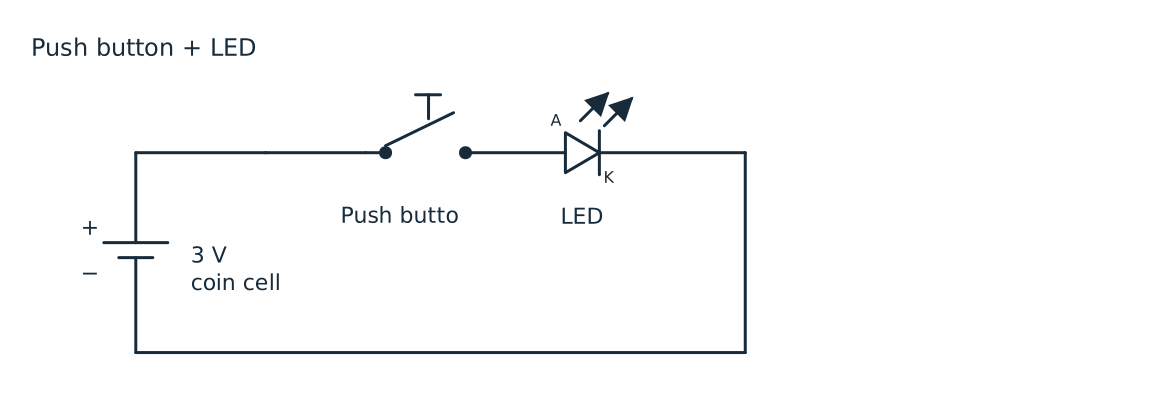
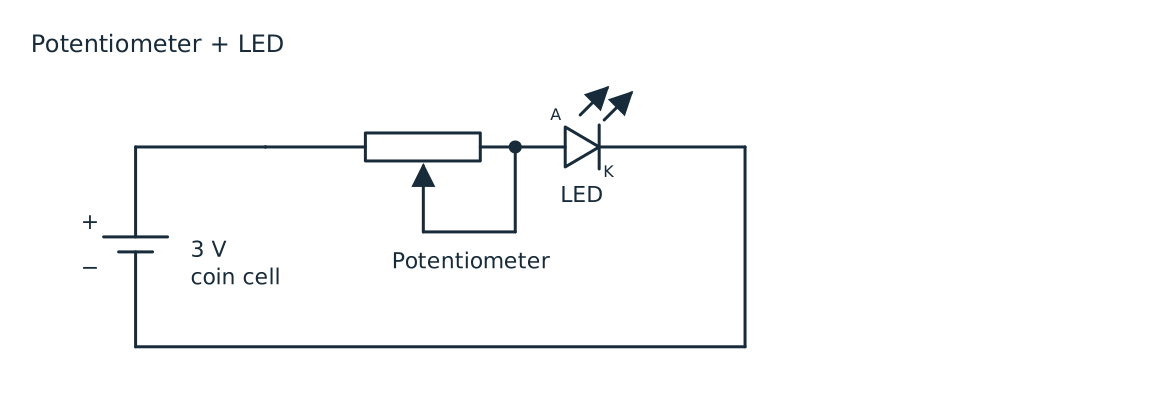
The modules connect using snap fasteners. These provide both a mechanical connection between the patches and an electrical connection between their conductive tracks. Arranging the modules in a loop creates a complete path from the positive terminal of the battery, through the components, and back to the negative terminal.
This makes it possible to change the behaviour of the circuit by replacing just one module. The battery and LED can stay in place while I swap the input module. The LED must be connected with the correct polarity: its anode faces the positive side of the circuit, and its cathode faces the negative side.
Push Button and LED
The first circuit combines the battery module, a textile push button, and an LED module. All three components are connected in series.
09 Final Result
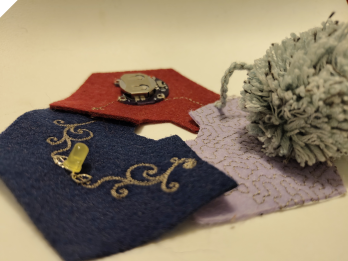
When I was about to take the final photos, my cat decided that the circuit boards were a great place to sleep.

99 Waste of the Week – Designing for Disassembly
This week, my waste reflection is not about waste I actually produced, but about a problem that comes from combining different materials.
In e-textiles, we connect fabrics, conductive threads, LEDs and other electronic components. While this creates interesting possibilities, it also makes recycling much more difficult. For example, if I embroider conductive thread directly onto fabric or sew an LED into it, the different materials are permanently connected.
In theory, they could be separated again, but realistically, nobody is going to sit down and undo every single stitch before recycling a textile.
So instead of asking "How can I recycle this?", I started thinking about "How can I design it so the materials can be separated more easily later?"
One possible idea would be to use water-soluble thread as the bobbin thread in the embroidery machine. If it works, the seams could dissolve in water, allowing the different components to be separated without manually removing every stitch.
However, the water could potentially damage the electronic components. This means the fabric could be separated and recycled more easily, but the electronics might no longer be reusable. Of course, this would also raise questions about durability, especially when washing the textile.
I don't have a perfect solution yet, but I think designing e-textiles for disassembly is an interesting topic worth exploring further. After all, sustainability is not only about what we do with waste, but also about how we design things before they become waste.