5. E-textiles
Objective
Learning Outcomes
-
Research skills: the participant has acquired knowledge through references or replicating existing projects
-
Design skills: the participant understands how to produce soft circuits and sensors
-
Fabrication skills: Learn how to embed electronics on fabrics, study soft-hard connections
-
Process skills: Anyone can go through the workflow, understand it and reproduce it
- Final outcome: The assignment is assembled and either complete or tested
Student Checklist
- Build at least one digital and one analogue soft sensor, using different materials and techniques.
- Document the sensor project as well as the readings got using the AnalogRead of Arduino
- Integrate the two soft sensors into one or two textile swatches using hard soft connections
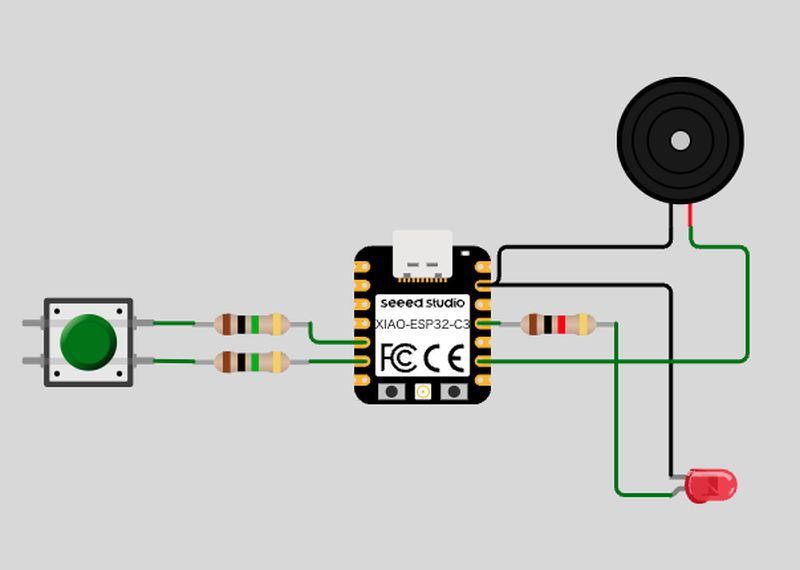
- Document the circuit and its schematic
- Document your swatches / samples
- Upload your arduino code as text
- Upload a small video of the swatches functioning
References, research & inspiration
This week, we will explore the possibilities between fabric and electrics. I already learnt the electrics during Fab Academy, but it was always with something hard, such as plastic and pcb.
So I searched what is e-textile to chatGPT and it answered as follows; E-textile is a textile product in which electronics components and circuit are incorporated into fabric or thread to give it electronic functionality.
This style is rather new to the world, people began to experiment in 19 century and it became more active in 1990s.
As E-textile are soft, flexible and suitable for contact with the body, they are currently used in a wide range of applications, such as fashion, healthcare and so on. It can be combined with traditional textile technique, such as sewing, embroidery, and knitting.
I also found many materials and things around our life are connected with electricity. For example, kids' books use electricity and many electirc toys are covered with fabric for preventing injuries and accidents.
In addition, we could find several things are electrical appliances. So I try to do this week's assignment using daily items as possible.
Tools
- Xiao C3
- LED
- Copper tape
- Resistor
- Piezo buzzer
- Breadboard
- Foil
Process & Workflow
Rico, my instructor gave me an idea of "Capacitive touch button" by using resister and metal and showed me the useful post.
STEP 1
First step was making the foil capacitor and a circuit. The foil was cut into small pieces(around 30mm x 40mm) and soldered 2 resistors at the both sides. However, soldering on the foil was too difficult. I found that the surface of the foil has a thin, strong oxide layer and it prevents ordinary solder from sticking on it. I managed to solder resistors on it and test how it works.
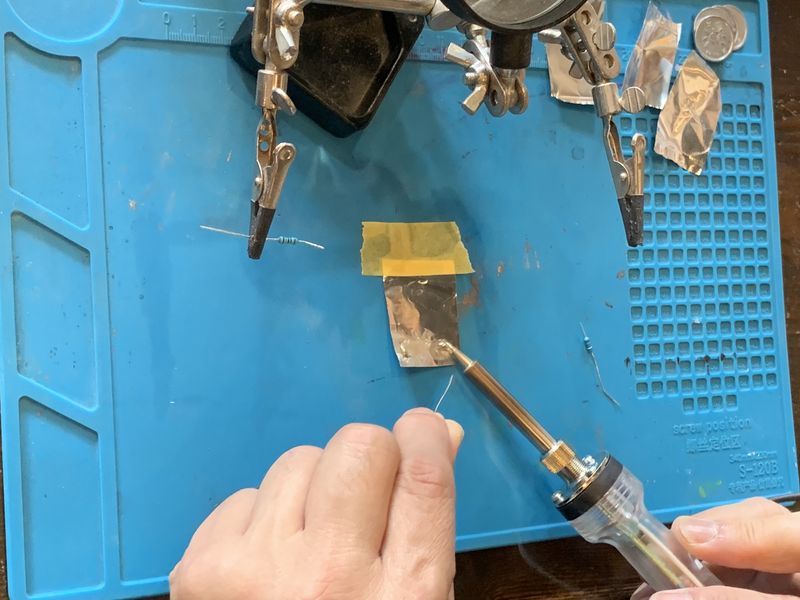
Solder resistor on the foil
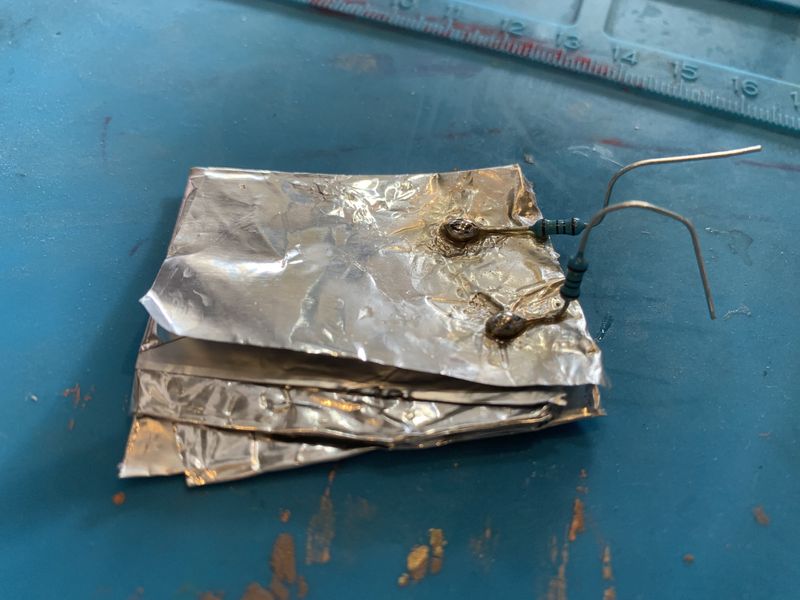
Result of foil soldering
Then I made a code with referencing the post, but it wasn't succeed to work, because it was unable to use the library called "CapacitiveSensor.h" with Xiao C3 which I'm using now. So I needed to think another way to check the capacitor work and asked chatGPT about making the program without using that library. It suggested that program using discharging time. I add to put led light when taking certain time to discharge;
const int sendPin = D4;
const int receivePin = D5;
const int ledPin = D10;
const int piezzoPin = D8;
const int dure = 8;

// Touch detection threshold
const float threshold = 60.0;

unsigned long readCapacitance() {
  // Discharge
  pinMode(sendPin, OUTPUT);
  pinMode(receivePin, OUTPUT);
  digitalWrite(sendPin, LOW);
  digitalWrite(receivePin, LOW);
  delayMicroseconds(100);

  // Scale discharge time
  pinMode(receivePin, INPUT);
  unsigned long start = micros();
  digitalWrite(sendPin, HIGH);

  while (digitalRead(receivePin) == LOW) {
    if (micros() - start > 3000) {
      return 3000;
    }
  }

  return micros() - start;
}

void setup() {
  Serial.begin(115200);
  pinMode(ledPin, OUTPUT);
  digitalWrite(ledPin, LOW);
}

void loop() {
  unsigned long total = 0;

  for (int i = 0; i < 20; i++) {
    total += readCapacitance();
  }

  float value = total / 20.0;

  Serial.print("Sensor: ");
  Serial.println(value);

  if (value > threshold) {
    digitalWrite(ledPin, HIGH); // 点灯
  } else {
    digitalWrite(ledPin, LOW);  // 消灯
  }

  delay(100);
}
STEP 2
Though it works well with foil, it was too difficult to solder on it. So I change the material to copper tape. It was really easy to solder and worked well. I tested same procedure with this copper capacitor.
This time, it worked well when I touch directly the copper.
STEP 3
While testing the electric test, sensor values showed on the serial monitor. I'd like to use those values to make sounds. I thought that we could hear the electric flow(charging) by the sound. So I add piezo buzzer and add to make sound from the sensor value.
STEP 4
After I could make sound with capacitor, I thought it would be fun to see led on when sound comes out. I also made threshold value to make sound and put LED on when sounds come out. I also needed to think how to put this capacitor into textile. I made 2 holes on the copper and tied copper thread and sew them into the felt. Then a resistor was connected to each thread and put in the pin.
As sound and LED light was fun to see, I'd like to make something easy to touch and make unexpected sound. So I put capacitor on the felt and copper thread and covered big button to push.
Result
I put a strange big button covered onto the copper. I'd like to make a strange big button to make fun sound. This sound is made by yourself but no one knows which note comes out!
Code
const int sendPin = D4;
const int receivePin = D5;
const int ledPin = D10;
const int piezzoPin = D8;
const int dure = 8;
const int thread = 80;

// Touch detection threshold
const float threshold = 60.0;

unsigned long readCapacitance() {
  // Discharging
  pinMode(sendPin, OUTPUT);
  pinMode(receivePin, OUTPUT);
  digitalWrite(sendPin, LOW);
  digitalWrite(receivePin, LOW);
  delayMicroseconds(100);

  // Measure charging time
  pinMode(receivePin, INPUT);
  unsigned long start = micros();
  digitalWrite(sendPin, HIGH);

  while (digitalRead(receivePin) == LOW) {
    if (micros() - start > 3000) {
      return 3000;
    }
  }

  return micros() - start;
}

void setup() {
  Serial.begin(115200);
  pinMode(ledPin, OUTPUT);
  digitalWrite(ledPin, LOW);
}

void loop() {
  unsigned long total = 0;

  for (int i = 0; i < 20; i++) {
    total += readCapacitance();
  }

  float value = total / 20.0;

  Serial.print("Sensor: ");
  Serial.println(value);

  int noteDuration = 1000 / dure;
  /*
  int freq = map(value, 0, 600, 200, 2000);
  freq = constrain(freq, 200, 2000);

  tone(piezzoPin,freq, noteDuration);
*/
  if (value > thread){
    tone(piezzoPin,value, noteDuration);
  }

  if (value > threshold) {
    digitalWrite(ledPin, HIGH); // ON
  } else {
    digitalWrite(ledPin, LOW);  // OFF
  }

  delay(100);
}
Weekly reflection & critical thinking
I had many interesting learnings. First of all, I was so happy the circuit and craft worked properly even my sewing skill was not so good. I used to think that soldering was normal for electronic components and all items are hard material.
However, I learnt that some of the threads could conduct electricity and we could use soft materials such as fabric or yarn and daily product could be one of the conducting material.
I'd like to cast aside preconceptions and focus all the possibilities and combinations of material.