Computational Couture
Parametric design
Where numbers and rules meet design and art. Changing a single parameter can transform an entire shape in a matter of seconds, and the same parameters can be reused across different objects using tools as Grasshopper with Rhino and Geometry Nodes with Blender.
Principal uses:
• Architecture: Designing complex, organic facades, stadiums, and free-form structures. • Product & Furniture Design: Rapidly scaling dimensions and tolerances across entire product families. • Fashion & Jewelry: Creating custom-fit, lattice-patterned, or organic wearables tailored to individual body measurements.
3D printing
Production method that solves many construction problems and speeds up some processes creating physical objects by building them up layer by layer from digital designs.
Print filaments:
| Material | Full name | Characteristics | Best for |
|---|---|---|---|
| PLA | Polylactic Acid | Easy to print, rigid | Conceptual models and aesthetic prototypes |
| ABS | Acrylonitrile Butadiene Styrene | Durable and impact-resistant | Functional prototypes |
| PETG | Polyethylene Terephthalate Glycol | Resistant to moisture and chemicals | Functional parts |
| Nylon (PA) | Polyamide | Strong, lightweight, durable, and wear-resistant | Functional components |
| TPU | Thermoplastic Polyurethane | Flexible, elastic, impact-resistant, and shock-absorbing | Flexible prototypes and footwear components |
| Resin (SLA) | Stereolithography resin | High detail, smooth surfaces, and precision | Detailed models and prototypes |
Together, they offer an infinity of creative possibilities and make it possible to build things that would otherwise be impossible or really difficult. Filaments info in spanish
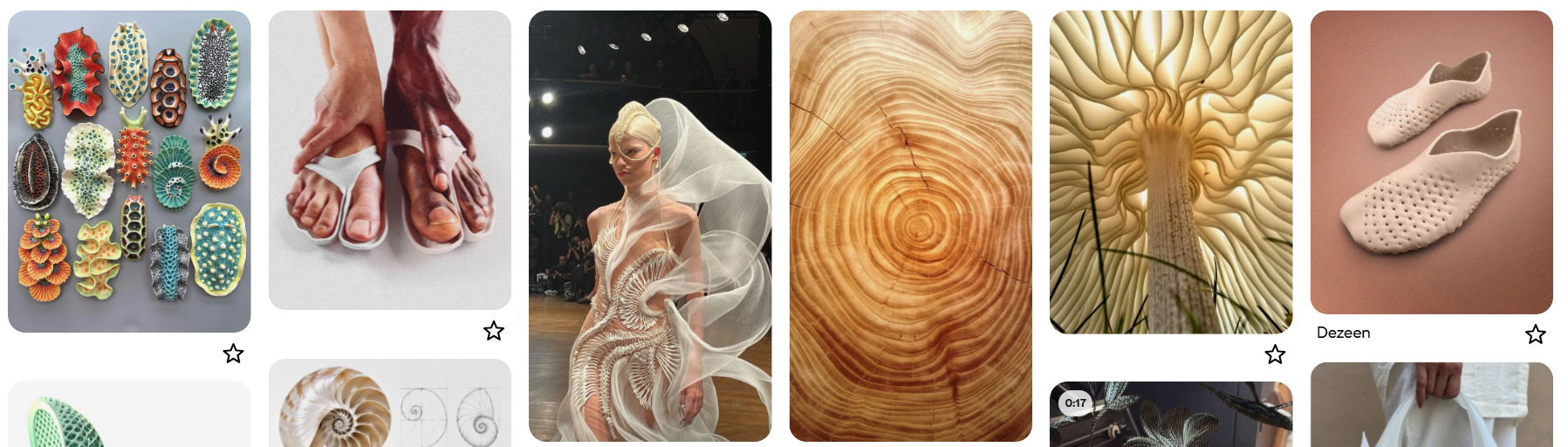
For this week, I created a Pinterest board with some inspiration for my project. I wanted to explore patterns found in nature, such as fungi, flowers, and water. I was also inspired by the Vibram FiveFingers Jaya Frog, a minimalist shoe developed in collaboration between Vibram FiveFingers and Secular Sabbath. It has a separate space for each toe, following the natural shape of the foot. I really liked how it combines functionality, anatomical inspiration, and experimental fashion, so I decided to start experimenting with footwear.
I looked for some videos of grasshopper in Rhino and Geometry Nodes in Blender to have a better idea of how I could mmake the parametric design with a better understanding of the tools.
Grasshopper
Geometry nodes
2. References, research & inspiration
Process and workflow
After looking for inspiration, I started sketching some of my ideas. I decided to stay with the simplest shape so I could experiment more with parametric design, but I really like the idea of a five-toe shoe for a future experiment.
After that, I started modeling. I downloaded a foot from Free3D and scaled it to my own size. With the right measures, I started with the sole and then the front of the shoe. With the model ready, I first experimented with Grasshopper in Rhino, and then I decided to switch to Blender.
I decided to make a single-print shoe and to experiment with fabric between the layers for the top of the shoe, where the flowers will be.
With that base, I started to experiment with parametric design. I took a picture of a water lily pond as inspiration because I liked the shapes under the water, and I thought it would be interesting to have something like that in my design. I drew it and then vectorized it so I could open it in Rhino and Blender.
Printing I wanted the shoes to be comfortable, so I chose to print with TPU.
How-to compress a PDF BEFORE uploading it:
Use a compressor when uploading a PDF, you can use online tools such as ilovepdf or smallpdf
How-to encode a VIDEO BEFORE uploading it:
Use a video encoder when uploading a video it needs to be well compressed, you can download tools such as Handbrake or online tools such as this Video Converter
How-to ZIP/compress a large Fabrication file:
To zip a file on Windows, right-click the file or folder, select "Show more options," choose "Send to," then "Compressed (zipped) folder." watch On a Mac, select the file or folder and choose "Compress" from the context menu. watch
get inspired!
Check out and research alumni pages to better understand how to document and get inspired
-
Blender research and tutorials - Erika Mirzoyan - FabLab Armenia
-
Documentation grasshopper - Ola Muhanna - CPF
-
Dual filament 3d print research - Stephanie Johnson - TextileLab Amsterdam
-
3d print on fabric - Zahia Albakri - CPF Makerspace
-
3d print on fabric - Aslı Aydın Aksan - TextileLab Amsterdam
-
Visaulisations & Ideation - Dinesh Kumar - FabLab Bcn
Add your fav alumni's pages as references
"Lorem ipsum dolor sit amet, consectetur adipiscing elit, sed do eiusmod tempor incididunt ut labore et dolore magna aliqua. Ut enim ad minim veniam, quis nostrud exercitation ullamco laboris nisi ut aliquip ex ea commodo consequat. Duis aute irure dolor in reprehenderit in voluptate velit esse cillum dolore eu fugiat nulla pariatur. Excepteur sint occaecat cupidatat non proident, sunt in culpa qui officia deserunt mollit anim id est laborum. Lorem ipsum dolor sit amet, consectetur adipiscing elit, sed do eiusmod tempor incididunt ut labore et dolore magna aliqua."
Caption for the left image
Caption for the right image
-
Download references Links to online reference files, PDF, booklets
-
or embed your own PDF as:
- Video references: Vimeo (only when not yours)
- Video references: Youtube (only when not yours)
3. Tools
Process and workflow
"Lorem ipsum dolor sit amet, consectetur adipiscing elit, sed do eiusmod tempor incididunt ut labore et dolore magna aliqua. "
How-to use footnotes for fabrication files
Fabrication files are a necessary element for evaluation. You can add the fabrication files at the bottom of the page and link them as a footnote. This was your work stays organised and files will be all together at the bottom of the page. Footnotes are created using 1 (without spaces, as shown in Step 1 & 2, and referenced as you see at the bottom of this page) You can reference the fabrication files to multiple places on your page.
5. Results
Results & documentation
- Don’t forget to document the outcome including:
- Upload the photos & files on oscircularfashion
- Final result
- Photos from different stages
- Videos of movement or interaction, show how a material moves, something was assembled or the interaction
- Include measurements or a reference object to give a sense of scale
- Describe the (material) properties of what you made
- Comparison between attempts, if you did multiple experiments or generated multiple files before fabricating / deploying. You can use a table as shown in week 4
6. Weekly reflection & critical thinking
- What did I learn? What did I personally find interesting or surprised me?
- What would I do differently? If something "failed" do I know how else to tackle it now?"
- How does this connect to my final project or my learning trajectory?
- What are implications and possible applications, think also from the ethical or environmental aspect, how it could connect to your practice and project?
NuEval — final step
Go to NuEval and fill in the checklist, when not complete notify your instructor.
7. Fabrication files & References
-
File: Grasshopper definition.. ↩
-
Reference: Author; Title; Source; year ↩