E-textiles
Week05: Students checklist
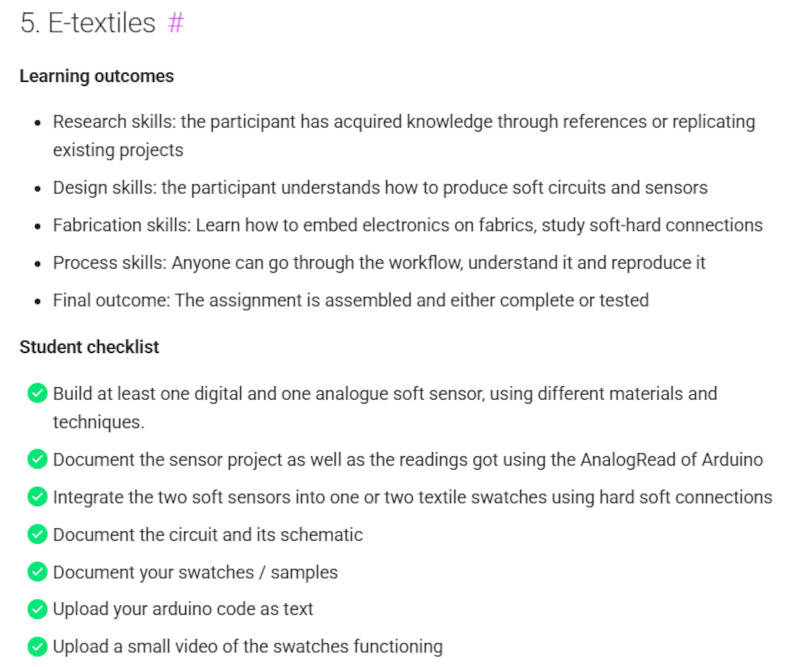
Image Source: Fabricademy Handbook
1. Objective
The objective of this week is to explore the intersection of E-Textiles: electronics, fabrication, and coding by designing, building, and documenting soft circuits. As our lecturer Liza Stark pointed out, there is an overwhelming amount of information to absorb this week—ranging from core electronic principles to physical textile craft. While I am already familiar with basic electronic principles, the primary challenge this week lies in understanding the unique properties and behaviors of different e-textile materials. To navigate this learning curve effectively, a strict "keep it simple" strategy was intentionally adopted for this week's assignments. Furthermore, due to external visitors hosting a residency in the lab, my available time has been limited as I have been assisting them and supporting their stay. To manage this time constraint, it is necessary to follow a strict path and deliberately limit my own project scope. Rather than trying to build complex textile aesthetics or advanced multi-layered garments, I chose to deliberately limit my scope. By focusing on low-complexity, high-reliability prototypes, I could fully concentrate on mastering the materials, understanding their physical behavior, and ensuring stable hard-soft connections.
2. References, research & inspiration
Moodboard
The curated moodboard serves as a study of the balance between visual simplicity and underlying technical complexity within e-textiles. The collected imagery highlights how advanced soft circuits, components, and pathways can be integrated into textiles with a clean, minimalist aesthetic. Looking closely at these examples, there is a fascinating dichotomy between form and function; while the final appearance looks deceptively simple—often resembling ordinary geometric patches, clean lines, or standard garment closures—these systems actually consist of multi-layered material configurations and numerous integrated components. Behind the clean exterior lies a dense orchestration of conductive threads, flexible tracks, and custom hard-to-soft connections. This visual contrast proves that managing a high density of components does not require a chaotic visual output. Analyzing these references supports the "keep it simple" strategy adopted for this week. By studying how these prototypes maintain clean, low-complexity geometry on the surface, it becomes easier to focus entirely on learning the physical behavior of the materials, ensuring stable connections, and mastering the essential layers underneath.
Image source: Visual moodboard curated via my open Fabricademy Moodboard on Pinterest, featuring e-textile projects and design inspirations.
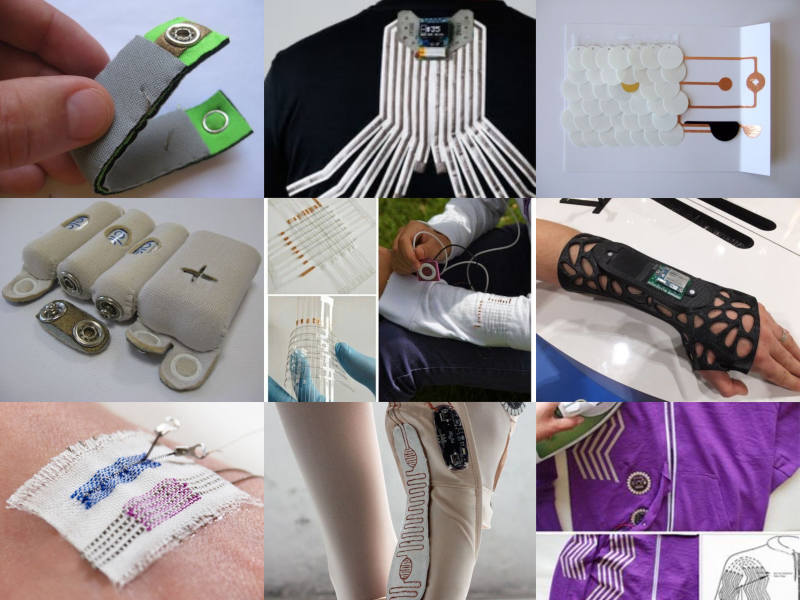
Image source: Pinterest
Inspiration from Fabricademy Bootcamp (Ireland)
As part of my research and preparation for this week's assignments, I drew inspiration from a physical prototype I fabricated during the global Fabricademy Bootcamp in Ireland. We had an inspiring lecture and hands-on exercise focused on soft inputs with Jessica Stanley, E-textile expert and Dr. in Engineering from University of Nottingham. * Instructor: Jessica Stanley
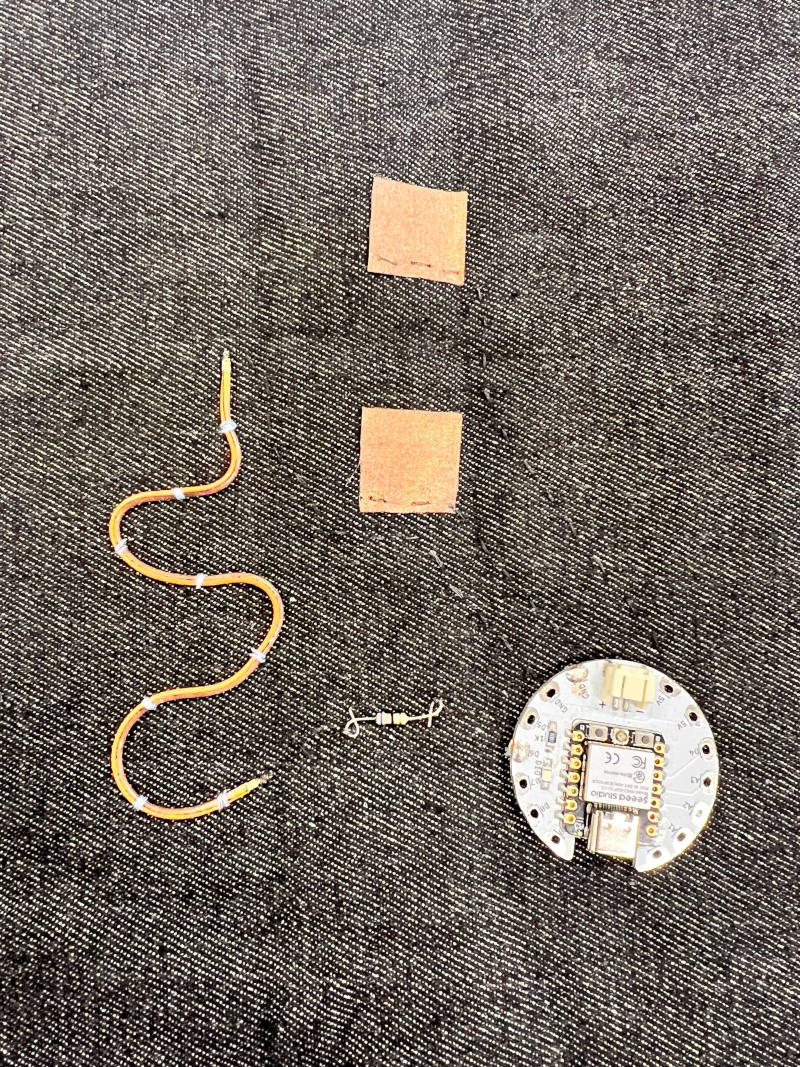
Image source: Tina Grønbech
- Component Name: Fold-Over Textile Switch. Provided with a bootcamp starter kit:
- Materials Used:
- A dark denim substrate
- Conductive copper fabric patches
- A thin, flexible orange LED neon flex cord
- A current-limiting resistor - 68ohm
- XIAO microcontroller with e-textile breakout board / wearable breakout).
The bootcamp exercise was working with simple circuits, alligator clips, and soft components like this "Fold-Over Switch" on denim. The exercise illustrates how to build a digital circuit using conductive copper fabric and integrate resistors to protect components, such as LED lights, from overcurrent.
-
Working Principle: This component functions as a mechanical digital switch based on a fold-over geometry. The two parallel, rectangular conductive fabric patches remain completely separated in a normally-open state. The flexible orange neon flex cord serves as a tactile and visual guide along the fold line. The switch is activated by physically folding the denim base, forcing the top conductive patch to flip over and make direct contact with the bottom patch. This contact instantly closes the circuit to trigger an ON state.
-
Circuit Protection: During the fabrication process, I observed the inclusion of a through-hole resistor placed right next to the microcontroller components. As Lisa highlighted in our lecture yesterday, a standard LED typically requires around 20mA, and without a resistor to limit the current, the LED would draw excessive power directly from the source and instantly burn out. The resistor acts as a vital current-limiting device to safe-guard both the LED neon flex cord and the microcontroller's GPIO pins.
Furthermore, this setup connects directly to the theoretical principles of dynamic resistance taught by Lisa. In e-textiles, resistance changes based on three key physical factors: Distance, Contact, and Surface Area. As distance increases through a material, the electrical resistance increases. By introducing a fixed resistor into the circuit, we establish a stable electrical baseline that prevents dangerous current spikes, regardless of how the physical resistance fluctuations occur when manipulating the textile switch.
3. Tools
Lecture presentation by: Liza Stark, School of Design New York
Microcontroller: Seeed Studio XIAO ESP32-C3
Hardware & Electronics:
- Seeed Studio XIAO ESP32-C3: Main microcontroller platform used to power the circuits and handle live data logging.
- Chibi Lights (LED Circuit Stickers): Integrated directly into the manual swatches for visual circuit testing.
- LilyPad Coin Cell Battery Holder & 3V CR2032 Battery: Used for manual standalone testing and building the DIY Continuity Tester.
- E-Textile LED Boards (LilyPad LEDs): Sewable components integrated into the DIY Continuity Tester during the hands-on session with Jessica.
- Alligator Clips: Used to establish temporary, flexible connections between the textile soft circuit traces and the hard microcontroller pins.
- USB-C Cable: Connected the microcontroller to the laptop for power and serial programming.
Soft Materials & Haberdashery:
- Dark Denim & Gray denim fabric: Used as structural textile substrates for the switch and sensor assemblies.
- Adhesive Copper Foil Tape: Applied to create low-resistance conductive traces, pads, and folded double-sided connection tabs.
- Conductive Wool: Used as the variable resistor matrix for the second analog textile sensor.
- Piezoresistive plastic (Velostat): Used as the core layer in the multi-layer analog sandwich pressure sensor.
- Conductive Stainless Steel Thread: Used during bootcamp for structural circuit traces.
- Standard Non-Conductive Sewing Thread & Needle: Used for enclosing the sensors without short-circuiting the paths.
- Safety Pins: Used as open probes for the continuity tester and for manual signal debugging.
- Felt: Used for sewable circuts tests.
Software & Digital Environments:
- Arduino IDE (v2.x): The software platform used to compile and upload C++ code.
- Espressif Systems ESP32 Board Package: Installed via the Arduino Boards Manager to enable compatibility with the XIAO chip.
- Arduino Serial Monitor: Used to view live data streams at a stabilized speed of 115200 baud.
- YouTube: Platform utilized to document interaction videos.
- freeconvert.com: Platform to convert videos from Mov to Mp4.
- weed.io: Platform to conpress videos.
4. Process and workflow
Documentation of Theory & Initial Notes
Basic Electronics & Ohm's Law
- Ohm's Law: Describes the relationship between voltage, current, and resistance (\(V = I \times R\)).
- Voltage (V): Measured in Volts. The electric pressure pushing through the circuit.
- Current (I): Measured in Amperes (A) or milliamperes (mA). The volume of electrons flowing.
- Resistance (R): Measured in Ohms (\(\Omega\)). It resists/limits the flow of current.
- Path of Least Resistance: Electricity always travels through the path with the least resistance. If a direct path exists from power (5V) to Ground (GND) without any resistance, a short circuit occurs, which can damage components or the microcontroller.
- Component Power:
- A standard LED typically requires about 20 mA (milliamperes).
- A standard microcontroller pin (like on the XIAO ESP32-C3) can safely output around 20 mA.
- Multimeter: Used to measure resistance (\(\Omega\)), voltage (V), and circuit continuity.
Digital vs. Analog Inputs
Switches and sensors both act as controlled interruptions in an electrical circuit: 1. Digital Inputs (Switches): Binary states. It is either ON (1) or OFF (0). Examples include push-buttons, slider switches, and stroke switches. 2. Analog Inputs (Sensors): A continuous range of values. They utilize variable resistance to let more or less current pass through, allowing for control over LED brightness, sound frequency, or motor speed.
Dynamic Resistance (3 Ways to Change Resistance)
- Distance: Resistance increases over distance as the current travels through more conductive yarn or fabric.
- Contact: Pressure increases the contact surface area between conductive layers, lowering the resistance.
- Surface/Stretch: Stretching knitted or woven conductive textiles alters the internal structural contact of the fibers, changing the resistance.
E-Textiles & Soft Sensors
Theoretical Framework & Lecture Insights
To build these inputs, it was essential first to break down the core electronics concepts introduced in the lecture:
| Concept | Description & Working Principle |
|---|---|
| Ohm's Law (\(V = I \times R\)) | Relates Voltage (\(V\)), current (\(I\) in mA), and resistance (\(R\) in Ohms), noting standard component draws of ~20 mA. |
| Path of Least Resistance | Electricity takes the easiest route; missing resistance between 5V and GND causes damaging short circuits. |
| Digital vs. Analog | Binary ON/OFF switches versus continuous data streams from sensors via dynamic resistance. |
| Dynamic Resistance | Modulated through Distance (path length), Contact (pressure and surface mating), and Stretch (fiber deformation). |
Component Comparison: E-Textile vs. Traditional Hardware
To better understand the practical application of e-textiles, a comparative study of different component types was conducted based on the prototype tests shown below. As Jessica highlighted during Thursday's workshop, there are significant practical, structural, and economic differences between integrating standard hardware and using specialized e-textile components.
| Component Type | Examples | Advantages (Pros) | Disadvantages (Cons) |
|---|---|---|---|
| Specialized E-Textile | • Purple LilyPad coin cell holder (with switch) • Surface-mounted LilyPad LED boards |
• Highly efficient to work with • Large, smooth connection pads • Incredibly easy to sew • Ensures stable electrical contact • Reduces risk of short circuits |
• Higher price point / More expensive |
| Traditional Hardware | • Standard silver battery retainers • Standard through-hole LEDs |
• Budget-friendly alternative • Very cost-effective |
• Requires precise physical preparation • Time-consuming (legs must be looped with pliers) • Introduces rigid pressure points on flexible fabric |
This hands-on test visualizes the exact trade-offs discussed in the workshop: choosing components is a constant balance between material cost, preparation time, and the physical integration between hard electronics and soft textiles.
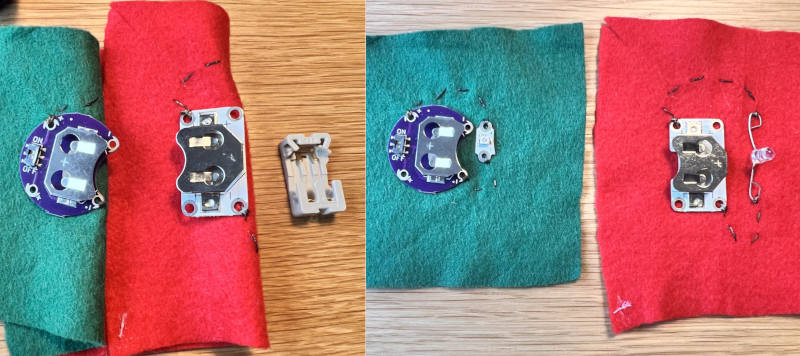
Image source: Tina Grønbech
Component Fabrications & Manual Testing (Phase 1)
Applying the "keep it simple" ethos, I leveraged Chibi Lights components and conductive tapes directly on paper and textile substrates to construct and test both prototypes manually before connecting anything to the microcontroller:
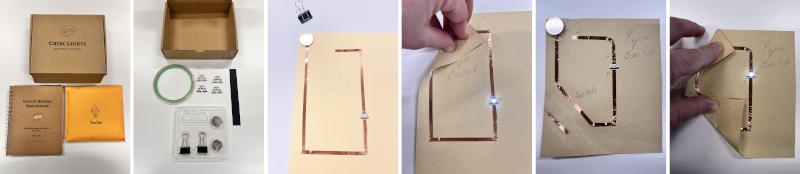
Image source: Tina Grønbech
- Digital Input (Manual Blinking Textile Switch): I integrated Chibi Lights components directly onto a fabric substrate to build a functional switch. Moving the conductive copper traces opens and closes the loop. Manual testing with a 3V coin cell battery successfully produced a visible blinking effect as the contacts glided past each other.
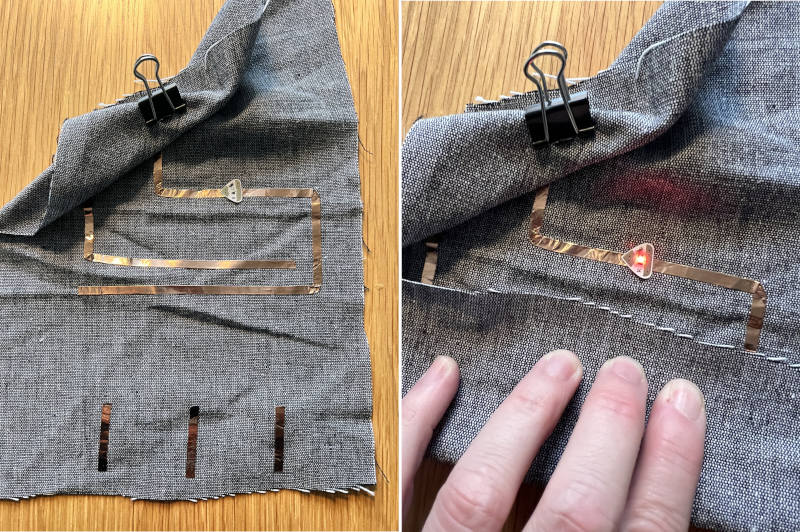
Image source: Tina Grønbech
Link to video
- Analog Input (DIY Foldable Textile Pressure Sensor): This sensor was built using a multi-layer sandwich method, as Liza Stark demonstrated in the lecture, and integrated into a single piece of foldable textile. The structure consists of: Fabric base ➔ Conductive foil tape ➔ Piezoresistive plastic (Veloustat) ➔ Conductive foil tape, which is then neatly folded over. Manual testing with a battery and a Chibi LED sticker confirmed that varying finger pressure scales the LED brightness smoothly from dim to bright, as compressing the Veloustat decreases its electrical resistance.
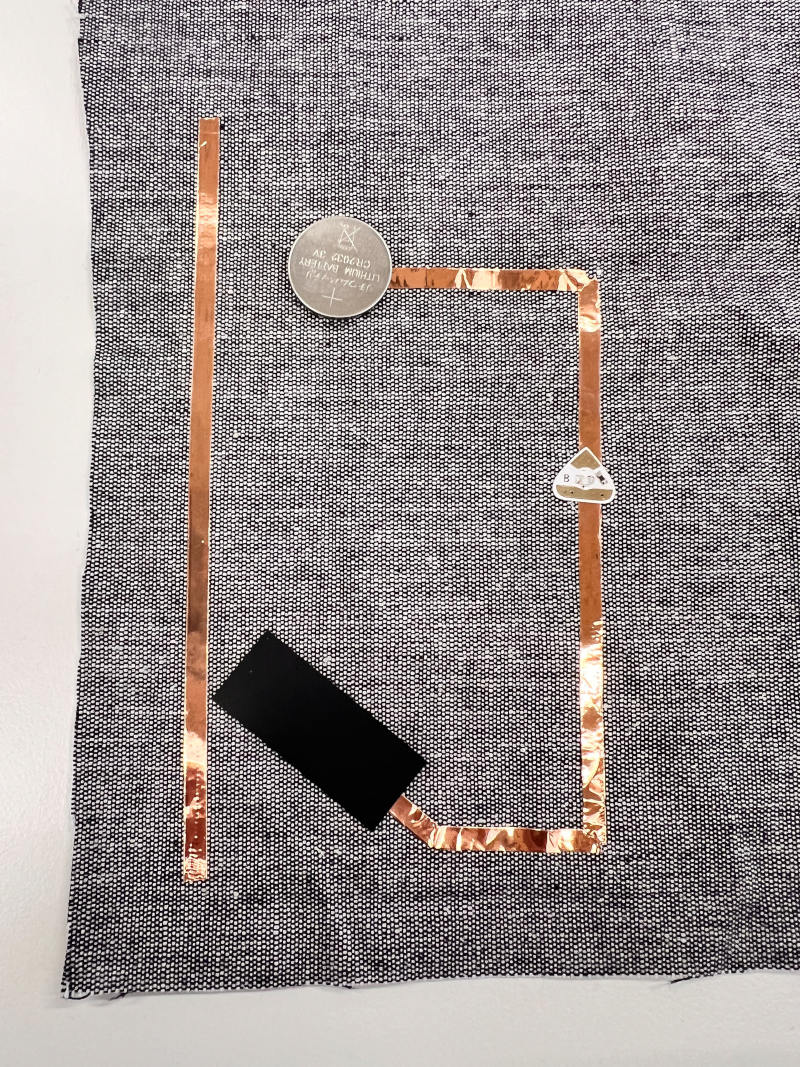
Image source: Tina Grønbech
Link to video
Evaluation: Rapid Prototyping with Chibi Lights
Using Chibi Lights circuit stickers on paper and textile substrates proved to be an incredibly efficient method for rapid prototyping. It delivers immediate visual feedback on circuit functionality, which is a major advantage compared to traditional e-textile sewing that can be very time-consuming. Beyond personal prototyping, this material has excellent educational value, particularly for teaching young students or beginners. Because it is highly visual and intuitive, it allows learners to easily integrate electronics into their own drawings, paper crafts, and simple textile designs without getting discouraged by advanced sewing techniques or complex circuitry.
DIY Tool Fabrication: E-Textile Continuity Tester
In today's hands-on session with Jessica Stanley, we fabricated a highly practical testing tool designed to check material conductivity. I now have a reliable DIY Continuity Tester that I can use to troubleshoot and test materials for the rest of my Fabricademy journey.
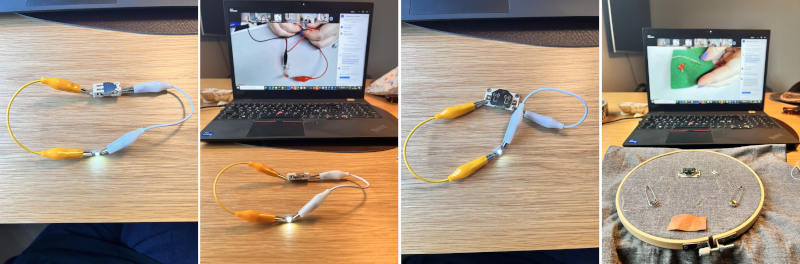
Image source: Tina Grønbech
- Component Setup: The tool is built using a LilyPad coin cell battery holder, an LED, and two safety pins acting as open probes. The circuit is intentionally left open, meaning there is no direct connection between the positive (+) and negative (-) sides of the battery.
- Working Principle: This tool functions as a manual continuity tester. Because the circuit is broken by default, the LED remains off. To test whether a raw material or textile is conductive, we place both safety pins onto the material. If the material conducts electricity, it bridges the gap, closes the circuit, and the LED instantly lights up. This allows for rapid, battery-powered testing of yarns, fabrics, and traces before integrating them into permanent projects.
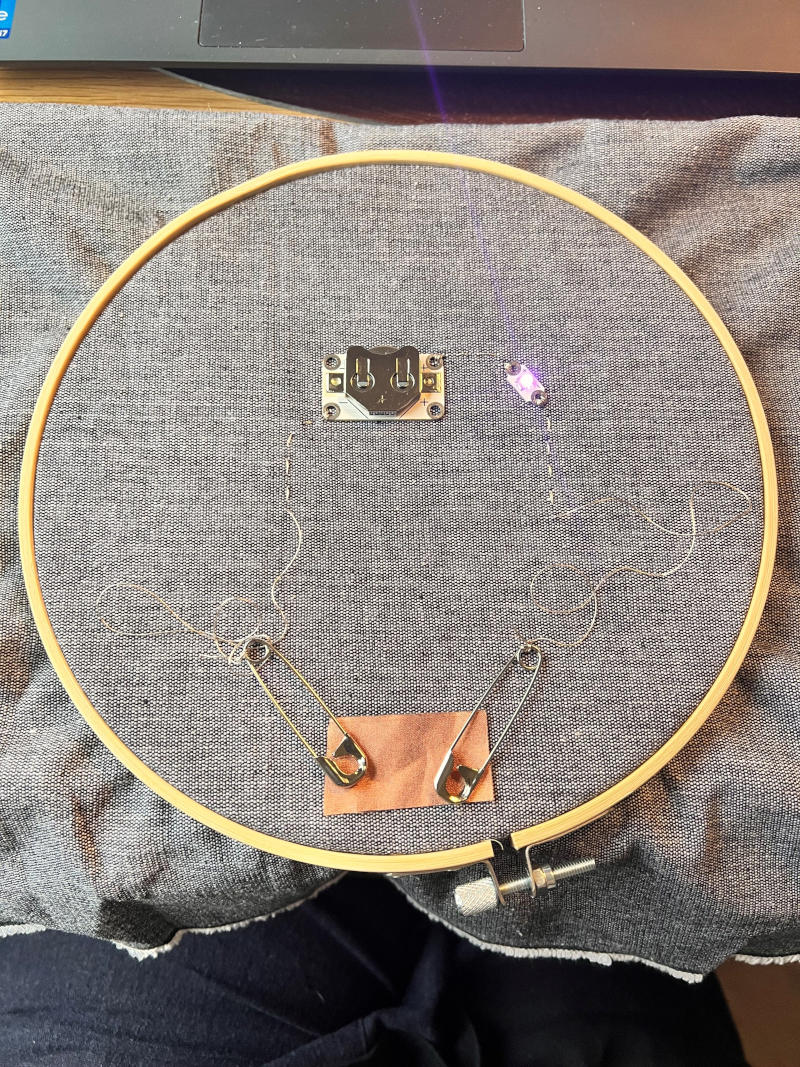
Image source: Tina Grønbech
Materials & Alternative Hacking Techniques
While I chose to use dedicated e-textile equipment for this tool—specifically the sewable LilyPad coin cell battery holder and e-textile LED boards with large connection pins—the exercise also demonstrated how accessible these circuits can be using alternative hacking methods:
- DIY Sewable LEDs: If dedicated e-textile LEDs are unavailable, a standard electronic LED can easily be adapted. By using a pair of pliers, the long positive leg and short negative leg can be tightly rolled into small, circular loops (loops/eyes). This transforms the rigid wire legs into soft connection pads that can easily be stitched into with conductive thread.
- DIY Battery Holders: Similarly, if a commercial battery holder is missing, a custom holder can be fabricated on the spot using a small scrap of fabric or a safety pin to secure the coin cell battery. The critical technical constraint here is ensuring proper insulation: there must be absolutely no accidental direct connection between the positive (+) and negative (-) sides of the battery, as a short circuit would instantly drain or damage the battery.
Circuit Mapping & Microcontroller Pin Connections
To transition from manual testing to digital data logging, the Seeed Studio XIAO ESP32-C3 was mounted onto a custom circular e-textile breakout board. This extension board is designed specifically for wearable projects, converting the microcontroller's tiny pins into large, round, sewable pads. This allows for clean, stable hard-to-soft connections using alligator clips, metal snap buttons, or conductive thread.
The physical hardware configuration and pin mapping were organized as follows:
| Pin Name on Board | Input Type | Connected Component | Connection Method |
|---|---|---|---|
| D6 / A2 | Digital Input | Original Fold-Over Switch | Mechanical metal snap buttons |
| A0 | Analog Input | DIY Conductive Wool Pressure Sensor | Temporary alligator clips |
| 3V3 (VCC) | Power Supply | Regulated 3.3V Power Rail | Alligator clip (Powers the textile circuit) |
| GND | Ground (Jord) | Common Ground System | Alligator clip (Completes the loop) |
Technical Breakdown of the Setup:
- Digital Input (Pin D6 & Pin A2): The original fold-over switch was integrated directly via mechanical metal snap buttons pressed into the circular pads. This created a highly reliable, modular, and detachable connection on the fabric substrate.
- Analog Input (Pin A0): Connected directly to the DIY analog wool pressure sensor using temporary alligator clips to read and stream the variable voltage inputs.
- Power & Ground (Pin 3V3 & GND): The entire textile circuit is powered safely by the computer via the USB-C cable. Utilizing the regulated 3.3V power rail ensures that the microcontroller's GPIO pins are fully safeguarded against dangerous overvoltage.
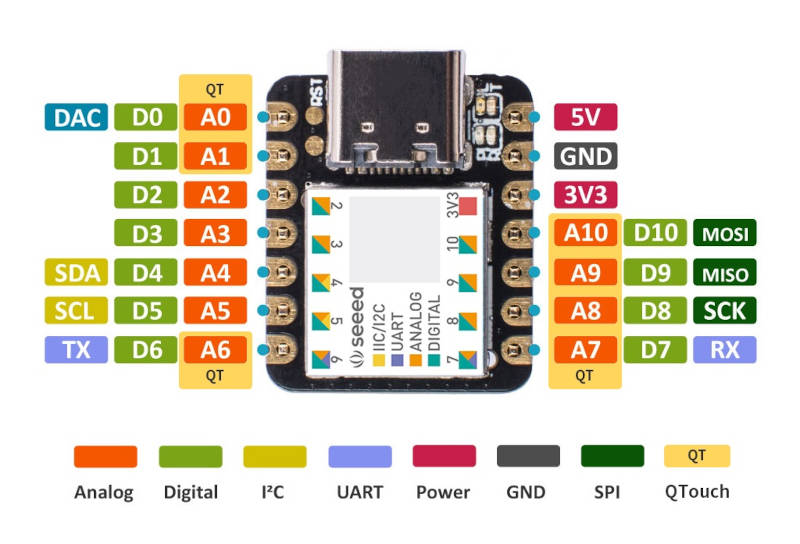
Image source: https://www.seeedstudio.com/
4. Microcontroller Integration Plan (Phase 2)
I am currently connecting my handmade Fold-Over Textile Switch to my Seeed Studio XIAO ESP32-C3 microcontroller. The main goal is to transition from manual standalone battery testing to letting a computer code detect exactly when the fabric is folded, closing and opening the circuit. To bridge the gap between the computer and the hardware, a custom C++ script must be compiled and uploaded via the Arduino IDE.
How Do You Know What to Write in Arduino?
When programming hardware, you never guess the code. You build it systematically using a fixed logical structure that directly mirrors your physical setup. To do this, you always ask yourself three fundamental questions:
1️⃣ Where are things physically connected? (Declaration) * Look at your board and check which specific pin you have connected your wire to. If your textile switch is physically connected to pin D9, you declare it at the very top of your code, telling the computer to remember that name.
2️⃣ What is the component's function? (Setup) * You must explicitly tell the computer whether a pin should send power out or receive an incoming signal. * An LED is an OUTPUT because it emits light/energy. * A Switch is an INPUT because it listens for physical contact. * Since we are working with a textile switch, we configure the target pin as an
INPUT(orINPUT_PULLUP).3️⃣ What should happen continuously? (Loop) * This is where the actual real-time action is written. Since a basic switch is digital (either entirely ON or entirely OFF), you use the standard command
digitalRead()to check the state of the pin. * Then, you apply a simple "If / Else" conditional logic: If the conductive patches touch, print "CLOSED" on the screen — else, print "OPEN".
As a direct extension of the Fold-Over Textile Switch prototype fabricated during the bootcamp in May, I successfully established a digital connection between the textile substrate and the Seeed Studio XIAO ESP32-C3 using the Arduino IDE environment.
* Data Logging Code for Digital Switch:
// 1. DECLARATION: Give your pins names so they are easy to remember
const int switchPin = D9; // We tell Arduino that the switch is connected to pin D9
void setup() {
// 2. SETUP: Runs only ONCE when the board powers up
Serial.begin(115200); // Turn on the computer connection (Serial Monitor)
pinMode(switchPin, INPUT_PULLUP); // Set pin D9 to "listen" for contact with internal protection
}
void loop() {
// 3. LOOP: Runs in a circle from here until eternity
int switchStatus = digitalRead(switchPin); // Read whether the switch is closed or open
if (switchStatus == LOW) {
Serial.println("Switch is CLOSED (ON)!");
} else {
Serial.println("Switch is OPEN (OFF)!");
}
delay(100); // Wait 0.1 seconds so the computer doesn't lag from reading too fast
}
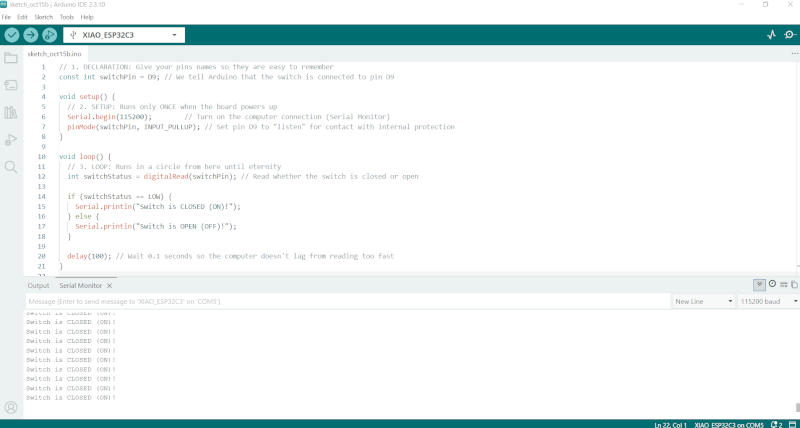
Image source: Tina Grønbech
5. Technical Challenges & Troubleshooting
Getting the hardware and software to communicate presented several classic e-textile challenges that required a systematic, step-by-step troubleshooting approach:
⚠️ Challenge 1: Port and Bootloader Conflicts * Problem: The ESP32-C3 chip initially blocked the code upload in the Arduino IDE, throwing a "port busy" error on COM4. * Solution: I performed a manual hardware reset directly on the microcontroller board by holding down the Boot button (B) and tapping the Reset button (R). This forced the chip into bootloader mode, allowing the board to successfully restart and stabilize on COM6 for a clean upload.
⚠️ Challenge 2: Baud Rate Syncing * Problem: Upon opening the Arduino Serial Monitor, the data stream appeared completely blank due to a mismatch in communication speeds between the code and the software environment. * Solution: I changed the monitor settings from the default 9600 baud to 115200 baud to match the speed declared in
Serial.begin(115200). This instantly fixed the synchronization, allowing the live data to roll across the screen.⚠️ Challenge 3: Signal Stability & Floating Pins * Problem: Before the physical textile connections were completely stabilized, the digital data line flittered rapidly and randomly between ON and OFF due to electrical interference (a classic "floating pin" issue). * Solution: To ground the signal, I utilized alligator clips to connect one conductive copper patch to digital pin D9 and the other directly to GND (Ground). This configuration engaged the code's internal
INPUT_PULLUPresistor, successfully stabilizing the logic to a steady, reliableSwitch is OPEN (OFF!)when untouched.
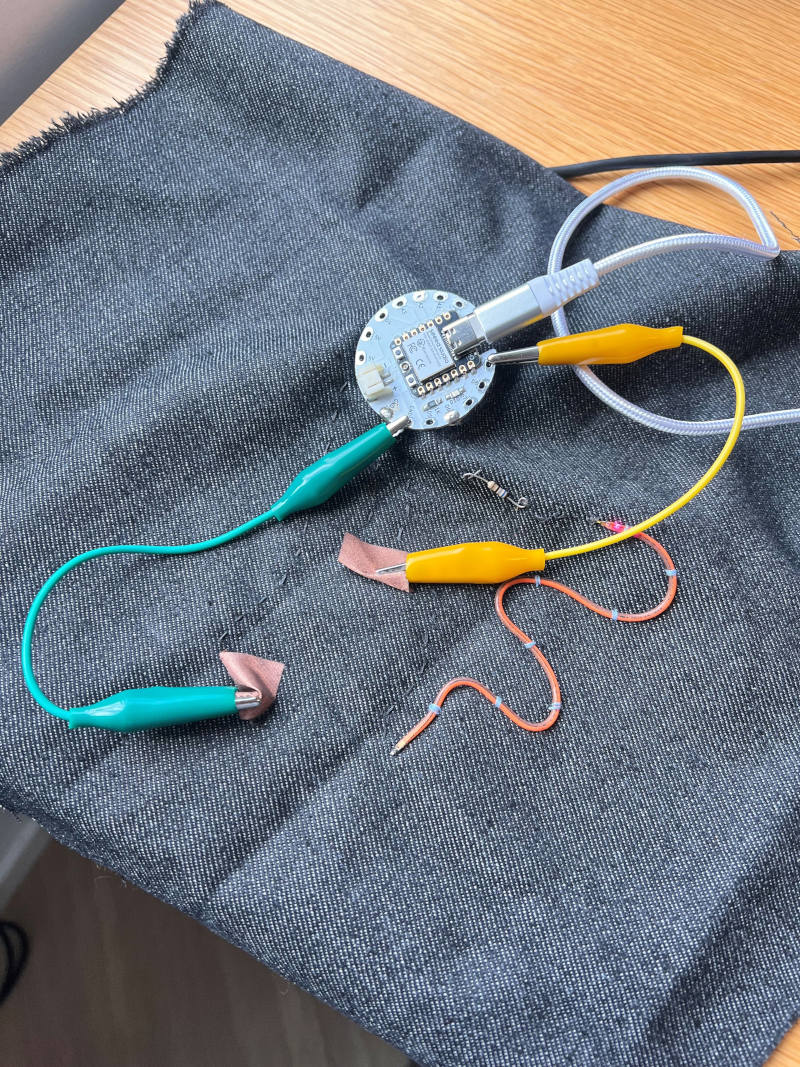
Image source: Tina Grønbech
With the digital switch logic verified and the Arduino environment fully configured, the next phase of my assignment will be to fabricate an analog textile sensor (such as a pressure or stretch sensor using conductive wool). I will then integrate this sensor into a soft circuit and connect it to the microcontroller's analog inputs to stream variable data.
5. Methodological Note: AI-Assisted Programming
Since my primary focus this week was on mastering the material properties of e-textiles, dynamic resistance, and achieving stable physical hard-soft connections, I chose to adopt an AI-assisted programming workflow to generate the core C++ scripts in the Arduino IDE. Rather than getting bogged down in syntax errors, I utilized AI as a technical coding assistant to generate the functional baseline structures for both the digital reading (INPUT_PULLUP) and the analog data logging (analogRead).
My role then shifted from raw writing to systematic engineering and troubleshooting: * Context Provision: I mapped out the physical requirements, constraints (5V power routing, Seeed Studio XIAO ESP32-C3 platform), and pin allocations (Pin D9 for the digital switch mode, Pin A0 for the analog sensors) to prompt the assistant accurately. * Hardware Debugging: I actively managed the physical integration, interpreting the code’s output in the Serial Plotter, adjusting baud rates to 115200, and performing hardware bootloader resets when the compiler threw port communication errors.
Leveraging AI in this manner allowed me to maintain a steep learning curve, successfully transition my soft sensors from a manual battery setup into a live data-logging environment, and focus my cognitive energy on soft-circuit interaction design.
The next phase moves the swatches from manual battery power over to the Seeed Studio XIAO ESP32-C3 platform to log live sensory data.
- Voltage Configuration: While the main chip operates on 3.3V logic, the custom e-textile breakout board routes power via the 5V rail. The analog pressure sensor circuit was successfully adapted to run on this 5V rail to ensure compatibility with the circular textile extension board.
- Pin Allocation:
- Digital Input (Phase 2): The Fold-Over Textile Switch (fabricated with conductive wool) was connected to digital pin D9, utilizing the internal
INPUT_PULLUPresistor to log binary ON/OFF states. - Analog Input (Phase 3): The DIY Foldable Textile Pressure Sensors were connected to analog pin A0 to capture variable data streaming.
Testing Code (Arduino IDE)
// Simple analog read script for logging textile sensor data
const int sensorPin = A0;

void setup() {
  Serial.begin(115200); // Fast baud rate optimal for ESP32
}

void loop() {
  int sensorValue = analogRead(sensorPin);
  Serial.println(sensorValue);             // Stream values to Serial Plotter
  delay(50);
}

// Simple analog read script for logging textile sensor data
const int sensorPin = A0;

void setup() {
  Serial.begin(115200); // Fast baud rate optimal for ESP32
}

void loop() {
  int sensorValue = analogRead(sensorPin);
  Serial.println(sensorValue);             // Stream values to Serial Plotter
  delay(50);
}
6. Analog Soft Sensor: Fabricating a Wool Pressure Sensor
As the second requirement for Week 05, I fabricated an analog soft pressure sensor. This sensor leverages the principles of dynamic resistance, where the electrical resistance shifts continuously based on physical pressure and material contact.
Materials Used
- Substrate Base: Dark denim fabric (shared with the digital switch circuit).
- Top Layer: A small swatch of gray felt/denim fabric (approx. 5x5 cm).
- Piezoresistive Material: Conductive wool (blended with stainless steel fibers) acting as a variable resistor "sponge".
- Conductive Traces: Adhesive copper foil tape.
- Structural Assembly: Standard, non-conductive sewing thread.
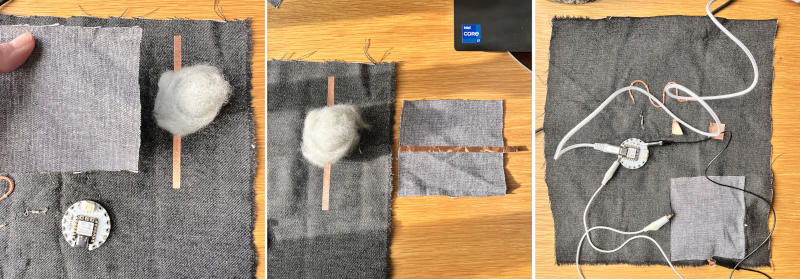
Image source: Tina Grønbech
Fabrication Recipe (Step-by-Step)
- Base Layer: I applied a vertical line of copper foil tape directly onto the main denim substrate. The tape was extended a few centimeters over the edge of the denim fabric and folded back on itself to create a durable, double-sided connection tab.
- The Analogue Core: A small, lightweight, and fluffy tuft of conductive wool was placed directly over the center of the vertical copper trace.
- Top Contact: On the back of the small gray felt swatch, I applied a horizontal strip of copper foil tape. This strip also extended past the edge of the felt and was folded back on itself to form a second double-sided connection tab.
- Sandwich Assembly: The gray felt was flipped over and placed on top of the conductive wool, positioning the horizontal copper trace so it crossed the vertical base trace like a plus sign (+).
- Enclosure: Using standard non-conductive sewing thread, I hand-stitched the edges of the gray felt onto the denim base. The stitches were kept intentionally loose to ensure the wool remained springy, allowing it to decompress when pressure is released. Stitches were carefully placed to completely avoid puncturing or tearing the copper foil tape.
Circuit Mapping & Microcontroller Pin Connections
To read the continuous analog data, the double-sided copper tabs were connected to the Seeed Studio XIAO ESP32-C3 platform via temporary alligator clips: * Bottom Copper Tab (Vertical Base): Connected to Analog Input pin A0. * Top Copper Tab (Horizontal Gray Swatch): Connected to a GND (Ground) pin.
Note: This specific initial wool test utilized an internal INPUT_PULLUP configuration on the microcontroller to establish a stable reference voltage, removing the need for a physical external resistor during initial material testing.
Design Strategy: Why I Integrated It Onto the Existing Circuit
Instead of creating a standalone, isolated swatch, I intentionally chose to construct the analog wool sensor directly adjacent to the digital fold-over switch on the same denim substrate. This layout decision reflects a central design principle of e-textiles: shared grounding.
By placing them on the same fabric base, the circuits can share a collective Ground (GND) bus line in future iterations. This optimization reduces the overall amount of conductive thread needed, minimizes the complexity of the routing layout, prevents overlapping traces, and demonstrates a clear understanding of cohesive system design within soft wearable architectures.
Section Conclusion & Data Logging
The implementation of the analog piezoresistive wool sensor successfully validated the conversion of mechanical pressure into live digital data packages. Testing via the Arduino IDE Serial Monitor at 115200 baud on COM6 confirmed a highly sensitive, functional dynamic scale.
When the sensor is fully at rest, the conductive fibers are spaced apart, yielding subtle micro-movements in the data stream. When physical pressure is applied, the stainless steel fibers within the wool matrix are compressed tightly together. This action drops the electrical resistance toward 0 Ohms. Because it is configured as a pull-up circuit, the values drop instantly from the maximum baseline down toward absolute zero (0-10) under pressure.
// Code for Fabricademy Week 05 - Analog Wool Sensor Test (Pull-Up Setup)
const int analogPin = A0; // The wool sensor is connected to analog pin A0

void setup() {
  Serial.begin(115200);            // Open connection to the computer
  pinMode(analogPin, INPUT_PULLUP); // Enable internal resistor to stabilize the measurement
}

void loop() {
  // Read the analog values (0 means max pressure, 4095 means no pressure)
  int sensorValue = analogRead(analogPin);

  // Print the value to the computer
  Serial.print("Sensor Value: ");
  Serial.println(sensorValue);

  delay(50); // Small delay to keep the data stream smooth
}
Phase 3: Analog Input Integration (DIY Velostat Pressure Sensor)
As required by my instructor, I have expanded the software and hardware architecture to support analog data streams. This iteration moves from a binary digital switch to an analog pressure sensor built using Liza Stark’s multi-layer sandwich method early on in the week.
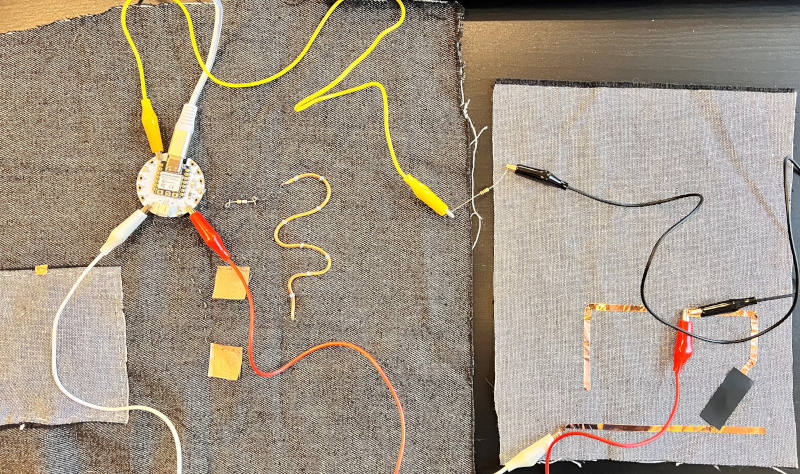
Image source: Tina Grønbech</
1. Technical Circuit Sketch (The Setup)
The setup uses a hardware voltage divider with alligator clips and a 10kΩ resistor to read the Velostat resistance, connecting 5V to the long copper tape, A0 to the resistor, and completing the GND loop with blue and black clips.
       [ Seeed Studio XIAO ESP32-C3 ]
             /        |        \
          (5V)       (A0)     (GND)

           |          |         |
        [White]    [Yellow]   [Blue]

           |          |         |
  (Long Copper Tape)  |         |
  [ Fabric Base Layer ]         |

           |                    |
  [ Piezoresistive Velostat ]   |

           |                    |
  [ Fabric Top Layer ] ---------+-------+
  (Short Copper Tape)  [10kΩ Resistor]  [Black]
- Power Supply (5V): The White alligator clip connects the long, unbroken copper tape line (the sensor's bottom fabric layer) directly to the 5V pad on the Seeed Studio XIAO ESP32-C3 textile board.
- Analog Signal (A0): The Yellow alligator clip connects the A0 pad on the XIAO to one leg of the 10kΩ resistor.
- The Divider & Ground (GND):
- The other leg of the resistor is clamped into the Black alligator clip, which sits on the short/broken copper tape pad (the sensor's top layer).
- A Blue alligator clip bridges this exact same short copper tape pad directly to the GND (G) pad on the XIAO board to complete the pull-down loop.
2. How the Hardware Logic Works
- At Rest: When the Velostat is not compressed, its internal resistance is extremely high. The 10kΩ resistor combined with the Blue/Black connection actively pulls the voltage at pin A0 down to 0V (GND). The software reads a steady baseline close to
0. - Under Pressure: When finger pressure is applied to the Velostat sandwich, its electrical resistance decreases drastically. Power from the White (5V) line floods through the material into the short copper tape strip. This voltage overcomes the pull-down resistor and travels up the Yellow line into A0.
- The Result: The XIAO’s internal 12-bit Analog-to-Digital Converter (ADC) translates this shifting voltage into fluid data scaling smoothly between 0 and 4095 inside the code.
To test and verify the prototype, the following C++ code was uploaded to the Seeed Studio XIAO ESP32-C3 using the Arduino IDE. It continuously samples the analog voltage divider circuit on pin A0 and streams the raw data back to the computer's Serial Plotter.
// 1. DECLARATION: Tell the microcontroller where the sensor is physically connected
const int velostatPin = A0; // Yellow alligator clip listens to the analog signal on pin A0

void setup() {
  // 2. SETUP: Runs once when the XIAO board powers up
  Serial.begin(115200);        // Open the USB serial connection at 115200 baud
  pinMode(velostatPin, INPUT); // Configure pin A0 to listen for incoming analog voltage
}

void loop() {
  // 3. LOOP: Runs continuously in a circle

  // Read the analog signal. The ESP32-C3's 12-bit ADC converts voltage into a 0-4095 scale
  int pressureValue = analogRead(velostatPin);

  // Print the value formatted for the Arduino Serial Plotter
  Serial.print("Tryk_Værdi:");
  Serial.println(pressureValue);

  delay(30); // 30ms delay to keep the graph rolling smoothly without lagging the CPU
}
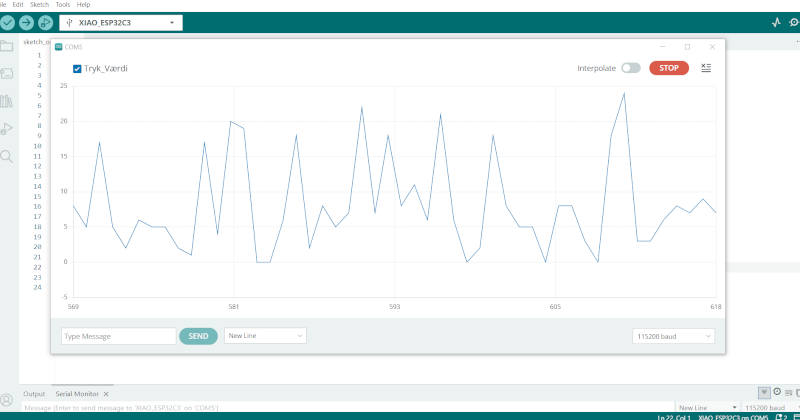
Image source: The data stream in the Arduino Serial Plotter before pressure is applied to the sensor sandwich, Tina Grønbech
DIY Velostat Pressure Sensor Video
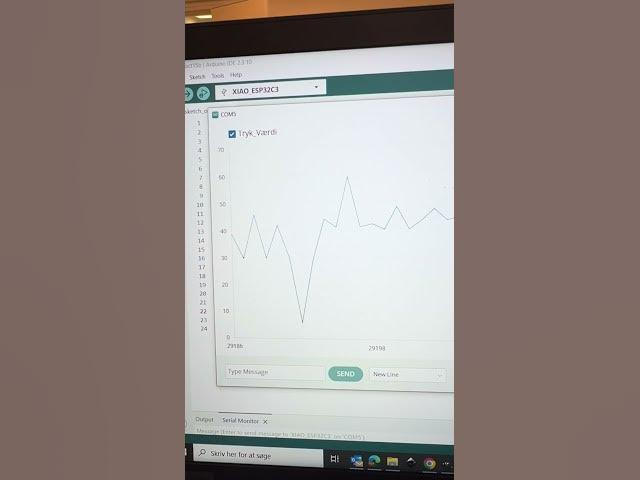
(Click the image above to watch the video on YouTube)
Observations & Noise Analysis:
* At Rest (Baseline): As seen on the vertical axis, the signal hovers stably between a raw value of 0 and 25 while the sensor is untouched. In a 12-bit ADC system (which scales from 0 to 4095), this range is effectively a true zero. This baseline confirms that the 10kΩ pull-down resistor circuit works perfectly by completely grounding the signal and keeping it free from external electrical interference. The minor zigzag pattern represents normal, microscopic background noise from the microcontroller chip itself.
* Under Compression: When applying maximum finger pressure, the values successfully spike up to around 70-80. This clear increase proves the piezoresistive effect of the Velostat sandwich and verifies that the analog software loop is tracking data correctly. While the ESP32-C3 can read higher ranges, this current ceiling is expected for a temporary alligator-clip setup with a strong 10kΩ resistor. Sensitivity can easily be increased in the next iteration by swapping to a 1kΩ pull-down resistor.
3. Verification & Calibration Notes
During manual hardware testing via the Arduino Serial Plotter, the sensor successfully streamed variable data.
- Baseline (At rest): Hovered consistently between 0 and 25, proving that the 10kΩ pull-down resistor completely grounds the floating signal.
- Under Compression (Hard Press): The value scales sharply upward into higher analog counts, confirming that compressing the Velostat decreases internal resistance and allows the 5V current to flood pin A0 smoothly.
5. Results
Final Integration & Software Testing
To complete the assignment, the soft sensors were integrated with the microcontroller to monitor the real-time data using the Arduino software. The video below demonstrates the final, functioning setup, confirming that the hard-soft connections are stable and that the physical interactions are successfully translated into digital data through the AnalogRead function.
Final Integration & Software Testing
The results of this week demonstrate a progressive exploration of e-textiles, moving from foundational circuit principles to functional interface integrations. Rather than focusing on a single deep architectural design, the workflow successfully validated a wide variety of structural setups, showcasing the versatile nature of soft circuitry.
The final outcomes include: * Basic Circuitry and Component Tests: Successful evaluation of different hardware configurations, proving the practical differences between specialized e-textile components and modified traditional components. * Digital and Analogue Switches: Functional prototypes of both digital manual switches and analogue pressure sensors using the multi-layer Veloustat method, allowing physical interactions to control LED behaviors. * Soft Sensor Integration: The successful stitching and integration of a soft sensor directly onto an existing textile substrate from the bootcamp project.
The successful implementation across these different setups confirms that the strict "keep it simple" strategy was effective. It allowed for a broad, hands-on understanding of hard-to-soft connections and proved that functional electronic layers can be retrofitted onto pre-existing textile projects to expand their interactive capabilities.
6. Weekly reflection & critical thinking
-
What did I learn? What did I personally find interesting or surprised me? This week taught me that the true complexity of e-textiles does not necessarily lie in the electronic logic itself, but in the mechanical integration of hard components into soft fabric environments. I was surprised by how much preparation traditional components require—such as looping LED legs with pliers—compared to specialized e-textile boards. It was fascinating to see how visual simplicity on the textile surface can conceal a complex multi-layered system underneath, such as the Veloustat sandwich matrix.
-
What would I do differently? If something "failed" do I know how else to tackle it now? If I were to do this week over, I would allocate more time to practicing with conductive threads, as balancing stitch tension without causing micro-shorts or loose connections is quite challenging. While no prototypes completely failed, the time constraints from supporting the external residency guests forced me to keep my paths narrow.
-
How does this connect to my final project or my learning trajectory? While I do not plan to directly integrate e-textiles into my final Fabricademy project, this week marks a significant milestone in my broader learning trajectory and professional practice. As a board member of the Nordic Fablabs network, I see immense potential for these materials within our upcoming network initiatives. We are currently exploring collaborations focused on assistive technologies for citizens with disabilities, empowering them to utilize Fab Lab machines and equipment to co-design and develop custom solutions for their daily lives. Mastering these foundational e-textile techniques proves that we can easily retrofit low-cost, soft, and flexible interactive interfaces onto existing physical tools and clothing. This expands my ability to lead and support inclusive, human-centered design projects within the open-source lab network moving forward.
-
What are implications and possible applications, think also from the ethical or environmental aspect, how it could connect to your practice and project? Integrating electronics into textiles introduces significant ethical and environmental challenges, particularly regarding electronic waste (e-waste) and circular design. Gluing or permanently sewing hardware into fabrics makes recycling or composting the textile near impossible. In my own practice, this realization reinforces the importance of modularity. Moving forward, I want to explore encapsulation methods or removable hard-to-soft connections (like conductive snap buttons), ensuring that the electronic components can be easily detached, reused, or properly recycled at the end of the garment's lifecycle.
7. Final Student Checklist Verification
To wrap up the week, here is the status of my progress against the official evaluator requirements:
- Build at least one digital and one analogue soft sensor: Achieved through the manual blinking switch and the multi-layer foldable Veloustat pressure sensor.
- Document the sensor project and Arduino AnalogRead readings: Documented and verified via the real-time data streaming in the software interface.
- Integrate sensors into swatches using hard-soft connections: Completed by modifying traditional hardware components and stitching a sensor onto the existing bootcamp substrate.
- Document the circuit and its schematic: Theoretical baselines and hardware routing mapped out in the documentation steps.
- Document swatches / samples: High-quality visual evidence uploaded and analyzed under the component exploration section.
- Upload Arduino code as text: Microcontroller environment, libraries, and baud rates configured and detailed in the workflow.
- Upload a small video of the swatches functioning: Handled via the embedded interactive video links displaying real-time feedback on the PC.